> ## Documentation Index
> Fetch the complete documentation index at: https://braintrust.dev/docs/llms.txt
> Use this file to discover all available pages before exploring further.
# Review with multiple reviewers
> See how Braintrust combines scores when several reviewers grade the same span, set a base value for non-numeric scores, and switch between reviewers.
Multiple reviewers can score the same span without overwriting each other. Braintrust stores each reviewer's scores independently as dedicated review spans attached to the parent span.
## How multiple reviewers' scores combine
How Braintrust resolves multiple reviewers' scores depends on the score type:
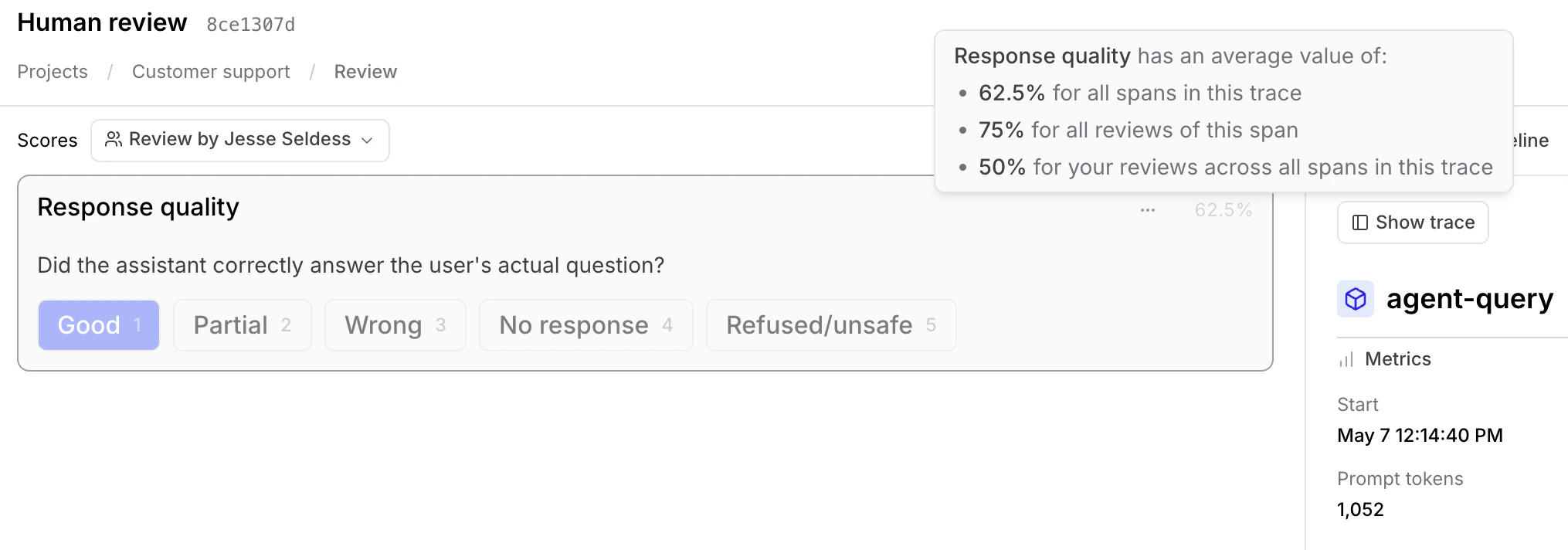
* **Scores that can be averaged**: Continuous scores and categorical scores resolve to a numeric value, so Braintrust averages them automatically on the parent span. In the review panel, each score shows its average as a percentage. Hover over the percentage to see detailed breakdowns: Your reviews in this trace, all reviewer scores for this span, and scores across all spans in the trace.
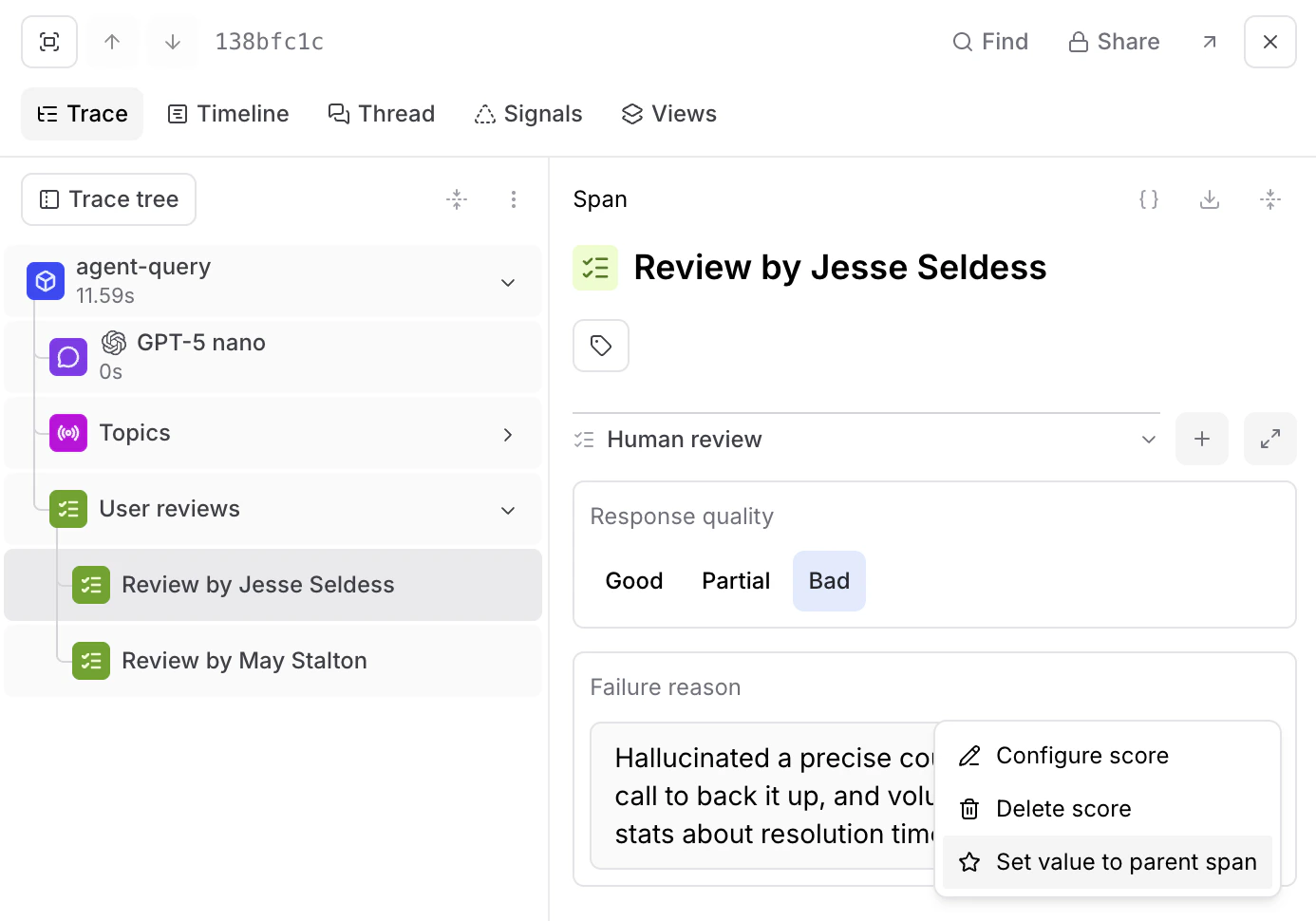
 * **Scores that can't be averaged**: Free-form text scores and categorical scores that write to expected output don't resolve to a numeric value, so there's no average to compute. To choose which reviewer's value becomes the parent span's value, open the score's options menu and select **Set as base span value**. On dataset rows, the same action reads **Set as root value**, and it's available on dataset reviews as well. This option is available wherever an individual reviewer's score is shown: in the review panel, or in the trace when you select that reviewer's human review span.
 Each score also shows a **N total reviews** indicator. Hover over it to see how many reviews match the base span's value and how many diverge, so you can gauge consensus and spot reviewers who disagreed with the source-of-truth value.
Reviewers can always see each other's aggregated scores. Braintrust doesn't support blind (confidential) review.
## Switch between reviewers
A row can have scores from multiple reviewers. To move between them without hunting through the trace tree:
1. Go to [** Review**](https://www.braintrust.dev/app/~/review) and open a row in review mode (see [Score traces and datasets](/annotate/human-review/score-traces) for entry points). The scores panel appears to the left of the trace.
2. In the scores panel header, open the **Review spans** dropdown.
3. Select **Review by \[reviewer]** to load that reviewer's scores, or select **Base span** to return to the parent span's own scores.
You can also select a reviewer's human review span directly in the trace tree. Either way, the right panel keeps showing the parent span's input and output while the scores panel updates to your selection.
When you view another reviewer with **Review by \[reviewer]**, the panel shows only the scores that reviewer set a value for, regardless of your personal [score-visibility filter](/annotate/human-review#restrict-score-visibility). If that reviewer set no values for scores that are hidden from you, the **No scores are available to you for this row** empty state appears. As elsewhere, the **Show all scores** toggle reveals the rest.
## Next steps
* [Manage review work](/annotate/human-review/manage-review-work) to assign and track review across your team
* [Score traces and datasets](/annotate/human-review/score-traces) in review mode
Each score also shows a **N total reviews** indicator. Hover over it to see how many reviews match the base span's value and how many diverge, so you can gauge consensus and spot reviewers who disagreed with the source-of-truth value.
Reviewers can always see each other's aggregated scores. Braintrust doesn't support blind (confidential) review.
## Switch between reviewers
A row can have scores from multiple reviewers. To move between them without hunting through the trace tree:
1. Go to [** Review**](https://www.braintrust.dev/app/~/review) and open a row in review mode (see [Score traces and datasets](/annotate/human-review/score-traces) for entry points). The scores panel appears to the left of the trace.
2. In the scores panel header, open the **Review spans** dropdown.
3. Select **Review by \[reviewer]** to load that reviewer's scores, or select **Base span** to return to the parent span's own scores.
You can also select a reviewer's human review span directly in the trace tree. Either way, the right panel keeps showing the parent span's input and output while the scores panel updates to your selection.
When you view another reviewer with **Review by \[reviewer]**, the panel shows only the scores that reviewer set a value for, regardless of your personal [score-visibility filter](/annotate/human-review#restrict-score-visibility). If that reviewer set no values for scores that are hidden from you, the **No scores are available to you for this row** empty state appears. As elsewhere, the **Show all scores** toggle reveals the rest.
## Next steps
* [Manage review work](/annotate/human-review/manage-review-work) to assign and track review across your team
* [Score traces and datasets](/annotate/human-review/score-traces) in review mode