> ## Documentation Index
> Fetch the complete documentation index at: https://braintrust.dev/docs/llms.txt
> Use this file to discover all available pages before exploring further.
# Classifying news articles
[Contributed](https://github.com/braintrustdata/braintrust-cookbook/blob/main/examples/ClassifyingNewsArticles/ClassifyingNewsArticles.ipynb) by [David Song](https://twitter.com/davidtsong) on 2023-09-01
Classification is a core natural language processing (NLP) task that large language models are good at, but building reliable systems is still challenging. In this cookbook, we'll walk through how to improve an LLM-based classification system that sorts news articles by category.
## Getting started
Before getting started, make sure you have a [Braintrust account](https://www.braintrust.dev/signup) and an API key for [OpenAI](https://platform.openai.com/signup). Make sure to plug the OpenAI key into your Braintrust account's [AI provider configuration](https://www.braintrust.dev/app/settings?subroute=secrets).
Once you have your Braintrust account set up with an OpenAI API key, install the following dependencies:
```python theme={"theme":{"light":"github-light","dark":"github-dark-dimmed"}}
%pip install -U braintrust openai datasets autoevals
```
Next, we'll import the libraries we need and load the [ag\_news](https://huggingface.co/datasets/ag_news) dataset from Hugging Face. Once the dataset is loaded, we'll extract the category names to build a map from indices to names, allowing us to compare expected categories with model outputs. Then, we'll shuffle the dataset with a fixed seed, trim it to 20 data points, and restructure it into a list where each item includes the article text as input and its expected category name.
```python theme={"theme":{"light":"github-light","dark":"github-dark-dimmed"}}
import braintrust
import os
from datasets import load_dataset
from autoevals import Levenshtein
from openai import OpenAI
dataset = load_dataset("ag_news", split="train")
category_names = dataset.features["label"].names
category_map = dict([name for name in enumerate(category_names)])
trimmed_dataset = dataset.shuffle(seed=42)[:20]
articles = [
{
"input": trimmed_dataset["text"][i],
"expected": category_map[trimmed_dataset["label"][i]],
}
for i in range(len(trimmed_dataset["text"]))
]
```
To authenticate with Braintrust, export your `BRAINTRUST_API_KEY` as an environment variable:
```bash theme={"theme":{"light":"github-light","dark":"github-dark-dimmed"}}
export BRAINTRUST_API_KEY="YOUR_API_KEY_HERE"
```
Exporting your API key is a best practice, but to make it easier to follow along with this cookbook, you can also hardcode it into the code below.
Once the API key is set, we initialize the OpenAI client using the AI proxy:
```python theme={"theme":{"light":"github-light","dark":"github-dark-dimmed"}}
# Uncomment the following line to hardcode your API key
# os.environ["BRAINTRUST_API_KEY"] = "YOUR_API_KEY_HERE"
client = braintrust.wrap_openai(
OpenAI(
base_url="https://api.braintrust.dev/v1/proxy",
api_key=os.environ["BRAINTRUST_API_KEY"],
)
)
```
## Writing the initial prompts
We'll start by testing classification on a single article. We'll select it from the dataset to examine its input and expected output:
```python theme={"theme":{"light":"github-light","dark":"github-dark-dimmed"}}
# Here's the input and expected output for the first article in our dataset.
test_article = articles[0]
test_text = test_article["input"]
expected_text = test_article["expected"]
print("Article Title:", test_text)
print("Article Label:", expected_text)
```
```
Article Title: Bangladesh paralysed by strikes Opposition activists have brought many towns and cities in Bangladesh to a halt, the day after 18 people died in explosions at a political rally.
Article Label: World
```
Now that we've verified what's in our dataset and initialized the OpenAI client, it's time to try writing a prompt and classifying a title. We'll define a `classify_article` function that takes an input title and returns a category:
```python theme={"theme":{"light":"github-light","dark":"github-dark-dimmed"}}
MODEL = "gpt-3.5-turbo"
@braintrust.traced
def classify_article(input):
messages = [
{
"role": "system",
"content": """You are an editor in a newspaper who helps writers identify the right category for their news articles,
by reading the article's title. The category should be one of the following: World, Sports, Business or Sci-Tech. Reply with one word corresponding to the category.""",
},
{
"role": "user",
"content": "Article title: {article_title} Category:".format(
article_title=input
),
},
]
result = client.chat.completions.create(
model=MODEL,
messages=messages,
max_tokens=10,
)
category = result.choices[0].message.content
return category
test_classify = classify_article(test_text)
print("Input:", test_text)
print("Classified as:", test_classify)
print("Score:", 1 if test_classify == expected_text else 0)
```
```
Input: Bangladesh paralysed by strikes Opposition activists have brought many towns and cities in Bangladesh to a halt, the day after 18 people died in explosions at a political rally.
Classified as: World
Score: 1
```
## Running an evaluation
We've tested our prompt on a single article, so now we can test across the rest of the dataset using the `Eval` function. Behind the scenes, `Eval` will in parallel run the `classify_article` function on each article in the dataset, and then compare the results to the ground truth labels using a simple `Levenshtein` scorer. When it finishes running, it will print out the results with a link to dig deeper.
```python theme={"theme":{"light":"github-light","dark":"github-dark-dimmed"}}
await braintrust.Eval(
"Classifying News Articles Cookbook",
data=articles,
task=classify_article,
scores=[Levenshtein],
experiment_name="Original Prompt",
)
```
```
Experiment Original Prompt-db3e9cae is running at https://www.braintrust.dev/app/braintrustdata.com/p/Classifying%20News%20Articles%20Cookbook/experiments/Original%20Prompt-db3e9cae
\`Eval()\` was called from an async context. For better performance, it is recommended to use \`await EvalAsync()\` instead.
Classifying News Articles Cookbook [experiment_name=Original Prompt] (data): 20it [00:00, 41755.14it/s]
Classifying News Articles Cookbook [experiment_name=Original Prompt] (tasks): 100%|██████████| 20/20 [00:02<00:00, 7.57it/s]
```
```
=========================SUMMARY=========================
Original Prompt-db3e9cae compared to New Prompt-9f185e9e:
71.25% (-00.62%) 'Levenshtein' score (1 improvements, 2 regressions)
1740081219.56s start
1740081220.69s end
1.10s (-298.16%) 'duration' (12 improvements, 8 regressions)
0.72s (-294.09%) 'llm_duration' (10 improvements, 10 regressions)
113.75tok (-) 'prompt_tokens' (0 improvements, 0 regressions)
2.20tok (-) 'completion_tokens' (0 improvements, 0 regressions)
115.95tok (-) 'total_tokens' (0 improvements, 0 regressions)
0.00$ (-) 'estimated_cost' (0 improvements, 0 regressions)
See results for Original Prompt-db3e9cae at https://www.braintrust.dev/app/braintrustdata.com/p/Classifying%20News%20Articles%20Cookbook/experiments/Original%20Prompt-db3e9cae
```
```
EvalResultWithSummary(summary="...", results=[...])
```
## Analyzing the results
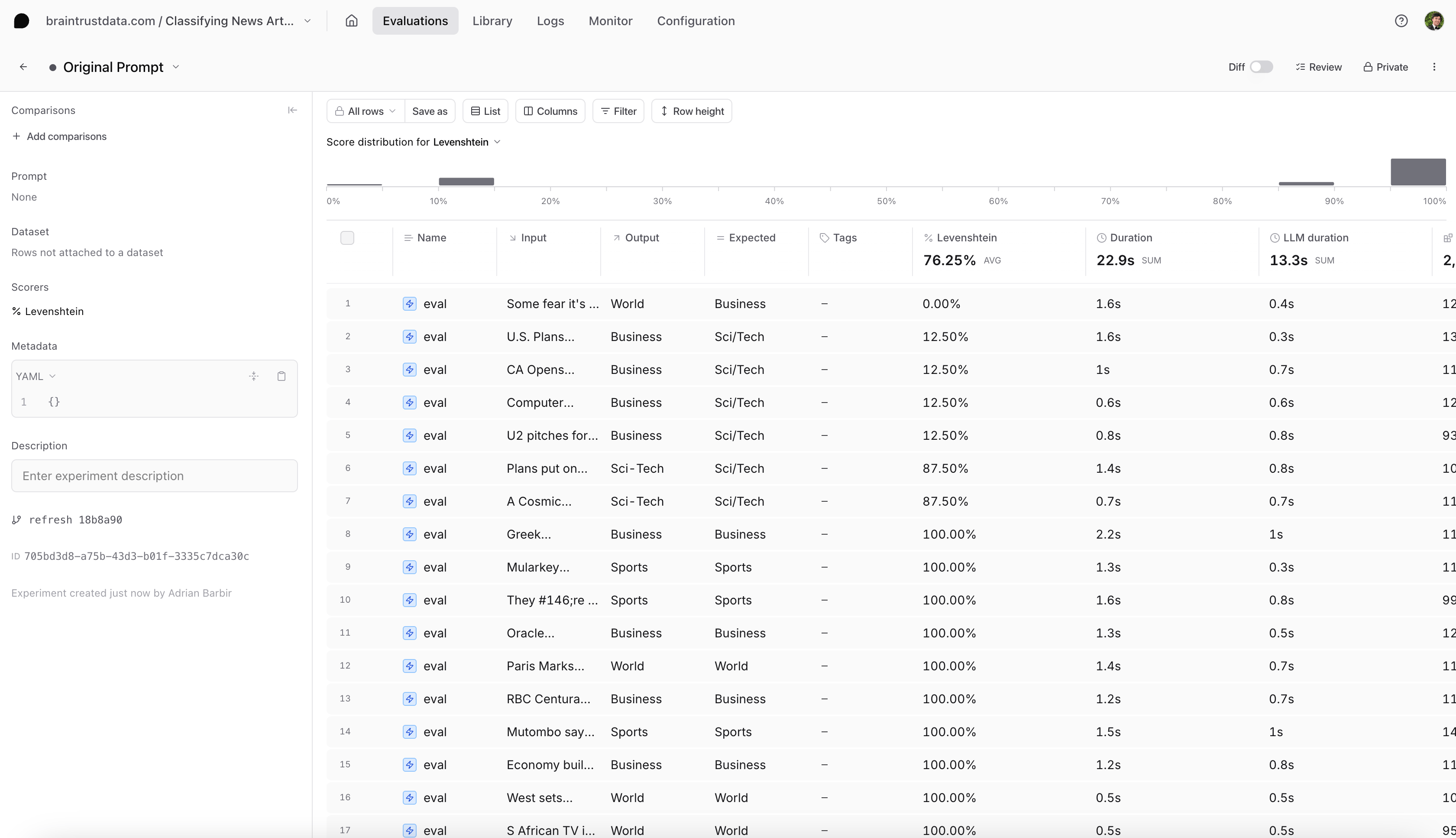
Looking at our results table (in the screenshot below), we see our that any data points that involve the category `Sci/Tech` are not scoring 100%. Let's dive deeper.
 ## Reproducing an example
First, let's see if we can reproduce this issue locally. We can test an article corresponding to the `Sci/Tech` category and reproduce the evaluation:
```python theme={"theme":{"light":"github-light","dark":"github-dark-dimmed"}}
sci_tech_article = [a for a in articles if "Galaxy Clusters" in a["input"]][0]
print(sci_tech_article["input"])
print(sci_tech_article["expected"])
out = classify_article(sci_tech_article["expected"])
print(out)
```
```
A Cosmic Storm: When Galaxy Clusters Collide Astronomers have found what they are calling the perfect cosmic storm, a galaxy cluster pile-up so powerful its energy output is second only to the Big Bang.
Sci/Tech
Sci-Tech
```
## Fixing the prompt
Have you spotted the issue? It looks like we misspelled one of the categories in our prompt. The dataset's categories are `World`, `Sports`, `Business` and `Sci/Tech` - but we are using `Sci-Tech` in our prompt. Let's fix it:
```python theme={"theme":{"light":"github-light","dark":"github-dark-dimmed"}}
@braintrust.traced
def classify_article(input):
messages = [
{
"role": "system",
"content": """You are an editor in a newspaper who helps writers identify the right category for their news articles,
by reading the article's title. The category should be one of the following: World, Sports, Business or Sci/Tech. Reply with one word corresponding to the category.""",
},
{
"role": "user",
"content": "Article title: {input} Category:".format(input=input),
},
]
result = client.chat.completions.create(
model=MODEL,
messages=messages,
max_tokens=10,
)
category = result.choices[0].message.content
return category
result = classify_article(sci_tech_article["input"])
print(result)
```
```
Sci/Tech
```
## Evaluate the new prompt
The model classified the correct category `Sci/Tech` for this example. But, how do we know it works for the rest of the dataset? Let's run a new experiment to evaluate our new prompt:
```python theme={"theme":{"light":"github-light","dark":"github-dark-dimmed"}}
await braintrust.Eval(
"Classifying News Articles Cookbook",
data=articles,
task=classify_article,
scores=[Levenshtein],
experiment_name="New Prompt",
)
```
## Conclusion
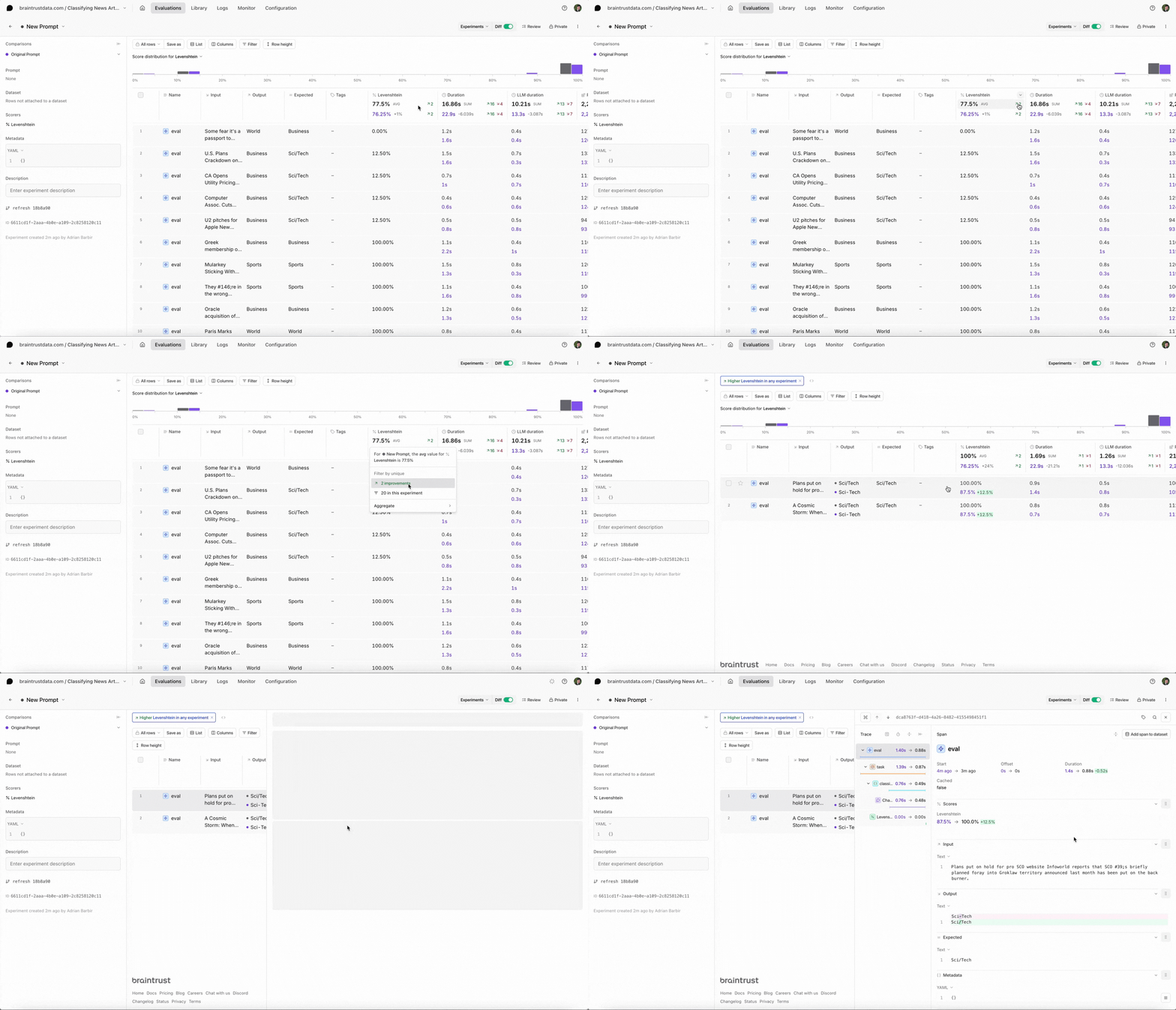
Select the new experiment, and check it out. You should notice a few things:
* Braintrust will automatically compare the new experiment to your previous one.
* You should see the eval scores increase and you can see which test cases improved.
* You can also filter the test cases by improvements to know exactly why the scores changed.
## Reproducing an example
First, let's see if we can reproduce this issue locally. We can test an article corresponding to the `Sci/Tech` category and reproduce the evaluation:
```python theme={"theme":{"light":"github-light","dark":"github-dark-dimmed"}}
sci_tech_article = [a for a in articles if "Galaxy Clusters" in a["input"]][0]
print(sci_tech_article["input"])
print(sci_tech_article["expected"])
out = classify_article(sci_tech_article["expected"])
print(out)
```
```
A Cosmic Storm: When Galaxy Clusters Collide Astronomers have found what they are calling the perfect cosmic storm, a galaxy cluster pile-up so powerful its energy output is second only to the Big Bang.
Sci/Tech
Sci-Tech
```
## Fixing the prompt
Have you spotted the issue? It looks like we misspelled one of the categories in our prompt. The dataset's categories are `World`, `Sports`, `Business` and `Sci/Tech` - but we are using `Sci-Tech` in our prompt. Let's fix it:
```python theme={"theme":{"light":"github-light","dark":"github-dark-dimmed"}}
@braintrust.traced
def classify_article(input):
messages = [
{
"role": "system",
"content": """You are an editor in a newspaper who helps writers identify the right category for their news articles,
by reading the article's title. The category should be one of the following: World, Sports, Business or Sci/Tech. Reply with one word corresponding to the category.""",
},
{
"role": "user",
"content": "Article title: {input} Category:".format(input=input),
},
]
result = client.chat.completions.create(
model=MODEL,
messages=messages,
max_tokens=10,
)
category = result.choices[0].message.content
return category
result = classify_article(sci_tech_article["input"])
print(result)
```
```
Sci/Tech
```
## Evaluate the new prompt
The model classified the correct category `Sci/Tech` for this example. But, how do we know it works for the rest of the dataset? Let's run a new experiment to evaluate our new prompt:
```python theme={"theme":{"light":"github-light","dark":"github-dark-dimmed"}}
await braintrust.Eval(
"Classifying News Articles Cookbook",
data=articles,
task=classify_article,
scores=[Levenshtein],
experiment_name="New Prompt",
)
```
## Conclusion
Select the new experiment, and check it out. You should notice a few things:
* Braintrust will automatically compare the new experiment to your previous one.
* You should see the eval scores increase and you can see which test cases improved.
* You can also filter the test cases by improvements to know exactly why the scores changed.
 ## Next steps
* [I ran an eval. Now what?](https://braintrust.dev/blog/after-evals)
* Add more [custom scorers](/evaluate/custom-code).
* Try other models like xAI's [Grok 2](https://x.ai/blog/grok-2) or OpenAI's [o1](https://openai.com/o1/). To learn more about comparing evals across multiple AI models, check out this [cookbook](/cookbook/recipes/ModelComparison).
## Next steps
* [I ran an eval. Now what?](https://braintrust.dev/blog/after-evals)
* Add more [custom scorers](/evaluate/custom-code).
* Try other models like xAI's [Grok 2](https://x.ai/blog/grok-2) or OpenAI's [o1](https://openai.com/o1/). To learn more about comparing evals across multiple AI models, check out this [cookbook](/cookbook/recipes/ModelComparison).