> ## Documentation Index
> Fetch the complete documentation index at: https://braintrust.dev/docs/llms.txt
> Use this file to discover all available pages before exploring further.
# Evaluating a prompt chaining agent
[Contributed](https://github.com/braintrustdata/braintrust-cookbook/blob/main/examples/PromptChaining/prompt-chaining.ipynb) by [Adrian Barbir](https://www.linkedin.com/in/adrianbarbir/) on 2025-01-30
Prompt chaining systems coordinate LLMs to solve complex tasks through a series of smaller, specialized steps. Without careful evaluation, these systems can produce unpredictable results since small inaccuracies can compound across multiple steps. To produce reliable, production-ready agents, you need to understand exactly what's going on under the hood. In this cookbook, we'll demonstrate how to:
1. Trace and evaluate a complete end-to-end agent in Braintrust.
2. Isolate and evaluate a particular step in the prompt chain to identify and measure issues.
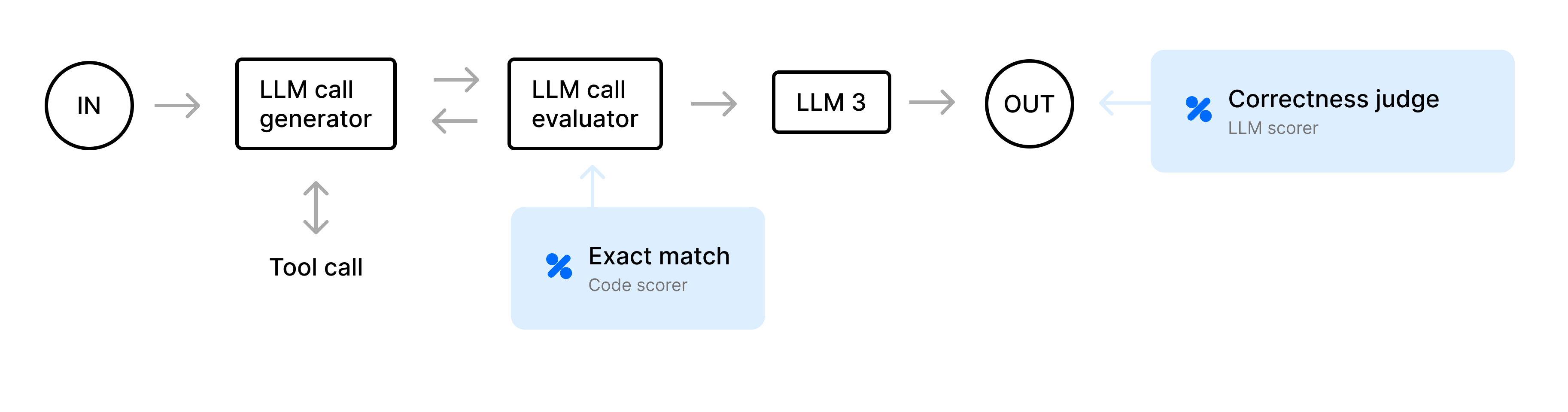
We’ll walk through a travel-planning agent that decides what actions to take (for example, calling a weather or flight API) and uses an LLM call evaluator (we'll call this the "judge step") to decide if each step is valid. As a final step, it produces an itinerary. We’ll do an end-to-end evaluation, then zoom in on the judge step to see how effectively it flags unnecessary actions.
 ## Getting started
To get started, you'll need [Braintrust](https://www.braintrust.dev/signup) and [OpenAI](https://platform.openai.com/) accounts, along with their corresponding API keys. Plug your OpenAI API key into your Braintrust account's [AI providers](https://www.braintrust.dev/app/settings?subroute=secrets) configuration. You can also add an API key for any other AI provider you'd like but be sure to change the code to use that model. Lastly, add your `BRAINTRUST_API_KEY` to your Python environment.
```bash theme={"theme":{"light":"github-light","dark":"github-dark-dimmed"}}
export BRAINTRUST_API_KEY="YOUR_BRAINTRUST_API_KEY"
```
Best practice is to export your API key as an environment variable. However, to make it easier to follow along with this cookbook, you can also hardcode it into the code below.
Start by installing the required Python dependencies:
```python theme={"theme":{"light":"github-light","dark":"github-dark-dimmed"}}
pip install braintrust openai autoevals pydantic
```
Next, we'll import all of the modules we need and initialize our OpenAI client. We're wrapping the client so that we have access to Braintrust features.
```python theme={"theme":{"light":"github-light","dark":"github-dark-dimmed"}}
import os
import json
import random
from datetime import datetime, timedelta
from typing import Dict, Any, List, Optional, Union
from pydantic import BaseModel, ValidationError, Field
from enum import Enum
import openai
import braintrust
import autoevals
# Uncomment if you want to hardcode your API keys
# BRAINTRUST_API_KEY="YOUR_BRAINTRUST_API_KEY"
BRAINTRUST_API_KEY = os.environ.get("BRAINTRUST_API_KEY")
client = braintrust.wrap_openai(
openai.OpenAI(
api_key=BRAINTRUST_API_KEY,
base_url="https://api.braintrust.dev/v1/proxy",
)
)
```
## Define mock APIs
For the purposes of this cookbook, we'll define placeholder “mock” APIs for weather and flight searches. In production applications, you'd call external services or databases. However, here we'll simulate dynamic outputs (randomly chosen weather, airfare prices, and seat availability) to confirm the agent logic works without external dependencies.
```python theme={"theme":{"light":"github-light","dark":"github-dark-dimmed"}}
def get_future_date() -> str:
base = datetime(2025, 1, 23)
if random.random() < 0.7:
days_ahead = random.randint(1, 10)
else:
days_ahead = random.randint(11, 365)
return (base + timedelta(days=days_ahead)).strftime("%Y-%m-%d")
def mock_weather_api(city: str, date: str) -> Dict[str, Any]:
return {
"condition": random.choice(["sunny", "rainy", "cloudy"]),
"temperature": random.randint(40, 95),
"date": date,
}
def mock_flight_api(origin: str, destination: str) -> Dict[str, Any]:
return {
"economy_price": random.randint(200, 800),
"business_price": random.randint(800, 2000),
"seats_left": random.randint(0, 100),
}
```
## Schema definition and validation helpers
To keep the agent's output consistent, we'll use a JSON schema enforced via `pydantic`. The agent can only return one of four actions: `GET_WEATHER`, `GET_FLIGHTS`, `GENERATE_ITINERARY`, or `DONE`. This constraint ensures we can reliably parse the agent’s response and handle it safely.
```python theme={"theme":{"light":"github-light","dark":"github-dark-dimmed"}}
class ActionEnum(str, Enum):
GET_WEATHER = "GET_WEATHER"
GET_FLIGHTS = "GET_FLIGHTS"
GENERATE_ITINERARY = "GENERATE_ITINERARY"
DONE = "DONE"
class Parameters(BaseModel):
city: Union[str, None] = Field(..., nullable=True)
date: Union[str, None] = Field(..., nullable=True)
origin: Union[str, None] = Field(..., nullable=True)
destination: Union[str, None] = Field(..., nullable=True)
class Config:
# Disallow extra fields, as structured outputs also require no additionalProperties
extra = "forbid"
class ActionStep(BaseModel):
action: ActionEnum
parameters: Parameters
class Config:
extra = "forbid"
```
## Agent action validation
The agent may propose actions that are unnecessary (for example, fetching weather repeatedly) or that contradict existing data. To solve this, we define an LLM call evaluator, or "judge step," to validate each proposed step. For example, if the agent attempts to `GET_WEATHER` a second time for data that has already been fetched, the judge flags it, and then we prompt the LLM to fix it.
```python theme={"theme":{"light":"github-light","dark":"github-dark-dimmed"}}
def judge_step_with_cot(
step_description: str, context_data: Dict[str, Any] = None
) -> (bool, str):
with braintrust.start_span(name="judge_step") as jspan:
context_snippet = ""
if context_data:
origin = context_data["input_data"].get("origin", "")
destination = context_data["input_data"].get("destination", "")
budget = context_data["input_data"].get("budget", "")
preferences = context_data["input_data"].get("preferences", {})
wdata = context_data["weather_data"]
fdata = context_data["flight_data"]
context_snippet = (
f"Context:\n"
f" - Origin: {origin}\n"
f" - Destination: {destination}\n"
f" - Budget: {budget}\n"
f" - Preferences: {preferences}\n"
f" - Known Weather: {json.dumps(wdata, indent=2)}\n"
f" - Known Flight: {json.dumps(fdata, indent=2)}\n"
)
prompt_msg = f"""You are a strict judge of correctness in a travel-planning chain.
Your task is to determine whether or not the next step is logically valid.
Typically a valid step is if we do NOT already have that piece of data
(e.g., fetching weather for an unknown city/date). If we already have that info,
the step is invalid. If all data is known, generating the itinerary is valid.
{context_snippet}
Step description:
\"\"\"
{step_description}
\"\"\"
Provide a short chain-of-thought.
Then end with: "Final Decision: Y" or "Final Decision: N"
"""
try:
response = client.chat.completions.create(
model="gpt-4o",
messages=[
{
"role": "system",
"content": "You are a meticulous correctness judge.",
},
{"role": "user", "content": prompt_msg},
],
temperature=0,
)
content = response.choices[0].message.content.strip()
jspan.log(metadata={"raw_judge_response": content})
lines = content.splitlines()
final_decision = "N"
rationale_lines = []
for line in lines:
if line.strip().startswith("Final Decision:"):
if "Y" in line.upper():
final_decision = "Y"
else:
final_decision = "N"
else:
rationale_lines.append(line)
rationale_text = "\n".join(rationale_lines).strip()
is_ok = final_decision.upper() == "Y"
return is_ok, rationale_text
except Exception as e:
jspan.log(error=f"Judge LLM error: {e}")
return False, "Error in judge LLM"
```
## Itinerary generation
Once the agent gathers enough information, we expect a generated final itinerary. Below is a function that takes all the gathered data, such as user preferences, API responses, and budget details, and constructs a cohesive multi-day travel plan. The result is a textual trip description, including recommended accommodations, daily activities, or tips.
```python theme={"theme":{"light":"github-light","dark":"github-dark-dimmed"}}
def generate_final_itinerary(context: Dict[str, Any]) -> Optional[str]:
with braintrust.start_span(name="generate_itinerary"):
input_data = context["input_data"]
weather_data = context["weather_data"]
flight_data = context["flight_data"]
prompt = (
f"Based on the data, generate a travel itinerary.\n\n"
f"Origin: {input_data['origin']}\n"
f"Destination: {input_data['destination']}\n"
f"Start Date: {input_data['start_date']}\n"
f"Budget: {input_data['budget']}\n"
f"Preferences: {json.dumps(input_data['preferences'])}\n\n"
f"Weather Data: {json.dumps(weather_data, indent=2)}\n"
f"Flight Data: {json.dumps(flight_data, indent=2)}\n\n"
"Create a day-by-day plan, mention booking recs, accommodations, etc. "
"Use a helpful, concise style."
)
try:
response = client.chat.completions.create(
model="gpt-4o",
messages=[
{"role": "system", "content": "You are a thorough travel planner."},
{"role": "user", "content": prompt},
],
temperature=0.3,
)
return response.choices[0].message.content.strip()
except Exception as e:
braintrust.current_span().log(error=f"Error generating itinerary: {e}")
return None
```
## Deciding the "next action"
Next, we create a system prompt that summarizes known data like weather and flights, and reiterates the JSON schema requirements. This ensures the agent doesn’t redundantly fetch data and responds in valid JSON.
```python theme={"theme":{"light":"github-light","dark":"github-dark-dimmed"}}
def generate_agent_prompt(context: Dict[str, Any]) -> str:
input_data = context["input_data"]
weather_data = context["weather_data"]
flight_data = context["flight_data"]
system_instructions = (
"You are an autonomous travel planning assistant.\n"
"You MUST return valid JSON with this schema:\n"
" action: one of [GET_WEATHER, GET_FLIGHTS, GENERATE_ITINERARY, DONE]\n"
" parameters: { city: (string|null), date: (string|null), origin: (string|null), destination: (string|null) }\n\n"
"If you already have flight info, do not fetch flights again.\n"
"If you already have weather for a given city/date, do not fetch it again.\n"
"If you have all the data you need, use action=GENERATE_ITINERARY.\n"
"If everything is complete/filled out, use action=DONE.\n"
)
user_prompt = "Current Travel Context:\n"
user_prompt += f" - Origin: {input_data['origin']}\n"
user_prompt += f" - Destination: {input_data['destination']}\n"
user_prompt += f" - Start Date: {input_data['start_date']}\n"
user_prompt += f" - Budget: {input_data['budget']}\n"
user_prompt += f" - Preferences: {json.dumps(input_data['preferences'])}\n\n"
if weather_data:
user_prompt += f"Weather Data: {json.dumps(weather_data, indent=2)}\n\n"
if flight_data:
user_prompt += f"Flight Data: {json.dumps(flight_data, indent=2)}\n\n"
user_prompt += (
"Reply with valid JSON only, no extra keys.\n"
"Example:\n"
'{"action": "GET_WEATHER", "parameters": {"city": "NYC", "date": "2025-02-02", "origin": null, "destination": null}}\n\n'
"What is your next step?"
)
return system_instructions + "\n" + user_prompt
```
## The main agent loop
Finally, we build the core loop that powers our entire travel planning agent. It runs for a given maximum number of iterations, performing the following steps each time:
* **Prompt** the LLM for the next action.
* **Validate** the JSON response against our schema.
* **Judge** if the step is logical in context. If it fails, attempt to fix it.
* **Execute** the step if valid (calling the mock weather/flight APIs).
* If the agent indicates `GENERATE_ITINERARY`, produce the final itinerary and exit.
By iterating until a final plan is reached (or until we exhaust retries), we create a semi-autonomous workflow that can correct missteps along the way.
```python theme={"theme":{"light":"github-light","dark":"github-dark-dimmed"}}
@braintrust.traced
def agent_loop(client: openai.OpenAI, input_data: Dict[str, Any]) -> str:
context: Dict[str, Any] = {
"input_data": input_data,
"weather_data": {},
"flight_data": {},
"itinerary": None,
"iteration_logs": [],
}
max_iterations = 10
for iteration in range(1, max_iterations + 1):
with braintrust.start_span(
name=f"travel_planning_iteration_{iteration}"
) as iter_span:
# 1) Build the prompt for the next action
llm_prompt = generate_agent_prompt(context)
# 2) Use structured outputs => parse to ActionStep
try:
response = client.beta.chat.completions.parse(
model="gpt-4o-2024-08-06", # or updated gpt-4o
messages=[{"role": "system", "content": llm_prompt}],
response_format=ActionStep,
temperature=0,
)
except Exception as e:
iter_span.log(error=f"Error calling LLM parse: {e}")
context["itinerary"] = f"Failed to parse LLM: {e}"
break
action_msg = response.choices[0].message
# Check if model refused
if action_msg.refusal:
iter_span.log(error=f"LLM refusal: {action_msg.refusal}")
context["itinerary"] = f"LLM refused: {action_msg.refusal}"
break
step = action_msg.parsed # A validated ActionStep
action = step.action
parameters = step.parameters
step_desc = f"Action={action}, Params={parameters}"
# 3) Domain judge
is_ok, rationale = judge_step_with_cot(step_desc, context)
iteration_log = {
"iteration": iteration,
"action": action.value,
"parameters": parameters.dict(),
"judge_decision": "Y" if is_ok else "N",
"judge_rationale": rationale,
}
context["iteration_logs"].append(iteration_log)
if not is_ok:
iter_span.log(
error="Judge flagged an error => We'll just reprompt next iteration."
)
continue
# 4) Execute the action
if action == ActionEnum.GET_WEATHER:
if (parameters.city is None) or (parameters.date is None):
iter_span.log(error="Missing city/date => re-iterate.")
continue
wdata = mock_weather_api(parameters.city, parameters.date)
context["weather_data"][parameters.date] = wdata
iter_span.log(metadata={"fetched_weather": wdata})
elif action == ActionEnum.GET_FLIGHTS:
if (parameters.origin is None) or (parameters.destination is None):
iter_span.log(error="Missing origin/dest => re-iterate.")
continue
fdata = mock_flight_api(parameters.origin, parameters.destination)
context["flight_data"] = fdata
iter_span.log(metadata={"fetched_flight": fdata})
elif action == ActionEnum.GENERATE_ITINERARY:
itinerary = generate_final_itinerary(context)
context["itinerary"] = itinerary or "Failed to generate itinerary."
break
elif action == ActionEnum.DONE:
iter_span.log(metadata={"status": "LLM indicated DONE"})
break
final_data = {
"final_itinerary": context["itinerary"],
"iteration_logs": context["iteration_logs"],
"input_data": context["input_data"],
}
return json.dumps(final_data, indent=2)
```
## Evaluation dataset
Our workflow needs sample input data for testing. Below are three hardcoded test cases with different origins, destinations, budgets, and preferences. In a production application, you'd have a more extensive dataset of test cases.
```python theme={"theme":{"light":"github-light","dark":"github-dark-dimmed"}}
def dataset() -> List[braintrust.EvalCase]:
return [
braintrust.EvalCase(
input={
"origin": "NYC",
"destination": "Miami",
"start_date": get_future_date(),
"budget": "high",
"preferences": {"activity_level": "high", "foodie": True},
},
),
braintrust.EvalCase(
input={
"origin": "SFO",
"destination": "Seattle",
"start_date": get_future_date(),
"budget": "medium",
"preferences": {"activity_level": "low"},
},
),
braintrust.EvalCase(
input={
"origin": "IAH",
"destination": "Paris",
"start_date": get_future_date(),
"budget": "low",
"preferences": {"activity_level": "low"},
},
),
]
```
## Defining our scoring function
For our scoring function, we implement a custom LLM-based correctness scorer that checks whether the final itinerary actually meets the user’s preferences. For instance, if the user wants a “high-activity trip,” but the final plan doesn’t suggest outdoor excursions or active elements, the scorer may judge that it’s missing key requirements.
```python theme={"theme":{"light":"github-light","dark":"github-dark-dimmed"}}
judge_itinerary = autoevals.LLMClassifier(
name="LLM Itinerary Judge",
prompt_template=(
"User preferences: {{input.preferences}}\n\n"
"Here is the final itinerary:\n{{output}}\n\n"
"Does this itinerary meet the user preferences? (Y/N)\n"
"Provide a short chain-of-thought, then say 'Final: Y' or 'Final: N'.\n"
),
choice_scores={"Y": 1.0, "N": 0.0},
use_cot=True,
)
```
## Evaluating the agent end-to-end
For our end-to-end evaluation, we define a `chain_task` that calls `agent_loop()`, then run an eval. Because the `agent_loop()` is wrapped with `@braintrust.traced`, each iteration and sub-step gets logged in the Braintrust UI.
```python theme={"theme":{"light":"github-light","dark":"github-dark-dimmed"}}
def chain_task(input_data: Dict[str, Any], hooks) -> str:
hooks.metadata["origin"] = input_data["origin"]
hooks.metadata["destination"] = input_data["destination"]
return agent_loop(client, input_data)
if __name__ == "__main__":
braintrust.Eval(
name="TravelPlannerDemo",
data=dataset,
task=chain_task,
scores=[judge_itinerary],
experiment_name="end-to-end-eval",
metadata={"notes": "End to end evaluation of our travel planning agent"},
)
```
## Getting started
To get started, you'll need [Braintrust](https://www.braintrust.dev/signup) and [OpenAI](https://platform.openai.com/) accounts, along with their corresponding API keys. Plug your OpenAI API key into your Braintrust account's [AI providers](https://www.braintrust.dev/app/settings?subroute=secrets) configuration. You can also add an API key for any other AI provider you'd like but be sure to change the code to use that model. Lastly, add your `BRAINTRUST_API_KEY` to your Python environment.
```bash theme={"theme":{"light":"github-light","dark":"github-dark-dimmed"}}
export BRAINTRUST_API_KEY="YOUR_BRAINTRUST_API_KEY"
```
Best practice is to export your API key as an environment variable. However, to make it easier to follow along with this cookbook, you can also hardcode it into the code below.
Start by installing the required Python dependencies:
```python theme={"theme":{"light":"github-light","dark":"github-dark-dimmed"}}
pip install braintrust openai autoevals pydantic
```
Next, we'll import all of the modules we need and initialize our OpenAI client. We're wrapping the client so that we have access to Braintrust features.
```python theme={"theme":{"light":"github-light","dark":"github-dark-dimmed"}}
import os
import json
import random
from datetime import datetime, timedelta
from typing import Dict, Any, List, Optional, Union
from pydantic import BaseModel, ValidationError, Field
from enum import Enum
import openai
import braintrust
import autoevals
# Uncomment if you want to hardcode your API keys
# BRAINTRUST_API_KEY="YOUR_BRAINTRUST_API_KEY"
BRAINTRUST_API_KEY = os.environ.get("BRAINTRUST_API_KEY")
client = braintrust.wrap_openai(
openai.OpenAI(
api_key=BRAINTRUST_API_KEY,
base_url="https://api.braintrust.dev/v1/proxy",
)
)
```
## Define mock APIs
For the purposes of this cookbook, we'll define placeholder “mock” APIs for weather and flight searches. In production applications, you'd call external services or databases. However, here we'll simulate dynamic outputs (randomly chosen weather, airfare prices, and seat availability) to confirm the agent logic works without external dependencies.
```python theme={"theme":{"light":"github-light","dark":"github-dark-dimmed"}}
def get_future_date() -> str:
base = datetime(2025, 1, 23)
if random.random() < 0.7:
days_ahead = random.randint(1, 10)
else:
days_ahead = random.randint(11, 365)
return (base + timedelta(days=days_ahead)).strftime("%Y-%m-%d")
def mock_weather_api(city: str, date: str) -> Dict[str, Any]:
return {
"condition": random.choice(["sunny", "rainy", "cloudy"]),
"temperature": random.randint(40, 95),
"date": date,
}
def mock_flight_api(origin: str, destination: str) -> Dict[str, Any]:
return {
"economy_price": random.randint(200, 800),
"business_price": random.randint(800, 2000),
"seats_left": random.randint(0, 100),
}
```
## Schema definition and validation helpers
To keep the agent's output consistent, we'll use a JSON schema enforced via `pydantic`. The agent can only return one of four actions: `GET_WEATHER`, `GET_FLIGHTS`, `GENERATE_ITINERARY`, or `DONE`. This constraint ensures we can reliably parse the agent’s response and handle it safely.
```python theme={"theme":{"light":"github-light","dark":"github-dark-dimmed"}}
class ActionEnum(str, Enum):
GET_WEATHER = "GET_WEATHER"
GET_FLIGHTS = "GET_FLIGHTS"
GENERATE_ITINERARY = "GENERATE_ITINERARY"
DONE = "DONE"
class Parameters(BaseModel):
city: Union[str, None] = Field(..., nullable=True)
date: Union[str, None] = Field(..., nullable=True)
origin: Union[str, None] = Field(..., nullable=True)
destination: Union[str, None] = Field(..., nullable=True)
class Config:
# Disallow extra fields, as structured outputs also require no additionalProperties
extra = "forbid"
class ActionStep(BaseModel):
action: ActionEnum
parameters: Parameters
class Config:
extra = "forbid"
```
## Agent action validation
The agent may propose actions that are unnecessary (for example, fetching weather repeatedly) or that contradict existing data. To solve this, we define an LLM call evaluator, or "judge step," to validate each proposed step. For example, if the agent attempts to `GET_WEATHER` a second time for data that has already been fetched, the judge flags it, and then we prompt the LLM to fix it.
```python theme={"theme":{"light":"github-light","dark":"github-dark-dimmed"}}
def judge_step_with_cot(
step_description: str, context_data: Dict[str, Any] = None
) -> (bool, str):
with braintrust.start_span(name="judge_step") as jspan:
context_snippet = ""
if context_data:
origin = context_data["input_data"].get("origin", "")
destination = context_data["input_data"].get("destination", "")
budget = context_data["input_data"].get("budget", "")
preferences = context_data["input_data"].get("preferences", {})
wdata = context_data["weather_data"]
fdata = context_data["flight_data"]
context_snippet = (
f"Context:\n"
f" - Origin: {origin}\n"
f" - Destination: {destination}\n"
f" - Budget: {budget}\n"
f" - Preferences: {preferences}\n"
f" - Known Weather: {json.dumps(wdata, indent=2)}\n"
f" - Known Flight: {json.dumps(fdata, indent=2)}\n"
)
prompt_msg = f"""You are a strict judge of correctness in a travel-planning chain.
Your task is to determine whether or not the next step is logically valid.
Typically a valid step is if we do NOT already have that piece of data
(e.g., fetching weather for an unknown city/date). If we already have that info,
the step is invalid. If all data is known, generating the itinerary is valid.
{context_snippet}
Step description:
\"\"\"
{step_description}
\"\"\"
Provide a short chain-of-thought.
Then end with: "Final Decision: Y" or "Final Decision: N"
"""
try:
response = client.chat.completions.create(
model="gpt-4o",
messages=[
{
"role": "system",
"content": "You are a meticulous correctness judge.",
},
{"role": "user", "content": prompt_msg},
],
temperature=0,
)
content = response.choices[0].message.content.strip()
jspan.log(metadata={"raw_judge_response": content})
lines = content.splitlines()
final_decision = "N"
rationale_lines = []
for line in lines:
if line.strip().startswith("Final Decision:"):
if "Y" in line.upper():
final_decision = "Y"
else:
final_decision = "N"
else:
rationale_lines.append(line)
rationale_text = "\n".join(rationale_lines).strip()
is_ok = final_decision.upper() == "Y"
return is_ok, rationale_text
except Exception as e:
jspan.log(error=f"Judge LLM error: {e}")
return False, "Error in judge LLM"
```
## Itinerary generation
Once the agent gathers enough information, we expect a generated final itinerary. Below is a function that takes all the gathered data, such as user preferences, API responses, and budget details, and constructs a cohesive multi-day travel plan. The result is a textual trip description, including recommended accommodations, daily activities, or tips.
```python theme={"theme":{"light":"github-light","dark":"github-dark-dimmed"}}
def generate_final_itinerary(context: Dict[str, Any]) -> Optional[str]:
with braintrust.start_span(name="generate_itinerary"):
input_data = context["input_data"]
weather_data = context["weather_data"]
flight_data = context["flight_data"]
prompt = (
f"Based on the data, generate a travel itinerary.\n\n"
f"Origin: {input_data['origin']}\n"
f"Destination: {input_data['destination']}\n"
f"Start Date: {input_data['start_date']}\n"
f"Budget: {input_data['budget']}\n"
f"Preferences: {json.dumps(input_data['preferences'])}\n\n"
f"Weather Data: {json.dumps(weather_data, indent=2)}\n"
f"Flight Data: {json.dumps(flight_data, indent=2)}\n\n"
"Create a day-by-day plan, mention booking recs, accommodations, etc. "
"Use a helpful, concise style."
)
try:
response = client.chat.completions.create(
model="gpt-4o",
messages=[
{"role": "system", "content": "You are a thorough travel planner."},
{"role": "user", "content": prompt},
],
temperature=0.3,
)
return response.choices[0].message.content.strip()
except Exception as e:
braintrust.current_span().log(error=f"Error generating itinerary: {e}")
return None
```
## Deciding the "next action"
Next, we create a system prompt that summarizes known data like weather and flights, and reiterates the JSON schema requirements. This ensures the agent doesn’t redundantly fetch data and responds in valid JSON.
```python theme={"theme":{"light":"github-light","dark":"github-dark-dimmed"}}
def generate_agent_prompt(context: Dict[str, Any]) -> str:
input_data = context["input_data"]
weather_data = context["weather_data"]
flight_data = context["flight_data"]
system_instructions = (
"You are an autonomous travel planning assistant.\n"
"You MUST return valid JSON with this schema:\n"
" action: one of [GET_WEATHER, GET_FLIGHTS, GENERATE_ITINERARY, DONE]\n"
" parameters: { city: (string|null), date: (string|null), origin: (string|null), destination: (string|null) }\n\n"
"If you already have flight info, do not fetch flights again.\n"
"If you already have weather for a given city/date, do not fetch it again.\n"
"If you have all the data you need, use action=GENERATE_ITINERARY.\n"
"If everything is complete/filled out, use action=DONE.\n"
)
user_prompt = "Current Travel Context:\n"
user_prompt += f" - Origin: {input_data['origin']}\n"
user_prompt += f" - Destination: {input_data['destination']}\n"
user_prompt += f" - Start Date: {input_data['start_date']}\n"
user_prompt += f" - Budget: {input_data['budget']}\n"
user_prompt += f" - Preferences: {json.dumps(input_data['preferences'])}\n\n"
if weather_data:
user_prompt += f"Weather Data: {json.dumps(weather_data, indent=2)}\n\n"
if flight_data:
user_prompt += f"Flight Data: {json.dumps(flight_data, indent=2)}\n\n"
user_prompt += (
"Reply with valid JSON only, no extra keys.\n"
"Example:\n"
'{"action": "GET_WEATHER", "parameters": {"city": "NYC", "date": "2025-02-02", "origin": null, "destination": null}}\n\n'
"What is your next step?"
)
return system_instructions + "\n" + user_prompt
```
## The main agent loop
Finally, we build the core loop that powers our entire travel planning agent. It runs for a given maximum number of iterations, performing the following steps each time:
* **Prompt** the LLM for the next action.
* **Validate** the JSON response against our schema.
* **Judge** if the step is logical in context. If it fails, attempt to fix it.
* **Execute** the step if valid (calling the mock weather/flight APIs).
* If the agent indicates `GENERATE_ITINERARY`, produce the final itinerary and exit.
By iterating until a final plan is reached (or until we exhaust retries), we create a semi-autonomous workflow that can correct missteps along the way.
```python theme={"theme":{"light":"github-light","dark":"github-dark-dimmed"}}
@braintrust.traced
def agent_loop(client: openai.OpenAI, input_data: Dict[str, Any]) -> str:
context: Dict[str, Any] = {
"input_data": input_data,
"weather_data": {},
"flight_data": {},
"itinerary": None,
"iteration_logs": [],
}
max_iterations = 10
for iteration in range(1, max_iterations + 1):
with braintrust.start_span(
name=f"travel_planning_iteration_{iteration}"
) as iter_span:
# 1) Build the prompt for the next action
llm_prompt = generate_agent_prompt(context)
# 2) Use structured outputs => parse to ActionStep
try:
response = client.beta.chat.completions.parse(
model="gpt-4o-2024-08-06", # or updated gpt-4o
messages=[{"role": "system", "content": llm_prompt}],
response_format=ActionStep,
temperature=0,
)
except Exception as e:
iter_span.log(error=f"Error calling LLM parse: {e}")
context["itinerary"] = f"Failed to parse LLM: {e}"
break
action_msg = response.choices[0].message
# Check if model refused
if action_msg.refusal:
iter_span.log(error=f"LLM refusal: {action_msg.refusal}")
context["itinerary"] = f"LLM refused: {action_msg.refusal}"
break
step = action_msg.parsed # A validated ActionStep
action = step.action
parameters = step.parameters
step_desc = f"Action={action}, Params={parameters}"
# 3) Domain judge
is_ok, rationale = judge_step_with_cot(step_desc, context)
iteration_log = {
"iteration": iteration,
"action": action.value,
"parameters": parameters.dict(),
"judge_decision": "Y" if is_ok else "N",
"judge_rationale": rationale,
}
context["iteration_logs"].append(iteration_log)
if not is_ok:
iter_span.log(
error="Judge flagged an error => We'll just reprompt next iteration."
)
continue
# 4) Execute the action
if action == ActionEnum.GET_WEATHER:
if (parameters.city is None) or (parameters.date is None):
iter_span.log(error="Missing city/date => re-iterate.")
continue
wdata = mock_weather_api(parameters.city, parameters.date)
context["weather_data"][parameters.date] = wdata
iter_span.log(metadata={"fetched_weather": wdata})
elif action == ActionEnum.GET_FLIGHTS:
if (parameters.origin is None) or (parameters.destination is None):
iter_span.log(error="Missing origin/dest => re-iterate.")
continue
fdata = mock_flight_api(parameters.origin, parameters.destination)
context["flight_data"] = fdata
iter_span.log(metadata={"fetched_flight": fdata})
elif action == ActionEnum.GENERATE_ITINERARY:
itinerary = generate_final_itinerary(context)
context["itinerary"] = itinerary or "Failed to generate itinerary."
break
elif action == ActionEnum.DONE:
iter_span.log(metadata={"status": "LLM indicated DONE"})
break
final_data = {
"final_itinerary": context["itinerary"],
"iteration_logs": context["iteration_logs"],
"input_data": context["input_data"],
}
return json.dumps(final_data, indent=2)
```
## Evaluation dataset
Our workflow needs sample input data for testing. Below are three hardcoded test cases with different origins, destinations, budgets, and preferences. In a production application, you'd have a more extensive dataset of test cases.
```python theme={"theme":{"light":"github-light","dark":"github-dark-dimmed"}}
def dataset() -> List[braintrust.EvalCase]:
return [
braintrust.EvalCase(
input={
"origin": "NYC",
"destination": "Miami",
"start_date": get_future_date(),
"budget": "high",
"preferences": {"activity_level": "high", "foodie": True},
},
),
braintrust.EvalCase(
input={
"origin": "SFO",
"destination": "Seattle",
"start_date": get_future_date(),
"budget": "medium",
"preferences": {"activity_level": "low"},
},
),
braintrust.EvalCase(
input={
"origin": "IAH",
"destination": "Paris",
"start_date": get_future_date(),
"budget": "low",
"preferences": {"activity_level": "low"},
},
),
]
```
## Defining our scoring function
For our scoring function, we implement a custom LLM-based correctness scorer that checks whether the final itinerary actually meets the user’s preferences. For instance, if the user wants a “high-activity trip,” but the final plan doesn’t suggest outdoor excursions or active elements, the scorer may judge that it’s missing key requirements.
```python theme={"theme":{"light":"github-light","dark":"github-dark-dimmed"}}
judge_itinerary = autoevals.LLMClassifier(
name="LLM Itinerary Judge",
prompt_template=(
"User preferences: {{input.preferences}}\n\n"
"Here is the final itinerary:\n{{output}}\n\n"
"Does this itinerary meet the user preferences? (Y/N)\n"
"Provide a short chain-of-thought, then say 'Final: Y' or 'Final: N'.\n"
),
choice_scores={"Y": 1.0, "N": 0.0},
use_cot=True,
)
```
## Evaluating the agent end-to-end
For our end-to-end evaluation, we define a `chain_task` that calls `agent_loop()`, then run an eval. Because the `agent_loop()` is wrapped with `@braintrust.traced`, each iteration and sub-step gets logged in the Braintrust UI.
```python theme={"theme":{"light":"github-light","dark":"github-dark-dimmed"}}
def chain_task(input_data: Dict[str, Any], hooks) -> str:
hooks.metadata["origin"] = input_data["origin"]
hooks.metadata["destination"] = input_data["destination"]
return agent_loop(client, input_data)
if __name__ == "__main__":
braintrust.Eval(
name="TravelPlannerDemo",
data=dataset,
task=chain_task,
scores=[judge_itinerary],
experiment_name="end-to-end-eval",
metadata={"notes": "End to end evaluation of our travel planning agent"},
)
```
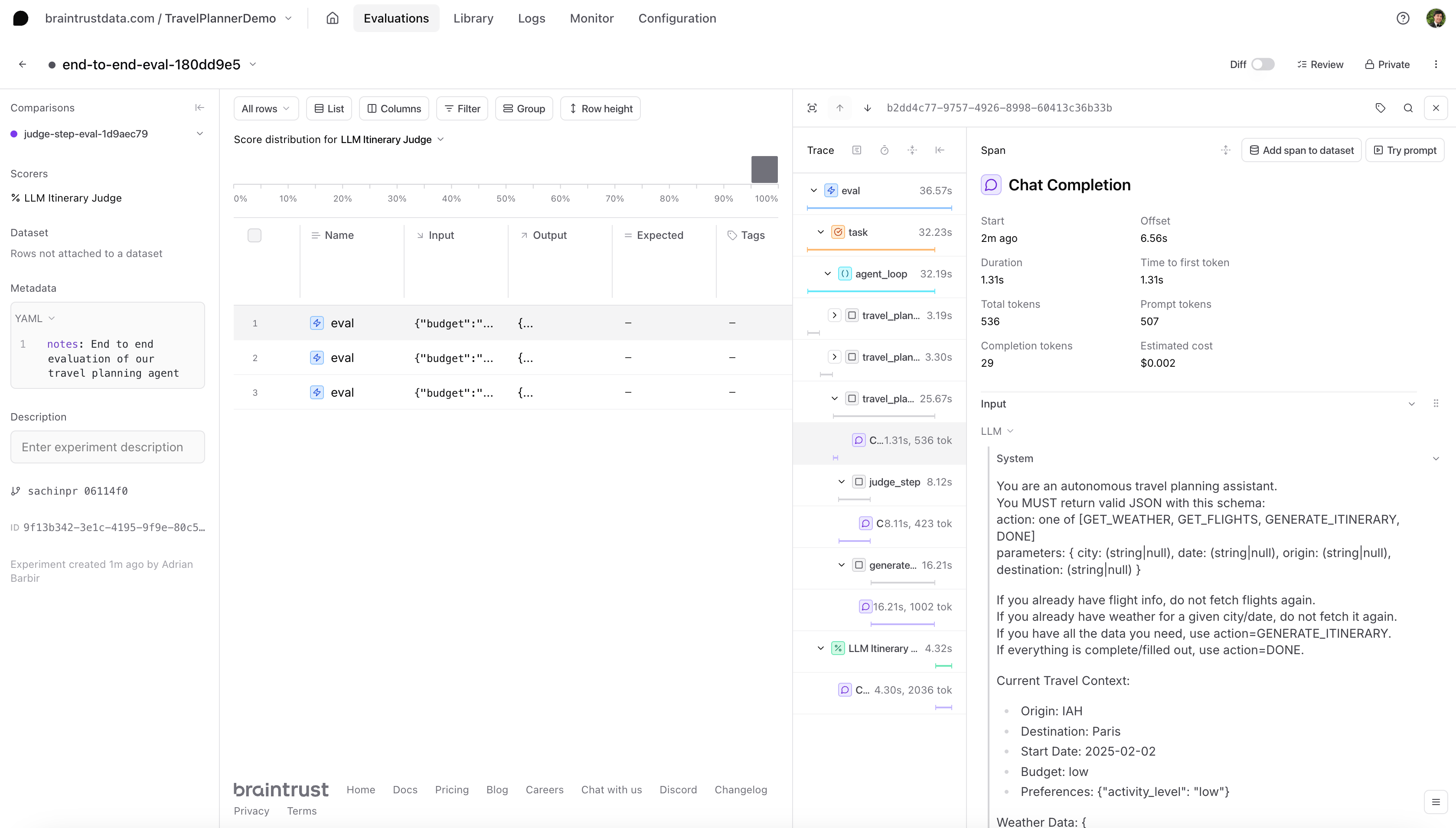 Starting with this top-down approach is generally recommended because it allows you to spot where the chain is not performing as expected. The Braintrust UI allows you to click into any given component, and view information such as the prompt or metadata. Viewing each step can help decide which sub-process (weather fetch, flight fetch, or judge) might need a closer look or tuning. You would then run a separate evaluation on that component.
## Evaluating the judge step in isolation
After evaluating the end-to-end performance of an agent, you might want to take a closer look at a single sub-process. For instance, if you notice that the agent frequently repeats certain actions when it shouldn’t, you might suspect the judge logic is misclassifying steps. To do this, we'll need to create a new experiment, a new dataset of test cases, and new scorers.
Depending on the complexity of your agent or how you like to organize your work in Braintrust, you can choose to create a new project for this evaluation instead of adding it to the existing project as we do here.
For demonstration purposes, we'll use a simple approach. We create a judge-only dataset, along with a minimal `judge_eval_task` that passes the sample inputs through `judge_step_with_cot()` and then compares the response to our expected label using a heuristic scorer called [`ExactMatch()`](https://github.com/braintrustdata/autoevals/blob/8b254b4e17897b7309bdc44880f55d3b88aa6744/py/autoevals/value.py#L9) from our built-in library of scoring functions, [autoevals](https://github.com/braintrustdata/autoevals).
```python theme={"theme":{"light":"github-light","dark":"github-dark-dimmed"}}
def dataset_judge_eval() -> List[braintrust.EvalCase]:
return [
braintrust.EvalCase(
input={
"step_description": "Action=GET_WEATHER, Params={'city': 'NYC', 'date': '2025-02-01', 'origin': null, 'destination': null}",
"context_data": {
"input_data": {
"origin": "NYC",
"destination": "Miami",
"budget": "medium",
"preferences": {"foodie": True},
},
"weather_data": {}, # no weather => expect "Y"
"flight_data": {},
},
},
expected="Y",
),
braintrust.EvalCase(
input={
"step_description": "Action=GET_FLIGHTS, Params={'origin': 'NYC', 'destination': 'Miami', 'city': null, 'date': null}",
"context_data": {
"input_data": {
"origin": "NYC",
"destination": "Miami",
"budget": "low",
"preferences": {},
},
"weather_data": {},
"flight_data": {
"economy_price": 300,
"business_price": 1200,
"seats_left": 10,
},
},
},
expected="N",
),
]
def judge_eval_task(inputs: Dict[str, Any], hooks) -> str:
step_desc = inputs["step_description"]
context_data = inputs["context_data"]
is_ok, _ = judge_step_with_cot(step_desc, context_data)
return "Y" if is_ok else "N"
if __name__ == "__main__":
braintrust.Eval(
name="TravelPlannerDemo",
data=dataset_judge_eval,
task=judge_eval_task,
scores=[autoevals.ExactMatch()],
experiment_name="judge-step-eval",
metadata={"notes": "Evaluating the judge_step_with_cot function in isolation."},
)
```
After you run this evaluation, you can return to your original project in Braintrust. There, you'll see the new experiment for the judge step.
Starting with this top-down approach is generally recommended because it allows you to spot where the chain is not performing as expected. The Braintrust UI allows you to click into any given component, and view information such as the prompt or metadata. Viewing each step can help decide which sub-process (weather fetch, flight fetch, or judge) might need a closer look or tuning. You would then run a separate evaluation on that component.
## Evaluating the judge step in isolation
After evaluating the end-to-end performance of an agent, you might want to take a closer look at a single sub-process. For instance, if you notice that the agent frequently repeats certain actions when it shouldn’t, you might suspect the judge logic is misclassifying steps. To do this, we'll need to create a new experiment, a new dataset of test cases, and new scorers.
Depending on the complexity of your agent or how you like to organize your work in Braintrust, you can choose to create a new project for this evaluation instead of adding it to the existing project as we do here.
For demonstration purposes, we'll use a simple approach. We create a judge-only dataset, along with a minimal `judge_eval_task` that passes the sample inputs through `judge_step_with_cot()` and then compares the response to our expected label using a heuristic scorer called [`ExactMatch()`](https://github.com/braintrustdata/autoevals/blob/8b254b4e17897b7309bdc44880f55d3b88aa6744/py/autoevals/value.py#L9) from our built-in library of scoring functions, [autoevals](https://github.com/braintrustdata/autoevals).
```python theme={"theme":{"light":"github-light","dark":"github-dark-dimmed"}}
def dataset_judge_eval() -> List[braintrust.EvalCase]:
return [
braintrust.EvalCase(
input={
"step_description": "Action=GET_WEATHER, Params={'city': 'NYC', 'date': '2025-02-01', 'origin': null, 'destination': null}",
"context_data": {
"input_data": {
"origin": "NYC",
"destination": "Miami",
"budget": "medium",
"preferences": {"foodie": True},
},
"weather_data": {}, # no weather => expect "Y"
"flight_data": {},
},
},
expected="Y",
),
braintrust.EvalCase(
input={
"step_description": "Action=GET_FLIGHTS, Params={'origin': 'NYC', 'destination': 'Miami', 'city': null, 'date': null}",
"context_data": {
"input_data": {
"origin": "NYC",
"destination": "Miami",
"budget": "low",
"preferences": {},
},
"weather_data": {},
"flight_data": {
"economy_price": 300,
"business_price": 1200,
"seats_left": 10,
},
},
},
expected="N",
),
]
def judge_eval_task(inputs: Dict[str, Any], hooks) -> str:
step_desc = inputs["step_description"]
context_data = inputs["context_data"]
is_ok, _ = judge_step_with_cot(step_desc, context_data)
return "Y" if is_ok else "N"
if __name__ == "__main__":
braintrust.Eval(
name="TravelPlannerDemo",
data=dataset_judge_eval,
task=judge_eval_task,
scores=[autoevals.ExactMatch()],
experiment_name="judge-step-eval",
metadata={"notes": "Evaluating the judge_step_with_cot function in isolation."},
)
```
After you run this evaluation, you can return to your original project in Braintrust. There, you'll see the new experiment for the judge step.
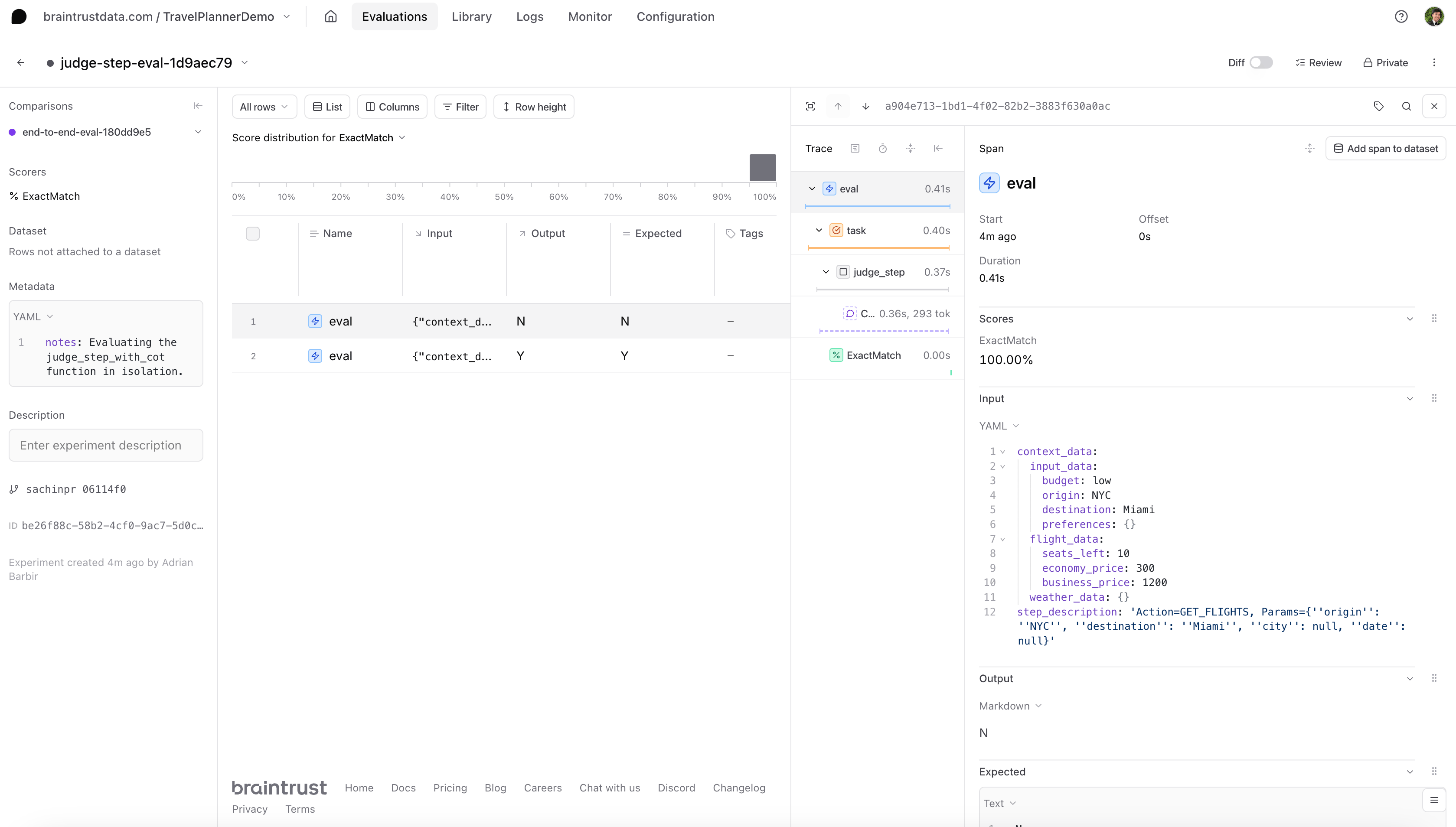
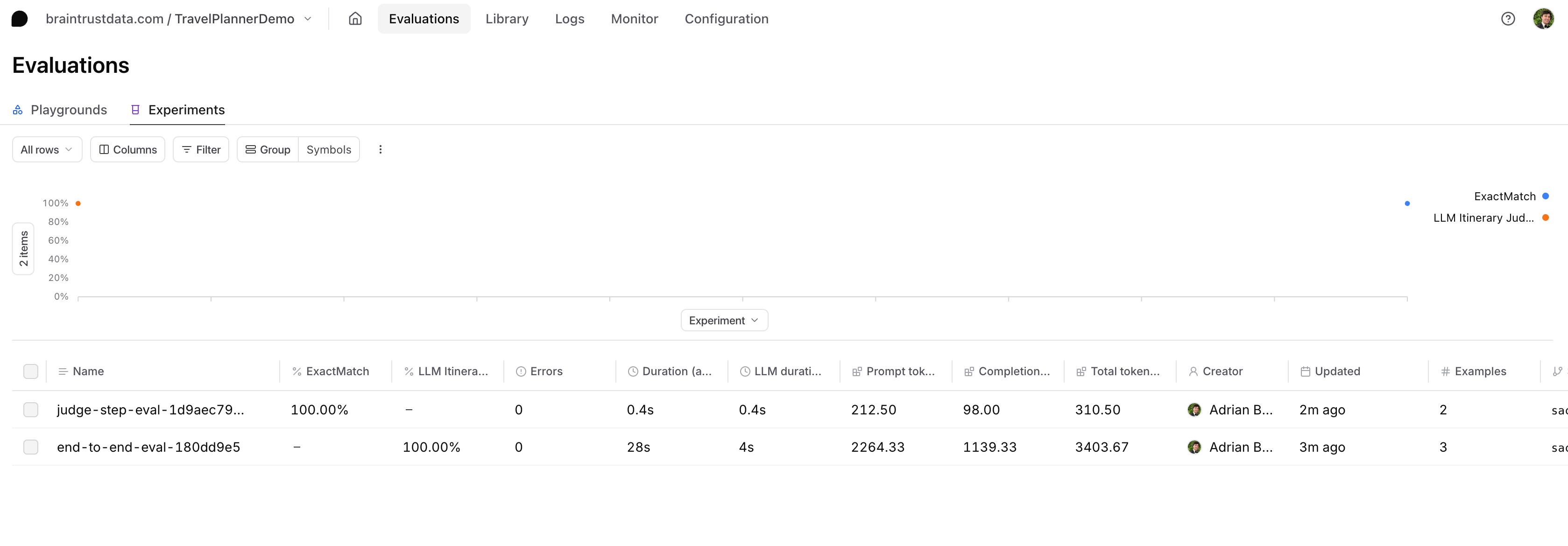 If you select the experiment, you can see all of the different evaluations and summaries. You can also select an individual row to view a full trace, which includes the task function, metadata, and the scorers.
 ## Next steps:
* Learn more about [how to evaluate agents](https://www.braintrust.dev/blog/evaluating-agents)
* Check out the [guide to what you should do after running an eval](https://www.braintrust.dev/blog/after-evals)
* Try out another [agent cookbook](https://www.braintrust.dev/docs/cookbook/recipes/APIAgent-Py)
## Next steps:
* Learn more about [how to evaluate agents](https://www.braintrust.dev/blog/evaluating-agents)
* Check out the [guide to what you should do after running an eval](https://www.braintrust.dev/blog/after-evals)
* Try out another [agent cookbook](https://www.braintrust.dev/docs/cookbook/recipes/APIAgent-Py)