> ## Documentation Index
> Fetch the complete documentation index at: https://braintrust.dev/docs/llms.txt
> Use this file to discover all available pages before exploring further.
# Evaluating multimodal receipt extraction
[Contributed](https://github.com/braintrustdata/braintrust-cookbook/blob/main/examples/ReceiptExtraction/ReceiptExtraction.ipynb) by [Ankur Goyal](https://twitter.com/ankrgyl) on 2024-09-30
Document extraction is a use case that is [near and dear to my heart](https://www.youtube.com/watch?v=hoBtFhZRxzw). The last time I dug deeply into it, there were not nearly as many models
capable of solving for it as there are today. In honor of Pixtral and LLaMa3.2, I thought it would be fun to revisit it with the classic SROIE dataset.
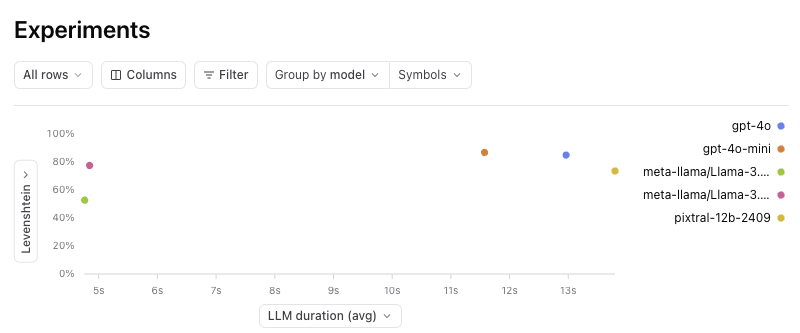
The results are fascinating:
* GPT-4o-mini performs the best, even better than GPT-4o
* Pixtral 12B is almost as good as LLaMa 3.2 90B
* The LLaMa models are almost 3x faster than the alternatives
 Let's jump right in!
## Install dependencies
```python theme={"theme":{"light":"github-light","dark":"github-dark-dimmed"}}
%pip install autoevals braintrust requests openai
```
## Setup LLM clients
We'll use OpenAI's GPT-4o, LLaMa 3.2 11B and 90B, and Pixtral 12B with a bunch of test cases from SROIE and see how they perform. You can access each of these models
behind the vanilla OpenAI client using Braintrust's proxy.
```python theme={"theme":{"light":"github-light","dark":"github-dark-dimmed"}}
import os
import braintrust
import openai
client = braintrust.wrap_openai(
openai.AsyncOpenAI(
api_key=os.environ["BRAINTRUST_API_KEY"],
base_url="https://api.braintrust.dev/v1/proxy",
)
)
```
## Downloading the data and sanity testing it
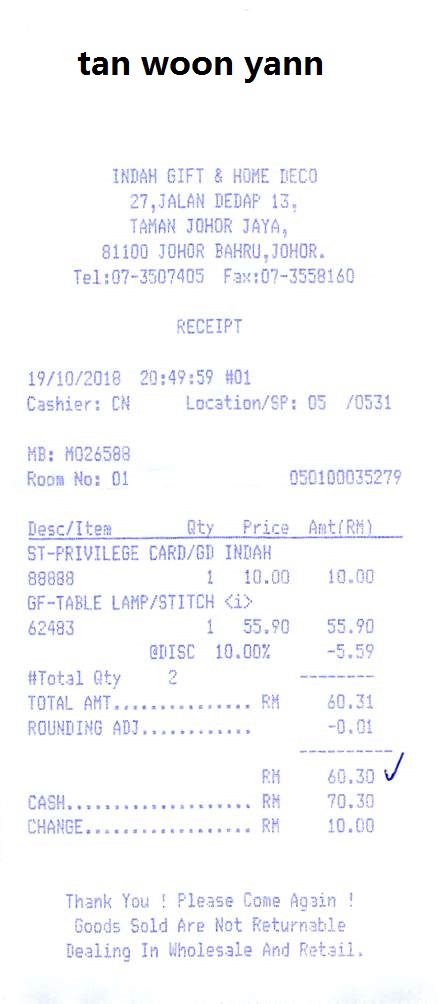
The [zzzDavid/ICDAR-2019-SROIE](https://github.com/zzzDavid/ICDAR-2019-SROIE/tree/master) repo has neatly organized the data for us. The files are enumerated in a 3 digit convention and for each image (e.g. 002.jpg), there is a corresponding
file (e.g. 002.json) with the key value pairs. There are a few different ways we could test the models:
* Ask each model to extract values for specific keys
* Ask each model to generate a value for each of a set of keys
* Ask the model to extract all keys and values from the receipt
To keep things simple, we'll go with the first option, but it would be interesting to do each and see how that affects the results.
```python theme={"theme":{"light":"github-light","dark":"github-dark-dimmed"}}
import requests
indices = [str(i).zfill(3) for i in range(100)]
def load_receipt(index):
img_path = f"https://raw.githubusercontent.com/zzzDavid/ICDAR-2019-SROIE/refs/heads/master/data/img/{index}.jpg"
json_path = f"https://raw.githubusercontent.com/zzzDavid/ICDAR-2019-SROIE/refs/heads/master/data/key/{index}.json"
json_response = requests.get(json_path).json()
return json_response, img_path
fields, img_path = load_receipt("001")
fields
```
```
{'company': 'INDAH GIFT & HOME DECO',
'date': '19/10/2018',
'address': '27, JALAN DEDAP 13, TAMAN JOHOR JAYA, 81100 JOHOR BAHRU, JOHOR.',
'total': '60.30'}
```
Let's jump right in!
## Install dependencies
```python theme={"theme":{"light":"github-light","dark":"github-dark-dimmed"}}
%pip install autoevals braintrust requests openai
```
## Setup LLM clients
We'll use OpenAI's GPT-4o, LLaMa 3.2 11B and 90B, and Pixtral 12B with a bunch of test cases from SROIE and see how they perform. You can access each of these models
behind the vanilla OpenAI client using Braintrust's proxy.
```python theme={"theme":{"light":"github-light","dark":"github-dark-dimmed"}}
import os
import braintrust
import openai
client = braintrust.wrap_openai(
openai.AsyncOpenAI(
api_key=os.environ["BRAINTRUST_API_KEY"],
base_url="https://api.braintrust.dev/v1/proxy",
)
)
```
## Downloading the data and sanity testing it
The [zzzDavid/ICDAR-2019-SROIE](https://github.com/zzzDavid/ICDAR-2019-SROIE/tree/master) repo has neatly organized the data for us. The files are enumerated in a 3 digit convention and for each image (e.g. 002.jpg), there is a corresponding
file (e.g. 002.json) with the key value pairs. There are a few different ways we could test the models:
* Ask each model to extract values for specific keys
* Ask each model to generate a value for each of a set of keys
* Ask the model to extract all keys and values from the receipt
To keep things simple, we'll go with the first option, but it would be interesting to do each and see how that affects the results.
```python theme={"theme":{"light":"github-light","dark":"github-dark-dimmed"}}
import requests
indices = [str(i).zfill(3) for i in range(100)]
def load_receipt(index):
img_path = f"https://raw.githubusercontent.com/zzzDavid/ICDAR-2019-SROIE/refs/heads/master/data/img/{index}.jpg"
json_path = f"https://raw.githubusercontent.com/zzzDavid/ICDAR-2019-SROIE/refs/heads/master/data/key/{index}.json"
json_response = requests.get(json_path).json()
return json_response, img_path
fields, img_path = load_receipt("001")
fields
```
```
{'company': 'INDAH GIFT & HOME DECO',
'date': '19/10/2018',
'address': '27, JALAN DEDAP 13, TAMAN JOHOR JAYA, 81100 JOHOR BAHRU, JOHOR.',
'total': '60.30'}
```
 ```python theme={"theme":{"light":"github-light","dark":"github-dark-dimmed"}}
MODELS = [
"gpt-4o",
"gpt-4o-mini",
"meta-llama/Llama-3.2-11B-Vision-Instruct-Turbo",
"meta-llama/Llama-3.2-90B-Vision-Instruct-Turbo",
"pixtral-12b-2409",
]
SYSTEM_PROMPT = """Extract the field '{key}' from the provided receipt. Return the extracted
value, and nothing else. For example, if the field is 'Total' and the value is '100',
you should just return '100'. If the field is not present, return null.
Do not decorate the output with any explanation, or markdown. Just return the extracted value.
"""
@braintrust.traced
async def extract_value(model, key, img_path):
response = await client.chat.completions.create(
model=model,
messages=[
{"role": "system", "content": SYSTEM_PROMPT.format(key=key)},
{
"role": "user",
"content": [{"type": "image_url", "image_url": {"url": img_path}}],
},
],
temperature=0,
)
return response.choices[0].message.content.strip()
for model in MODELS:
print("Running model: ", model)
print(await extract_value(model, "company", img_path))
print("\n")
```
```
Running model: gpt-4o
INDAH GIFT & HOME DECO
Running model: gpt-4o-mini
INDAH GIFT & HOME DECO
Running model: meta-llama/Llama-3.2-11B-Vision-Instruct-Turbo
60.30
Running model: meta-llama/Llama-3.2-90B-Vision-Instruct-Turbo
INDAH GIFT & HOME DECO
Running model: pixtral-12b-2409
tan woon yann
```
## Running the evaluation
Now that we were able to perform a basic sanity test, let's run an evaluation! We'll use the `Levenshtein` and `Factuality` scorers to assess performance.
`Levenshtein` is heuristic and will tell us how closely the actual and expected strings match. Assuming some of the models will occasionally spit out superfluous
explanation text, `Factuality`, which is LLM based, should be able to still give us an accuracy measurement.
```python theme={"theme":{"light":"github-light","dark":"github-dark-dimmed"}}
from braintrust import EvalAsync
from autoevals import Factuality, Levenshtein
NUM_RECEIPTS = 100
data = [
{
"input": {
"key": key,
"img_path": img_path,
},
"expected": value,
"metadata": {
"idx": idx,
},
}
for idx, (fields, img_path) in [
(idx, load_receipt(idx)) for idx in indices[:NUM_RECEIPTS]
]
for key, value in fields.items()
]
for model in MODELS:
async def task(input):
return await extract_value(model, input["key"], input["img_path"])
await EvalAsync(
"Receipt Extraction",
data=data,
task=task,
scores=[Levenshtein, Factuality],
experiment_name=f"Receipt Extraction - {model}",
metadata={"model": model},
)
```
```
Experiment Receipt Extraction - gpt-4o is running at https://www.braintrust.dev/app/braintrustdata.com/p/Receipt%20Extraction/experiments/Receipt%20Extraction%20-%20gpt-4o
Receipt Extraction [experiment_name=Receipt Extraction - gpt-4o] (data): 400it [00:00, 421962.17it/s]
Receipt Extraction [experiment_name=Receipt Extraction - gpt-4o] (tasks): 100%|██████████| 400/400 [00:42<00:00, 9.48it/s]
```
```
=========================SUMMARY=========================
84.40% 'Factuality' score
84.93% 'Levenshtein' score
1223tok prompt_tokens
12.06tok completion_tokens
1235.06tok total_tokens
See results for Receipt Extraction - gpt-4o at https://www.braintrust.dev/app/braintrustdata.com/p/Receipt%20Extraction/experiments/Receipt%20Extraction%20-%20gpt-4o
```
```
Experiment Receipt Extraction - gpt-4o-mini is running at https://www.braintrust.dev/app/braintrustdata.com/p/Receipt%20Extraction/experiments/Receipt%20Extraction%20-%20gpt-4o-mini
Receipt Extraction [experiment_name=Receipt Extraction - gpt-4o-mini] (data): 400it [00:00, 76419.86it/s]
Receipt Extraction [experiment_name=Receipt Extraction - gpt-4o-mini] (tasks): 100%|██████████| 400/400 [00:41<00:00, 9.63it/s]
```
```
=========================SUMMARY=========================
Receipt Extraction - gpt-4o-mini compared to Receipt Extraction - gpt-4o:
86.81% (+01.88%) 'Levenshtein' score (85 improvements, 48 regressions)
81.40% (-03.00%) 'Factuality' score (34 improvements, 42 regressions)
38052.40tok (+3682940.00%) 'prompt_tokens' (0 improvements, 400 regressions)
12.31tok (+25.25%) 'completion_tokens' (62 improvements, 49 regressions)
38064.71tok (+3682965.25%) 'total_tokens' (0 improvements, 400 regressions)
See results for Receipt Extraction - gpt-4o-mini at https://www.braintrust.dev/app/braintrustdata.com/p/Receipt%20Extraction/experiments/Receipt%20Extraction%20-%20gpt-4o-mini
```
```
Experiment Receipt Extraction - meta-llama/Llama-3.2-11B-Vision-Instruct-Turbo is running at https://www.braintrust.dev/app/braintrustdata.com/p/Receipt%20Extraction/experiments/Receipt%20Extraction%20-%20meta-llama%2FLlama-3.2-11B-Vision-Instruct-Turbo
Receipt Extraction [experiment_name=Receipt Extraction - meta-llama/Llama-3.2-11B-Vision-Instruct-Turbo] (data): 400it [00:00, 73234.17it/s]
Receipt Extraction [experiment_name=Receipt Extraction - meta-llama/Llama-3.2-11B-Vision-Instruct-Turbo] (tasks): 100%|██████████| 400/400 [00:26<00:00, 15.01it/s]
```
```
=========================SUMMARY=========================
Receipt Extraction - meta-llama/Llama-3.2-11B-Vision-Instruct-Turbo compared to Receipt Extraction - gpt-4o-mini:
52.78% (-34.04%) 'Levenshtein' score (41 improvements, 235 regressions)
56.10% (-25.30%) 'Factuality' score (38 improvements, 162 regressions)
89tok (-3796340.00%) 'prompt_tokens' (400 improvements, 0 regressions)
11.31tok (-100.50%) 'completion_tokens' (125 improvements, 268 regressions)
100.31tok (-3796440.50%) 'total_tokens' (400 improvements, 0 regressions)
See results for Receipt Extraction - meta-llama/Llama-3.2-11B-Vision-Instruct-Turbo at https://www.braintrust.dev/app/braintrustdata.com/p/Receipt%20Extraction/experiments/Receipt%20Extraction%20-%20meta-llama%2FLlama-3.2-11B-Vision-Instruct-Turbo
```
```
Experiment Receipt Extraction - meta-llama/Llama-3.2-90B-Vision-Instruct-Turbo is running at https://www.braintrust.dev/app/braintrustdata.com/p/Receipt%20Extraction/experiments/Receipt%20Extraction%20-%20meta-llama%2FLlama-3.2-90B-Vision-Instruct-Turbo
Receipt Extraction [experiment_name=Receipt Extraction - meta-llama/Llama-3.2-90B-Vision-Instruct-Turbo] (data): 400it [00:00, 59897.24it/s]
Receipt Extraction [experiment_name=Receipt Extraction - meta-llama/Llama-3.2-90B-Vision-Instruct-Turbo] (tasks): 100%|██████████| 400/400 [00:36<00:00, 10.90it/s]
```
```
=========================SUMMARY=========================
Receipt Extraction - meta-llama/Llama-3.2-90B-Vision-Instruct-Turbo compared to Receipt Extraction - meta-llama/Llama-3.2-11B-Vision-Instruct-Turbo:
77.52% (+24.74%) 'Levenshtein' score (212 improvements, 40 regressions)
79.10% (+23.00%) 'Factuality' score (154 improvements, 35 regressions)
89tok (-) 'prompt_tokens' (0 improvements, 0 regressions)
14.45tok (+313.75%) 'completion_tokens' (75 improvements, 157 regressions)
103.45tok (+313.75%) 'total_tokens' (75 improvements, 157 regressions)
See results for Receipt Extraction - meta-llama/Llama-3.2-90B-Vision-Instruct-Turbo at https://www.braintrust.dev/app/braintrustdata.com/p/Receipt%20Extraction/experiments/Receipt%20Extraction%20-%20meta-llama%2FLlama-3.2-90B-Vision-Instruct-Turbo
```
```
Experiment Receipt Extraction - pixtral-12b-2409 is running at https://www.braintrust.dev/app/braintrustdata.com/p/Receipt%20Extraction/experiments/Receipt%20Extraction%20-%20pixtral-12b-2409
Receipt Extraction [experiment_name=Receipt Extraction - pixtral-12b-2409] (data): 400it [00:00, 125474.65it/s]
Receipt Extraction [experiment_name=Receipt Extraction - pixtral-12b-2409] (tasks): 100%|██████████| 400/400 [00:50<00:00, 7.88it/s]
```
```
=========================SUMMARY=========================
Receipt Extraction - pixtral-12b-2409 compared to Receipt Extraction - meta-llama/Llama-3.2-90B-Vision-Instruct-Turbo:
66.75% (-12.35%) 'Factuality' score (47 improvements, 98 regressions)
73.56% (-03.96%) 'Levenshtein' score (72 improvements, 145 regressions)
2364.51tok (+227551.00%) 'prompt_tokens' (0 improvements, 400 regressions)
19.22tok (+477.50%) 'completion_tokens' (121 improvements, 252 regressions)
2383.73tok (+228028.50%) 'total_tokens' (0 improvements, 400 regressions)
See results for Receipt Extraction - pixtral-12b-2409 at https://www.braintrust.dev/app/braintrustdata.com/p/Receipt%20Extraction/experiments/Receipt%20Extraction%20-%20pixtral-12b-2409
```
## Analyzing the results
Now that we have a bunch of results, let's take a look at some of the insights. If you click into the project in Braintrust, and then "Group by" model, you'll see the following:
```python theme={"theme":{"light":"github-light","dark":"github-dark-dimmed"}}
MODELS = [
"gpt-4o",
"gpt-4o-mini",
"meta-llama/Llama-3.2-11B-Vision-Instruct-Turbo",
"meta-llama/Llama-3.2-90B-Vision-Instruct-Turbo",
"pixtral-12b-2409",
]
SYSTEM_PROMPT = """Extract the field '{key}' from the provided receipt. Return the extracted
value, and nothing else. For example, if the field is 'Total' and the value is '100',
you should just return '100'. If the field is not present, return null.
Do not decorate the output with any explanation, or markdown. Just return the extracted value.
"""
@braintrust.traced
async def extract_value(model, key, img_path):
response = await client.chat.completions.create(
model=model,
messages=[
{"role": "system", "content": SYSTEM_PROMPT.format(key=key)},
{
"role": "user",
"content": [{"type": "image_url", "image_url": {"url": img_path}}],
},
],
temperature=0,
)
return response.choices[0].message.content.strip()
for model in MODELS:
print("Running model: ", model)
print(await extract_value(model, "company", img_path))
print("\n")
```
```
Running model: gpt-4o
INDAH GIFT & HOME DECO
Running model: gpt-4o-mini
INDAH GIFT & HOME DECO
Running model: meta-llama/Llama-3.2-11B-Vision-Instruct-Turbo
60.30
Running model: meta-llama/Llama-3.2-90B-Vision-Instruct-Turbo
INDAH GIFT & HOME DECO
Running model: pixtral-12b-2409
tan woon yann
```
## Running the evaluation
Now that we were able to perform a basic sanity test, let's run an evaluation! We'll use the `Levenshtein` and `Factuality` scorers to assess performance.
`Levenshtein` is heuristic and will tell us how closely the actual and expected strings match. Assuming some of the models will occasionally spit out superfluous
explanation text, `Factuality`, which is LLM based, should be able to still give us an accuracy measurement.
```python theme={"theme":{"light":"github-light","dark":"github-dark-dimmed"}}
from braintrust import EvalAsync
from autoevals import Factuality, Levenshtein
NUM_RECEIPTS = 100
data = [
{
"input": {
"key": key,
"img_path": img_path,
},
"expected": value,
"metadata": {
"idx": idx,
},
}
for idx, (fields, img_path) in [
(idx, load_receipt(idx)) for idx in indices[:NUM_RECEIPTS]
]
for key, value in fields.items()
]
for model in MODELS:
async def task(input):
return await extract_value(model, input["key"], input["img_path"])
await EvalAsync(
"Receipt Extraction",
data=data,
task=task,
scores=[Levenshtein, Factuality],
experiment_name=f"Receipt Extraction - {model}",
metadata={"model": model},
)
```
```
Experiment Receipt Extraction - gpt-4o is running at https://www.braintrust.dev/app/braintrustdata.com/p/Receipt%20Extraction/experiments/Receipt%20Extraction%20-%20gpt-4o
Receipt Extraction [experiment_name=Receipt Extraction - gpt-4o] (data): 400it [00:00, 421962.17it/s]
Receipt Extraction [experiment_name=Receipt Extraction - gpt-4o] (tasks): 100%|██████████| 400/400 [00:42<00:00, 9.48it/s]
```
```
=========================SUMMARY=========================
84.40% 'Factuality' score
84.93% 'Levenshtein' score
1223tok prompt_tokens
12.06tok completion_tokens
1235.06tok total_tokens
See results for Receipt Extraction - gpt-4o at https://www.braintrust.dev/app/braintrustdata.com/p/Receipt%20Extraction/experiments/Receipt%20Extraction%20-%20gpt-4o
```
```
Experiment Receipt Extraction - gpt-4o-mini is running at https://www.braintrust.dev/app/braintrustdata.com/p/Receipt%20Extraction/experiments/Receipt%20Extraction%20-%20gpt-4o-mini
Receipt Extraction [experiment_name=Receipt Extraction - gpt-4o-mini] (data): 400it [00:00, 76419.86it/s]
Receipt Extraction [experiment_name=Receipt Extraction - gpt-4o-mini] (tasks): 100%|██████████| 400/400 [00:41<00:00, 9.63it/s]
```
```
=========================SUMMARY=========================
Receipt Extraction - gpt-4o-mini compared to Receipt Extraction - gpt-4o:
86.81% (+01.88%) 'Levenshtein' score (85 improvements, 48 regressions)
81.40% (-03.00%) 'Factuality' score (34 improvements, 42 regressions)
38052.40tok (+3682940.00%) 'prompt_tokens' (0 improvements, 400 regressions)
12.31tok (+25.25%) 'completion_tokens' (62 improvements, 49 regressions)
38064.71tok (+3682965.25%) 'total_tokens' (0 improvements, 400 regressions)
See results for Receipt Extraction - gpt-4o-mini at https://www.braintrust.dev/app/braintrustdata.com/p/Receipt%20Extraction/experiments/Receipt%20Extraction%20-%20gpt-4o-mini
```
```
Experiment Receipt Extraction - meta-llama/Llama-3.2-11B-Vision-Instruct-Turbo is running at https://www.braintrust.dev/app/braintrustdata.com/p/Receipt%20Extraction/experiments/Receipt%20Extraction%20-%20meta-llama%2FLlama-3.2-11B-Vision-Instruct-Turbo
Receipt Extraction [experiment_name=Receipt Extraction - meta-llama/Llama-3.2-11B-Vision-Instruct-Turbo] (data): 400it [00:00, 73234.17it/s]
Receipt Extraction [experiment_name=Receipt Extraction - meta-llama/Llama-3.2-11B-Vision-Instruct-Turbo] (tasks): 100%|██████████| 400/400 [00:26<00:00, 15.01it/s]
```
```
=========================SUMMARY=========================
Receipt Extraction - meta-llama/Llama-3.2-11B-Vision-Instruct-Turbo compared to Receipt Extraction - gpt-4o-mini:
52.78% (-34.04%) 'Levenshtein' score (41 improvements, 235 regressions)
56.10% (-25.30%) 'Factuality' score (38 improvements, 162 regressions)
89tok (-3796340.00%) 'prompt_tokens' (400 improvements, 0 regressions)
11.31tok (-100.50%) 'completion_tokens' (125 improvements, 268 regressions)
100.31tok (-3796440.50%) 'total_tokens' (400 improvements, 0 regressions)
See results for Receipt Extraction - meta-llama/Llama-3.2-11B-Vision-Instruct-Turbo at https://www.braintrust.dev/app/braintrustdata.com/p/Receipt%20Extraction/experiments/Receipt%20Extraction%20-%20meta-llama%2FLlama-3.2-11B-Vision-Instruct-Turbo
```
```
Experiment Receipt Extraction - meta-llama/Llama-3.2-90B-Vision-Instruct-Turbo is running at https://www.braintrust.dev/app/braintrustdata.com/p/Receipt%20Extraction/experiments/Receipt%20Extraction%20-%20meta-llama%2FLlama-3.2-90B-Vision-Instruct-Turbo
Receipt Extraction [experiment_name=Receipt Extraction - meta-llama/Llama-3.2-90B-Vision-Instruct-Turbo] (data): 400it [00:00, 59897.24it/s]
Receipt Extraction [experiment_name=Receipt Extraction - meta-llama/Llama-3.2-90B-Vision-Instruct-Turbo] (tasks): 100%|██████████| 400/400 [00:36<00:00, 10.90it/s]
```
```
=========================SUMMARY=========================
Receipt Extraction - meta-llama/Llama-3.2-90B-Vision-Instruct-Turbo compared to Receipt Extraction - meta-llama/Llama-3.2-11B-Vision-Instruct-Turbo:
77.52% (+24.74%) 'Levenshtein' score (212 improvements, 40 regressions)
79.10% (+23.00%) 'Factuality' score (154 improvements, 35 regressions)
89tok (-) 'prompt_tokens' (0 improvements, 0 regressions)
14.45tok (+313.75%) 'completion_tokens' (75 improvements, 157 regressions)
103.45tok (+313.75%) 'total_tokens' (75 improvements, 157 regressions)
See results for Receipt Extraction - meta-llama/Llama-3.2-90B-Vision-Instruct-Turbo at https://www.braintrust.dev/app/braintrustdata.com/p/Receipt%20Extraction/experiments/Receipt%20Extraction%20-%20meta-llama%2FLlama-3.2-90B-Vision-Instruct-Turbo
```
```
Experiment Receipt Extraction - pixtral-12b-2409 is running at https://www.braintrust.dev/app/braintrustdata.com/p/Receipt%20Extraction/experiments/Receipt%20Extraction%20-%20pixtral-12b-2409
Receipt Extraction [experiment_name=Receipt Extraction - pixtral-12b-2409] (data): 400it [00:00, 125474.65it/s]
Receipt Extraction [experiment_name=Receipt Extraction - pixtral-12b-2409] (tasks): 100%|██████████| 400/400 [00:50<00:00, 7.88it/s]
```
```
=========================SUMMARY=========================
Receipt Extraction - pixtral-12b-2409 compared to Receipt Extraction - meta-llama/Llama-3.2-90B-Vision-Instruct-Turbo:
66.75% (-12.35%) 'Factuality' score (47 improvements, 98 regressions)
73.56% (-03.96%) 'Levenshtein' score (72 improvements, 145 regressions)
2364.51tok (+227551.00%) 'prompt_tokens' (0 improvements, 400 regressions)
19.22tok (+477.50%) 'completion_tokens' (121 improvements, 252 regressions)
2383.73tok (+228028.50%) 'total_tokens' (0 improvements, 400 regressions)
See results for Receipt Extraction - pixtral-12b-2409 at https://www.braintrust.dev/app/braintrustdata.com/p/Receipt%20Extraction/experiments/Receipt%20Extraction%20-%20pixtral-12b-2409
```
## Analyzing the results
Now that we have a bunch of results, let's take a look at some of the insights. If you click into the project in Braintrust, and then "Group by" model, you'll see the following:
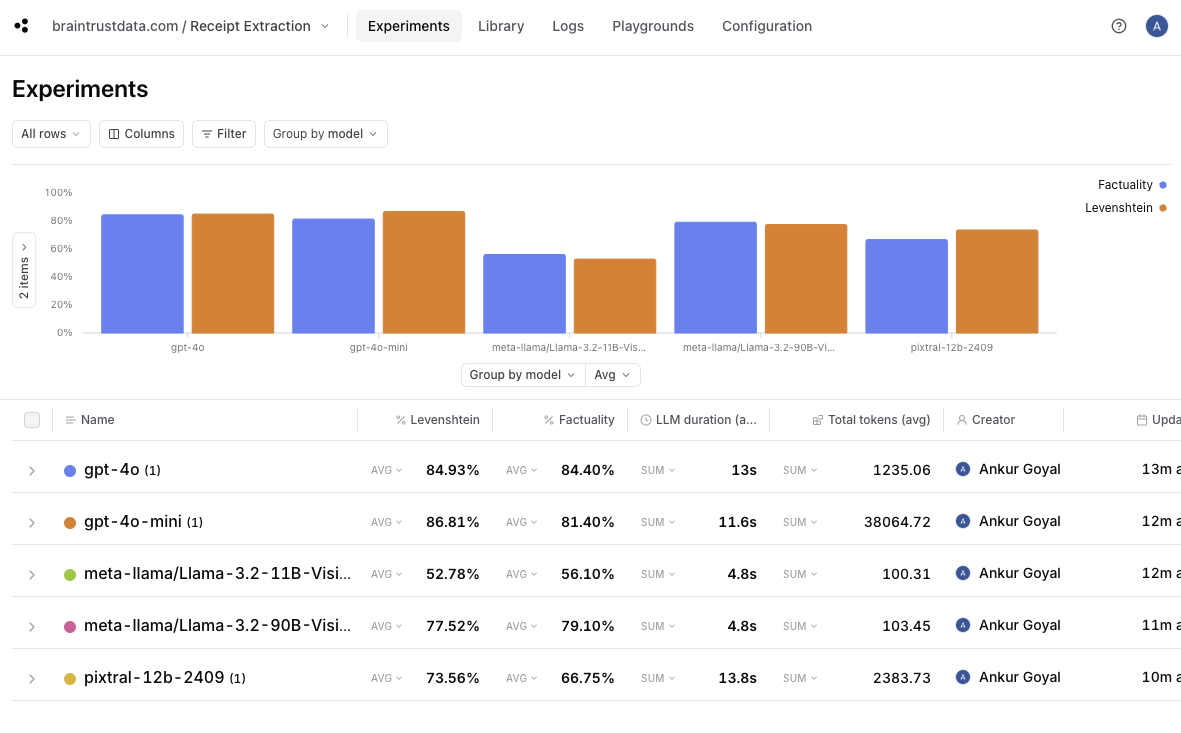 A few quick takeaways:
* it looks like `gpt-4o-mini` performs the best -- even slightly better than `gpt-4o`.
* Pixtral, a 12B model, performs significantly better than LLaMa 3.2 11B and almost as well as 90B.
* Both LLaMa models (for these tests, hosted on [Together](https://together.xyz)), are dramatically faster -- almost 3x -- than GPT-4o, GPT-4o-mini, and Pixtral.
Let's dig into these individual results in some more depth.
### GPT-4o-mini vs GPT-4o
If you click into the gpt-4o experiment and compare it to gpt-4o-mini, you can drill down into the individual improvements and regressions.
A few quick takeaways:
* it looks like `gpt-4o-mini` performs the best -- even slightly better than `gpt-4o`.
* Pixtral, a 12B model, performs significantly better than LLaMa 3.2 11B and almost as well as 90B.
* Both LLaMa models (for these tests, hosted on [Together](https://together.xyz)), are dramatically faster -- almost 3x -- than GPT-4o, GPT-4o-mini, and Pixtral.
Let's dig into these individual results in some more depth.
### GPT-4o-mini vs GPT-4o
If you click into the gpt-4o experiment and compare it to gpt-4o-mini, you can drill down into the individual improvements and regressions.
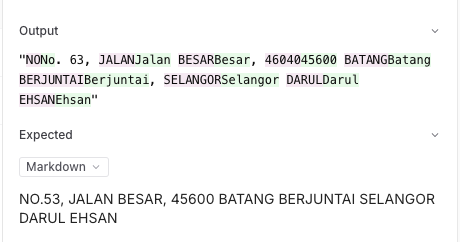
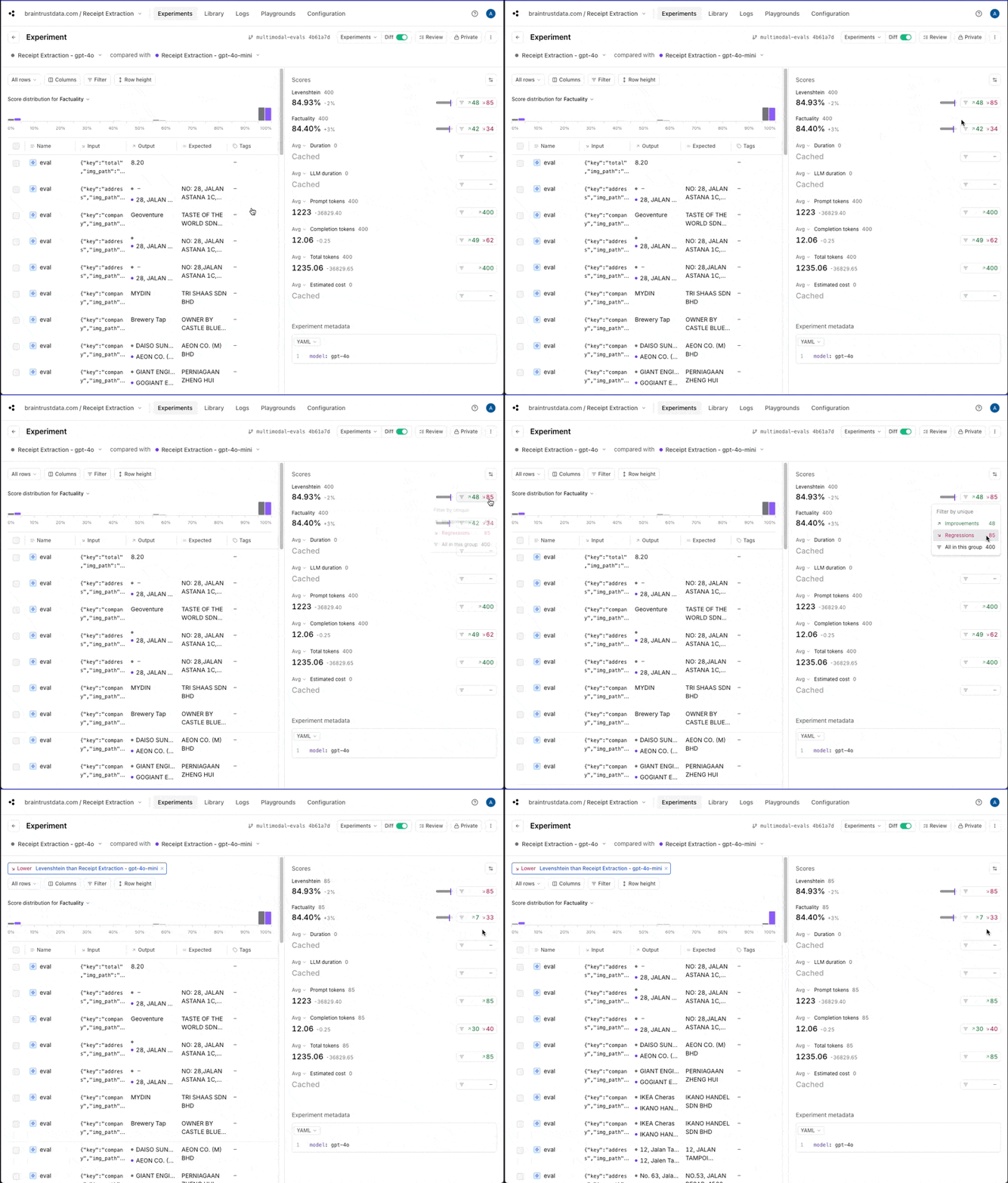 There are several different types of regressions, one of which appears to be that `gpt-4o` returns information in a different case than `gpt-4o-mini`. That may or
may not be important for this use case, but if not, we could adjust our scoring functions to lowercase everything before comparing.
There are several different types of regressions, one of which appears to be that `gpt-4o` returns information in a different case than `gpt-4o-mini`. That may or
may not be important for this use case, but if not, we could adjust our scoring functions to lowercase everything before comparing.
 ### Pixtral vs. LLaMa 3.2
To compare Pixtral to LLaMa 3.2, you can do a multi-way comparison where the baseline is Pixtral.
### Pixtral vs. LLaMa 3.2
To compare Pixtral to LLaMa 3.2, you can do a multi-way comparison where the baseline is Pixtral.
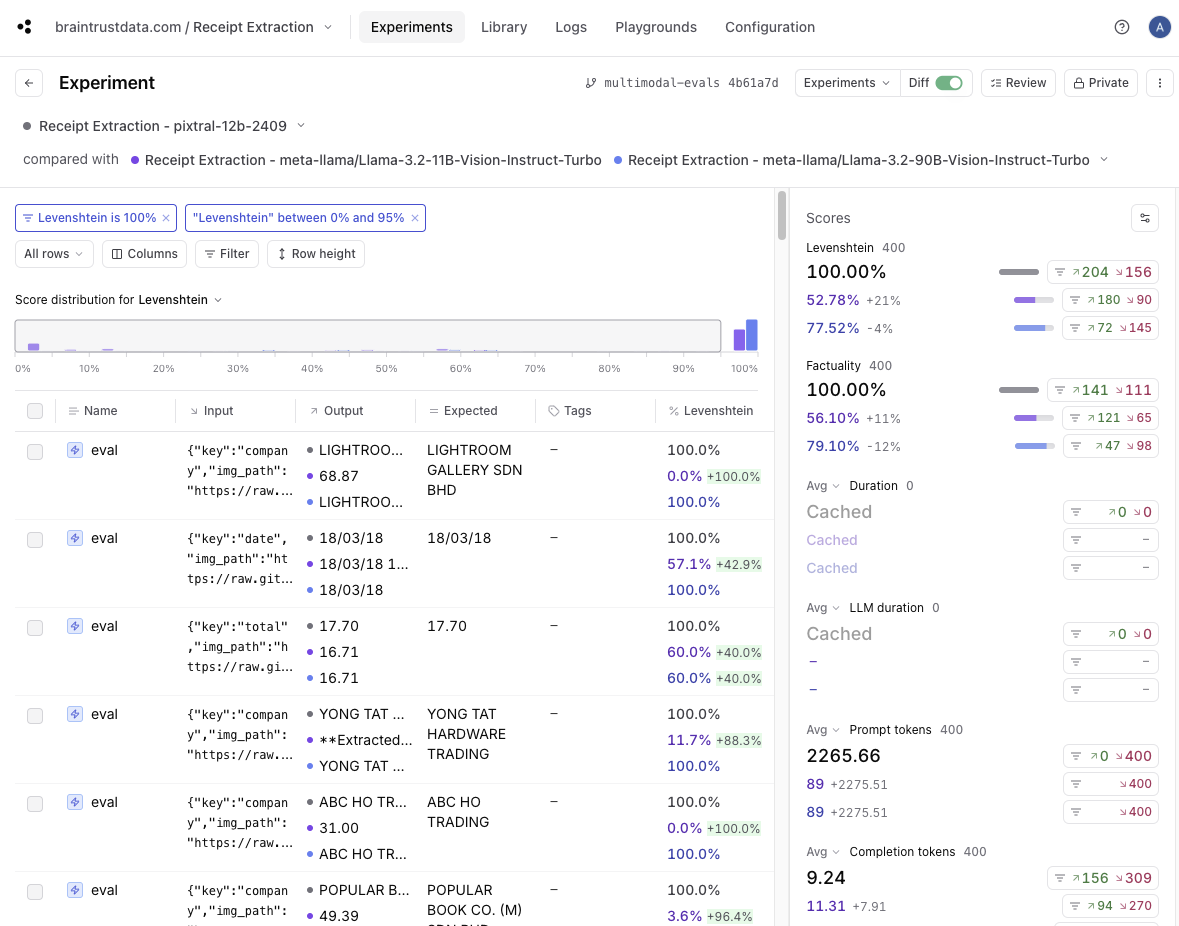
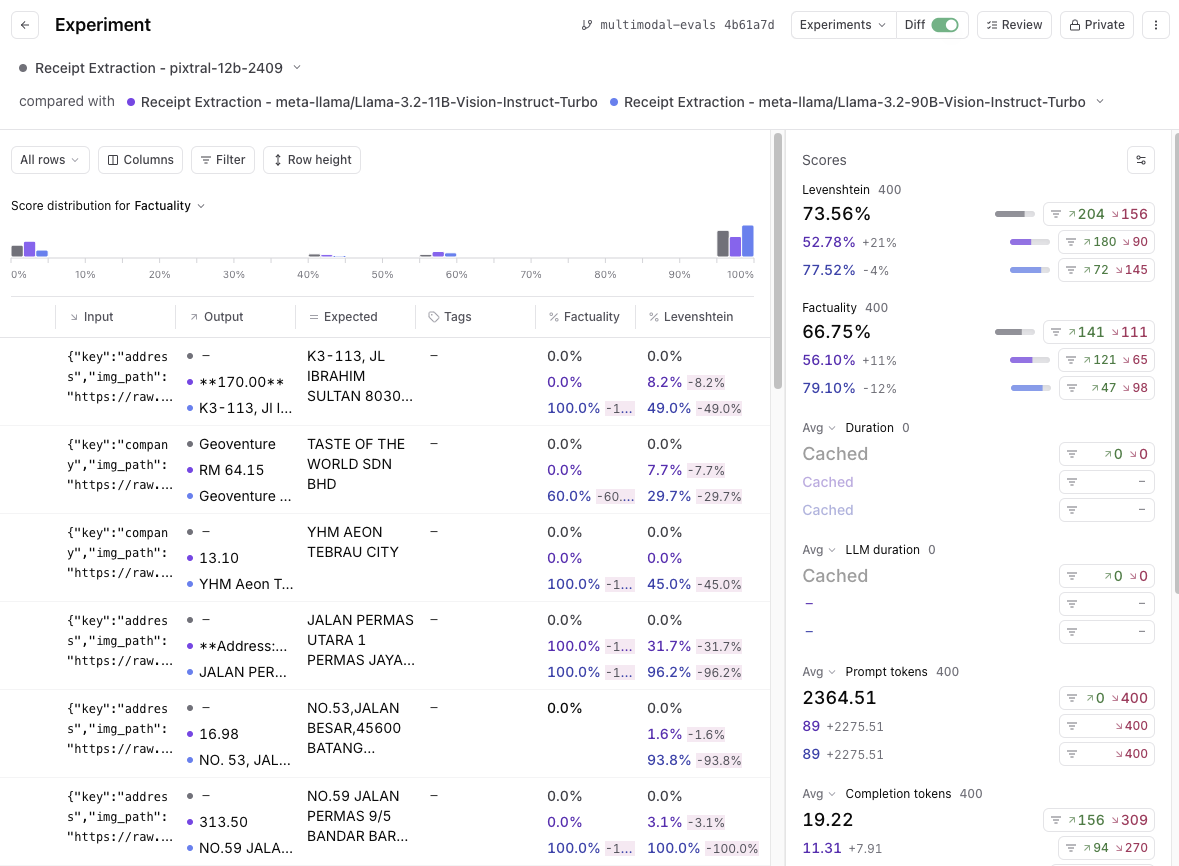 If you filter to results where the `Levenshtein` score is 100%, and then drag to filter the score buckets where `Levenshtein` is less than 100% for LLaMa models, you'll
see that 109 out of the 400 total tests match. That means that around 25% of the results had a perfect (100%) score for Pixtral and a lower score for LLaMa models.
If you filter to results where the `Levenshtein` score is 100%, and then drag to filter the score buckets where `Levenshtein` is less than 100% for LLaMa models, you'll
see that 109 out of the 400 total tests match. That means that around 25% of the results had a perfect (100%) score for Pixtral and a lower score for LLaMa models.
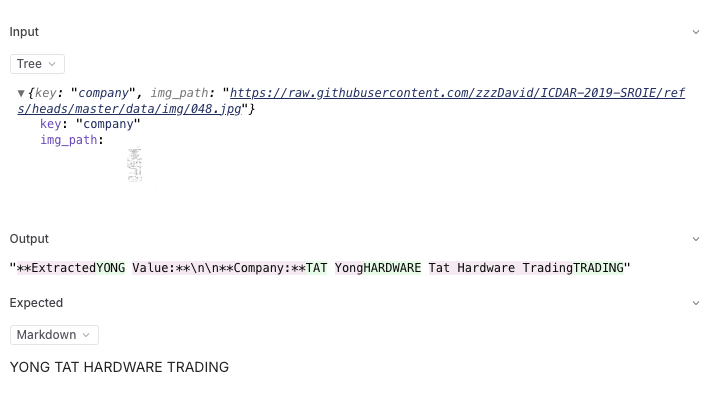
 It's useful to eyeball a few of these, where you'll see that many of the answers are just straight up incorrect for LLaMa 3.2 models.
 ### Speed vs. quality trade-off
Back on the experiments page, it can be useful to view a scatterplot of score vs. duration to understand the trade-off between accuracy and speed.
The LLaMa 3.2 models are significantly faster—almost 3x—without sacrificing much accuracy. For certain use cases, this can be a significant factor to consider.
## Where to go from here
Now that we have some baseline evals in place, you can start to think about how to either iterate on these models to improve performance, or expand the testing to get a
more comprehensive benchmark:
* Try tweaking the prompt, perhaps with some few-shot examples, and see if that affects absolute and relative performance
* Add a few more models into the mix and see how they perform
* Dig into a few regressions and tweak the scoring methods to better reflect the actual use case
To get started with this use case in Braintrust, you can [sign up for a free account](https://www.braintrust.dev/signup) and start with this Notebook. Happy evaluating!
### Speed vs. quality trade-off
Back on the experiments page, it can be useful to view a scatterplot of score vs. duration to understand the trade-off between accuracy and speed.
The LLaMa 3.2 models are significantly faster—almost 3x—without sacrificing much accuracy. For certain use cases, this can be a significant factor to consider.
## Where to go from here
Now that we have some baseline evals in place, you can start to think about how to either iterate on these models to improve performance, or expand the testing to get a
more comprehensive benchmark:
* Try tweaking the prompt, perhaps with some few-shot examples, and see if that affects absolute and relative performance
* Add a few more models into the mix and see how they perform
* Dig into a few regressions and tweak the scoring methods to better reflect the actual use case
To get started with this use case in Braintrust, you can [sign up for a free account](https://www.braintrust.dev/signup) and start with this Notebook. Happy evaluating!