> ## Documentation Index
> Fetch the complete documentation index at: https://braintrust.dev/docs/llms.txt
> Use this file to discover all available pages before exploring further.
# Evaluating video QA with Twelve Labs
[Contributed](https://github.com/braintrustdata/braintrust-cookbook/blob/main/examples/VideoQATwelveLabs/VideoQATwelveLabs.ipynb) by [James Le](https://x.com/le_james94), [Ornella Altunyan](https://twitter.com/ornelladotcom) on 2025-05-14
[Twelve Labs](https://www.twelvelabs.io) is a video intelligence platform that builds models for video understanding. Their video-first language model, [Pegasus](https://www.twelvelabs.io/product/models-overview#pegasus), can analyze, understand, and generate text from video content. Through its visual and audio understanding capabilities, it enables sophisticated video analysis, Q\&A generation, content summarization, and detailed insights extraction from video content.
In this cookbook, we'll evaluate a Pegasus-based video question-answering (video QA) system using the [MMVU dataset](https://mmvu-benchmark.github.io/). The MMVU dataset includes multi-disciplinary videos paired with questions and ground-truth answers, spanning many different topics.
By the end, you'll have a repeatable workflow for quantitatively evaluating video QA performance, which you can adapt to different datasets or use cases. You can also use other models for video QA by following [this cookbook](/cookbook/recipes/VideoQA).
## Getting started
First, we'll install the required packages:
```python theme={"theme":{"light":"github-light","dark":"github-dark-dimmed"}}
!pip install requests datasets braintrust autoevals twelvelabs
```
Next, we'll import our modules and define constants:
```python theme={"theme":{"light":"github-light","dark":"github-dark-dimmed"}}
import os
from typing import List, Dict, Any, Optional
import requests
from requests.adapters import HTTPAdapter
from urllib3.util.retry import Retry
from datasets import load_dataset
import braintrust
import autoevals
from twelvelabs import TwelveLabs
RETRY_TOTAL = 3
RETRY_BACKOFF = 0.5
STATUS_FORCELIST = [502, 503, 504]
```
If you haven't already, sign up for [Braintrust](https://www.braintrust.dev/signup) and [Twelve Labs](https://www.twelvelabs.io). To authenticate, export your `BRAINTRUST_API_KEY` and `TWELVE_LABS_API_KEY` as environment variables:
```bash theme={"theme":{"light":"github-light","dark":"github-dark-dimmed"}}
export BRAINTRUST_API_KEY="YOUR_API_KEY_HERE"
export TWELVE_LABS_API_KEY="YOUR_API_KEY_HERE"
```
Exporting your API key is a best practice, but to make it easier to follow along with this cookbook, you can also hardcode it into the code below.
```python theme={"theme":{"light":"github-light","dark":"github-dark-dimmed"}}
# Initialize Braintrust
BRAINTRUST_API_KEY = os.environ["BRAINTRUST_API_KEY"]
if not BRAINTRUST_API_KEY:
raise ValueError("Please set the BRAINTRUST_API_KEY environment variable.")
# Initialize Twelve Labs
TWELVE_LABS_API_KEY = os.environ["TWELVE_LABS_API_KEY"]
if not TWELVE_LABS_API_KEY:
raise ValueError("Please set the TWELVE_LABS_API_KEY environment variable.")
twelvelabs_client = TwelveLabs(api_key=TWELVE_LABS_API_KEY)
```
## Downloading or reading raw video data
Storing the raw video file as an attachment in Braintrust can simplify debugging by allowing you to easily reference the original source. The helper function `get_video_data` retrieves a video file either from a local path or URL:
```python theme={"theme":{"light":"github-light","dark":"github-dark-dimmed"}}
def get_video_data(video_path: str, session: requests.Session) -> Optional[bytes]:
try:
if video_path.startswith("http"):
response = session.get(video_path, timeout=10)
response.raise_for_status()
return response.content
else:
with open(video_path, "rb") as f:
return f.read()
except Exception as e:
print(f"Error retrieving video data from {video_path}: {e}")
return None
```
## Setting up Twelve Labs video indexing
While traditional LLMs sometimes require processing individual frames, Twelve Labs can analyze entire videos through its powerful indexing system, making it more efficient for video understanding tasks. We also don't need to manage the frames directly.
Before we can ask questions about our videos, we need to create an index and upload our content to Twelve Labs. Let's start by creating an index with the appropriate configuration:
```python theme={"theme":{"light":"github-light","dark":"github-dark-dimmed"}}
# Create or retrieve pegasus index
models = [{"name": "pegasus1.2", "options": ["visual", "audio"]}]
index_name = "mmvu_videos"
indices_list = twelvelabs_client.index.list(name=index_name)
if len(indices_list) == 0:
index = twelvelabs_client.index.create(
name=index_name, models=models, addons=["thumbnail"]
)
print(
f"A new index has been created: id={index.id} name={index.name} models={index.models}"
)
else:
index = indices_list[0]
print(
f"Index already exists: id={index.id} name={index.name} models={index.models}"
)
```
Next, we'll create a function called `upload_video_to_twelve_labs` that handles the video upload and indexing process. This function takes a video URL as input and returns a `video_id` that we'll use later to query and analyze the video content.
```python theme={"theme":{"light":"github-light","dark":"github-dark-dimmed"}}
def on_task_update(task):
print(f" Status={task.status}")
def upload_video_to_twelve_labs(index, video_url):
task = twelvelabs_client.task.create(index_id=index.id, url=video_url)
print(f"Task created: id={task.id} status={task.status}")
task.wait_for_done(sleep_interval=5, callback=on_task_update)
if task.status != "ready":
raise RuntimeError(f"Indexing failed with status {task.status}")
print(f"The unique identifier of your video is {task.video_id}.")
# return the video id
return task.video_id
```
We'll work with the first 20 samples from the MMVU validation split. Each sample contains a video, a question, and an expected answer. We'll index each video using Twelve Labs, attach the `video_id` for the indexed video, and include the question-answer pair.
First, we'll create `video_id_dict` to store `video_id`s so we don't accidentally re-index videos:
```python theme={"theme":{"light":"github-light","dark":"github-dark-dimmed"}}
video_id_dict = {}
```
Next, we'll create our `load_data_subset` function:
```python theme={"theme":{"light":"github-light","dark":"github-dark-dimmed"}}
def load_data_subset() -> List[Dict[str, Any]]:
ds = load_dataset("yale-nlp/MMVU", split="validation[:20]")
session = requests.Session()
retry = Retry(
total=RETRY_TOTAL,
backoff_factor=RETRY_BACKOFF,
status_forcelist=STATUS_FORCELIST,
)
adapter = HTTPAdapter(max_retries=retry)
session.mount("http://", adapter)
session.mount("https://", adapter)
data_list = []
for row in ds:
question_type = row["question_type"]
video_path = row["video"]
print(row["video"])
raw_video = get_video_data(video_path, session)
choices_data = (
row.get("choices") if question_type == "multiple-choice" else None
)
if video_path in video_id_dict.keys():
video_id = video_id_dict[video_path]
else:
video_id = upload_video_to_twelve_labs(index, video_path)
video_id_dict[video_path] = video_id
data_list.append(
{
"input": {
"video_id": video_id,
"question": row["question"],
"question_type": question_type,
"choices": choices_data,
"video_attachment": braintrust.Attachment(
filename=os.path.basename(video_path),
content_type="video/mp4",
data=raw_video,
),
},
"expected": {"answer": row["answer"]},
"metadata": {
"subject": row["metadata"]["subject"],
"textbook": row["metadata"]["textbook"],
"question_type": question_type,
},
}
)
session.close()
return data_list
```
Finally, we will load the data. It may take a few minutes depending on the size of your subset.
```python theme={"theme":{"light":"github-light","dark":"github-dark-dimmed"}}
load_data_subset()
```
After you run the evaluation, you'll be able to investigate each video as an attachment in Braintrust, so you can dig into any cases that may need attention during evaluation.
## Prompting Pegasus
Next, we'll define a `video_qa` function to prompt Pegasus for answers. It constructs a prompt with the `video_id`, the question, and, for multiple-choice questions, the available options:
```python theme={"theme":{"light":"github-light","dark":"github-dark-dimmed"}}
def video_qa(input_dict: Dict[str, Any]) -> str:
video_id = input_dict["video_id"]
question = input_dict["question"]
question_type = input_dict.get("question_type", "open-ended")
choices_data = input_dict.get("choices")
if question_type == "multiple-choice" and choices_data:
if isinstance(choices_data, dict):
options_text = "\n".join(
f"{key}: {value}" for key, value in choices_data.items()
)
else:
options_text = "\n".join(
f"{chr(65 + i)}: {option}" for i, option in enumerate(choices_data)
)
prompt_text = (
f"answer the following question: {question}.\n\n"
f"Here are your options:\n{options_text}\n"
"Choose the correct option in the format 'answer: X' where X is the letter that corresponds to the correct choice. If uncertain, guess. You MUST pick something."
)
else:
prompt_text = (
f"Answer the following question: {question}. Use the most succinct language possible.\n"
"If uncertain, guess. Provide the best possible answer. You MUST answer to the best of your ability."
)
res = twelvelabs_client.generate.text(video_id=video_id, prompt=prompt_text)
return res.data
```
## Evaluating the model's answers
To evaluate the model's answers, we'll define a function called `evaluator` that uses the `LLMClassifier` from the [autoevals](https://github.com/braintrustdata/autoevals?tab=readme-ov-file#custom-evaluation-prompts) library as a starting point. This scorer compares the model's output with the expected answer, assigning 1 if they match and 0 otherwise.
```python theme={"theme":{"light":"github-light","dark":"github-dark-dimmed"}}
evaluator = autoevals.LLMClassifier(
name="evaluator",
prompt_template=(
"You are a judge evaluating a model's ability to answer a question "
"Model's answer:\n{{output}}\n\n"
"Expected answer:\n{{expected.answer}}\n\n"
"Is the model's answer correct? (Y/N)? Only Y or N."
),
choice_scores={"Y": 1, "N": 0},
use_cot=True,
)
```
Now that we have the three required components (a dataset, task, and prompt), we can run the eval. It loads data using `load_data_subset`, uses `video_qa` to get answers from Pegasus, and scores each response with `evaluator`:
```python theme={"theme":{"light":"github-light","dark":"github-dark-dimmed"}}
await braintrust.EvalAsync(
"Twelve Labs Video QA",
data=load_data_subset,
task=video_qa,
scores=[evaluator],
metadata={"model": "pegasus1.2"},
experiment_name="mmvu_eval",
)
```
## Analyzing results
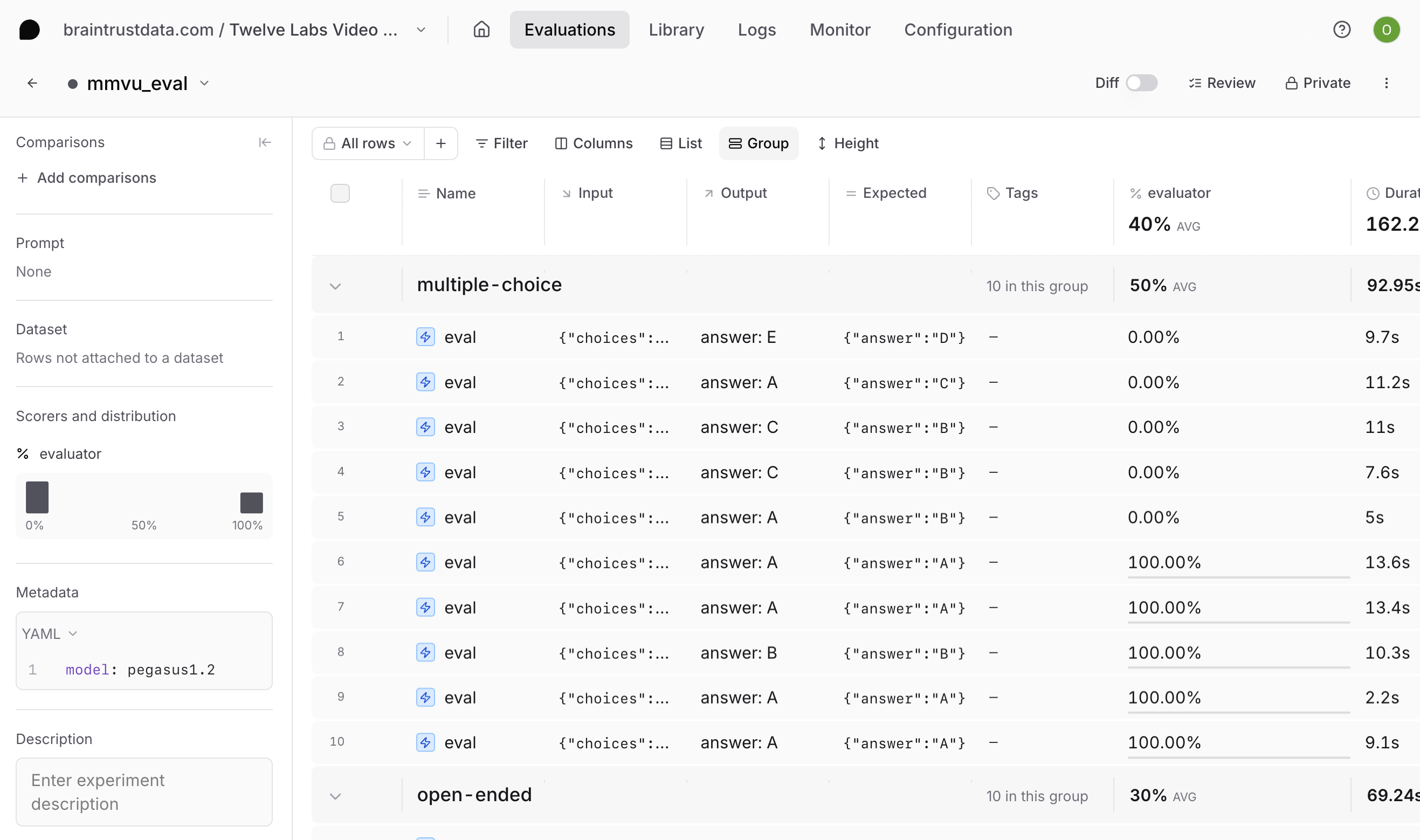
After running the evaluation, navigate to **Evaluations** > **Experiments** in the Braintrust UI to see your results. Select your most recent experiment to review the videos included in our dataset, the model's answer for each sample, and the scoring by our LLM-based judge. We also attached metadata like subject and question\_type, which you can use to filter in the Braintrust UI. This makes it easy to see whether the model underperforms on a certain type of question or domain.
 If you discover specific weaknesses, you can consider:
* Refining your model prompt with more subject-specific context
* Refining your LLM-as-a-judge scorer
* [Switching models](/cookbook/recipes/VideoQA) and running experiments in tandem
* Refining the QA dataset to optimize for a particular domain
If you discover specific weaknesses, you can consider:
* Refining your model prompt with more subject-specific context
* Refining your LLM-as-a-judge scorer
* [Switching models](/cookbook/recipes/VideoQA) and running experiments in tandem
* Refining the QA dataset to optimize for a particular domain