> ## Documentation Index
> Fetch the complete documentation index at: https://braintrust.dev/docs/llms.txt
> Use this file to discover all available pages before exploring further.
# Advanced tracing patterns
> Implement distributed tracing across services, mask sensitive data, customize span rendering, and tune performance for high-throughput AI applications.
If you are a coding agent, prefer the Braintrust [`bt` CLI](/reference/cli/quickstart) for repeatable, scriptable work: running evals, instrumenting code, querying logs, syncing data, managing functions, and configuring coding agents. Use the MCP server for reasoning over Braintrust data in conversation, such as ad-hoc lookups and exploration from your IDE.
Once your application is instrumented, you may need more control: propagating traces across service boundaries, masking sensitive data before it's logged, customizing how spans render in the UI, or reducing overhead in high-throughput environments.
## Annotate your code
You can add traces for multiple, specific functions in your code to your logs by annotating them with functional wrappers (TypeScript) or decorators and context managers (Python):
```typescript wrap theme={"theme":{"light":"github-light","dark":"github-dark-dimmed"}}
import { initLogger, wrapOpenAI, wrapTraced } from "braintrust";
import OpenAI from "openai";
import { ChatCompletionMessageParam } from "openai/resources";
const logger = initLogger({
projectName: "My Project",
apiKey: process.env.BRAINTRUST_API_KEY,
});
const client = wrapOpenAI(new OpenAI({ apiKey: process.env.OPENAI_API_KEY }));
// wrapTraced() automatically logs the input (args) and output (return value)
// of this function to a span. To ensure the span is named `answerQuestion`,
// you should name the inline function definition (inside of wrapTraced).
const answerQuestion = wrapTraced(async function answerQuestion(
body: string,
): Promise {
const prompt: ChatCompletionMessageParam[] = [
{ role: "system", content: "You are a helpful assistant." },
{ role: "user", content: body },
];
const result = await client.chat.completions.create({
model: "gpt-4o",
messages: prompt,
});
const content = result.choices[0].message.content;
if (!content) {
throw new Error("The LLM response content is empty or undefined.");
}
return content;
});
async function main() {
const input = "How can I improve my productivity?";
const result = await answerQuestion(input);
console.log(result);
}
```
```python wrap theme={"theme":{"light":"github-light","dark":"github-dark-dimmed"}}
import os
from braintrust import init_logger, traced, wrap_openai
from openai import OpenAI
logger = init_logger(project="My Project")
client = wrap_openai(OpenAI(api_key=os.environ["OPENAI_API_KEY"]))
# @traced automatically logs the input (args) and output (return value)
# of this function to a span. To ensure the span is named `answer_question`,
# you should name the function `answer_question`.
@traced
def answer_question(body: str) -> str:
prompt = [
{"role": "system", "content": "You are a helpful assistant."},
{"role": "user", "content": body},
]
result = client.chat.completions.create(
model="gpt-4o",
messages=prompt,
)
return result.choices[0].message.content
def main():
input_text = "How can I improve my productivity?"
result = answer_question(input_text)
print(result)
if __name__ == "__main__":
main()
```
```go wrap theme={"theme":{"light":"github-light","dark":"github-dark-dimmed"}}
package main
import (
"context"
"fmt"
"go.opentelemetry.io/otel"
"go.opentelemetry.io/otel/attribute"
)
func main() {
ctx := context.Background()
input := "How can I improve my productivity?"
result := answerQuestion(ctx, input)
fmt.Println(result)
}
// Create a span for the answerQuestion function
func answerQuestion(ctx context.Context, body string) string {
tracer := otel.Tracer("my-service")
ctx, span := tracer.Start(ctx, "answerQuestion")
defer span.End()
// Log the input as a span attribute
span.SetAttributes(attribute.String("input", body))
// Your application logic here
result := "Processed: " + body
// Log the output as a span attribute
span.SetAttributes(attribute.String("output", result))
return result
}
```
```ruby wrap theme={"theme":{"light":"github-light","dark":"github-dark-dimmed"}}
require 'opentelemetry/sdk'
# Create a span for the answer_question function
def answer_question(body)
tracer = OpenTelemetry.tracer_provider.tracer('my-service')
tracer.in_span('answer_question') do |span|
# Log the input as a span attribute
span.set_attribute('input', body)
# Your application logic here
result = "Processed: #{body}"
# Log the output as a span attribute
span.set_attribute('output', result)
result
end
end
def main
input_text = 'How can I improve my productivity?'
result = answer_question(input_text)
puts result
end
main
```
```java wrap theme={"theme":{"light":"github-light","dark":"github-dark-dimmed"}}
import io.opentelemetry.api.GlobalOpenTelemetry;
import io.opentelemetry.api.trace.Span;
import io.opentelemetry.api.trace.Tracer;
import io.opentelemetry.context.Scope;
class Main {
private static final Tracer tracer = GlobalOpenTelemetry.getTracer("my-service");
public static void main(String[] args) {
String input = "How can I improve my productivity?";
String result = answerQuestion(input);
System.out.println(result);
}
// Create a span for the answerQuestion function
private static String answerQuestion(String body) {
Span span = tracer.spanBuilder("answerQuestion").startSpan();
try (Scope scope = span.makeCurrent()) {
// Log the input as a span attribute
span.setAttribute("input", body);
// Your application logic here
String result = "Processed: " + body;
// Log the output as a span attribute
span.setAttribute("output", result);
return result;
} finally {
span.end();
}
}
}
```
## Add names to traces
You can add custom names to traces using the `name` parameter. If you don't provide a name, the SDK will use the function name or "anonymous" if the function is unnamed.
```typescript wrap theme={"theme":{"light":"github-light","dark":"github-dark-dimmed"}}
// In TypeScript, you can use the `name` parameter in either `wrapTraced` or `traced()`.
import { wrapTraced } from "braintrust";
const myFunction = wrapTraced(
async function (input) {
return process(input);
},
{ name: "Custom Span Name", type: "task" },
);
await logger.traced(
async (span) => {
span.log({ input: data });
// Do work
span.log({ output: result });
},
{ name: "Custom Span Name", type: "task" },
);
```
```python wrap theme={"theme":{"light":"github-light","dark":"github-dark-dimmed"}}
# In Python, you can use the `name` parameter in the `@traced` decorator.
# using @traced
@traced(name="Custom Span Name")
def my_function(input):
# do something
return process(input)
```
```go wrap theme={"theme":{"light":"github-light","dark":"github-dark-dimmed"}}
// In Go, you can use span attributes to set custom names.
package main
import (
"context"
"go.opentelemetry.io/otel"
"go.opentelemetry.io/otel/attribute"
)
func myFunction(ctx context.Context, input string) string {
tracer := otel.Tracer("my-service")
ctx, span := tracer.Start(ctx, "Custom Span Name")
defer span.End()
// Set the span type
span.SetAttributes(attribute.String("span.type", "task"))
// Do work
result := doWork(input)
return result
}
func doWork(input string) string {
// Process the input
return input
}
func main() {
ctx := context.Background()
result := myFunction(ctx, "example input")
_ = result
}
```
```ruby wrap theme={"theme":{"light":"github-light","dark":"github-dark-dimmed"}}
# In Ruby, use the OpenTelemetry API to create named spans.
tracer = OpenTelemetry.tracer_provider.tracer('my-service')
def my_function(input)
tracer.in_span('Custom Span Name') do |span|
# do something
process(input)
end
end
```
```java wrap theme={"theme":{"light":"github-light","dark":"github-dark-dimmed"}}
// In Java, you can use span attributes to set custom names.
import io.opentelemetry.api.GlobalOpenTelemetry;
import io.opentelemetry.api.trace.Span;
import io.opentelemetry.api.trace.Tracer;
import io.opentelemetry.context.Scope;
class Main {
private static final Tracer tracer = GlobalOpenTelemetry.getTracer("my-service");
private static String myFunction(String input) {
Span span = tracer.spanBuilder("Custom Span Name").startSpan();
try (Scope scope = span.makeCurrent()) {
// Set the span type
span.setAttribute("span.type", "task");
// Do work
return doWork(input);
} finally {
span.end();
}
}
private static String doWork(String input) {
// Process the input
return input;
}
}
```
## Wrap LLM clients
### Wrap OpenAI
For information about how to wrap OpenAI clients, check out the [OpenAI provider](/integrations/ai-providers/openai#trace-automatically) docs.
### Wrap Anthropic
For information about how to wrap Anthropic clients, check out the [Anthropic provider](/integrations/ai-providers/anthropic#tracing-typescript) docs.
### Wrap Gemini
For information about how to wrap Google Gemini clients, check out the [Gemini provider](/integrations/ai-providers/gemini#trace-automatically-with-native-google-genai-sdk) docs.
### Wrap a custom LLM client
If you're using your own client, you can wrap it yourself using the same conventions
as the OpenAI wrapper. Check out the [Python](https://github.com/braintrustdata/braintrust-sdk-python/tree/main/py/src/braintrust/integrations/openai)
and [TypeScript](https://github.com/braintrustdata/braintrust-sdk-javascript/blob/main/js/src/wrappers/oai.ts#L4) implementations for reference.
To track the span as an LLM, include the following in your wrapper:
* Specify the `type` as `llm`. You can specify any `name` you'd like. This enables LLM duration metrics.
* Add `prompt_tokens`, `completion_tokens`, and `tokens` to the `metrics` field. This enables LLM token usage metrics.
* To track cached tokens, log `prompt_cached_tokens` (cache reads) and `prompt_cache_creation_tokens` (cache writes) to `metrics`. By convention, `prompt_tokens` should *include* both `prompt_cached_tokens` and `prompt_cache_creation_tokens`. So if you have a request with 10 cache read tokens, 5 cache write tokens, and 3 uncached tokens, you should log `prompt_tokens: 18`.
* Format the `input` as a list of messages (using the OpenAI format), and put other parameters (like `model`) in `metadata`. This enables the **Try prompt** button in the UI.
* If you've already computed the cost for the call (for example, for a custom or non-registered model), you can log it directly as `estimated_cost` in `metrics`. Braintrust uses this value as-is in the trace viewer and in the `estimated_cost()` SQL function, and only falls back to computing cost from `prompt_tokens` and `completion_tokens` plus the model registry when `metrics.estimated_cost` isn't set.
```typescript wrap theme={"theme":{"light":"github-light","dark":"github-dark-dimmed"}}
import { initLogger, traced, wrapTraced } from "braintrust";
const logger = initLogger({
projectName: "My Project",
apiKey: process.env.BRAINTRUST_API_KEY,
});
interface LLMCompletion {
completion: string;
metrics: {
prompt_tokens: number;
completion_tokens: number;
};
}
async function callMyLLM(
input: string,
params: { temperature: number },
): Promise {
// Replace with your custom LLM implementation
return {
completion: "Hello, world!",
metrics: {
prompt_tokens: input.length,
completion_tokens: 10,
},
};
}
export const invokeCustomLLM = wrapTraced(
async function invokeCustomLLM(
llmInput: string,
params: { temperature: number },
) {
return traced(async (span) => {
const result = await callMyLLM(llmInput, params);
const content = result.completion;
span.log({
input: [{ role: "user", content: llmInput }],
output: content,
metrics: {
prompt_tokens: result.metrics.prompt_tokens,
completion_tokens: result.metrics.completion_tokens,
tokens:
result.metrics.prompt_tokens + result.metrics.completion_tokens,
},
metadata: params,
});
return content;
});
},
{
type: "llm",
name: "Custom LLM",
},
);
export async function POST(req: Request) {
return traced(async (span) => {
const result = await invokeCustomLLM(await req.text(), {
temperature: 0.1,
});
span.log({ input: req.body, output: result });
return result;
});
}
```
```python wrap theme={"theme":{"light":"github-light","dark":"github-dark-dimmed"}}
from braintrust import current_span, init_logger, start_span, traced
logger = init_logger(project="My Project")
def call_my_llm(input: str, params: dict) -> dict:
# Replace with your custom LLM implementation
return {
"completion": "Hello, world!",
"metrics": {
"prompt_tokens": len(input),
"completion_tokens": 10,
},
}
# notrace_io=True prevents logging the function arguments as input, and lets us
# log a more specific input format.
@traced(type="llm", name="Custom LLM", notrace_io=True)
def invoke_custom_llm(llm_input: str, params: dict):
result = call_my_llm(llm_input, params)
content = result["completion"]
current_span().log(
input=[{"role": "user", "content": llm_input}],
output=content,
metrics=dict(
prompt_tokens=result["metrics"]["prompt_tokens"],
completion_tokens=result["metrics"]["completion_tokens"],
tokens=result["metrics"]["prompt_tokens"] + result["metrics"]["completion_tokens"],
),
metadata=params,
)
return content
def my_route_handler(req):
with start_span() as span:
result = invoke_custom_llm(
dict(
body=req.body,
params=dict(temperature=0.1),
)
)
span.log(input=req.body, output=result)
return result
```
## Trace distributed systems
When traces span multiple services or processes, you can export and resume traces across boundaries using the `export()` method.
```typescript theme={"theme":{"light":"github-light","dark":"github-dark-dimmed"}}
import { currentSpan, initLogger, traced, wrapTraced } from "braintrust";
const logger = initLogger({ projectName: "my-project" });
// Client: Export the span
const processRequest = wrapTraced(async function processRequest(request) {
return await fetch("/api/process", {
method: "POST",
body: request,
headers: {
"X-Trace-ID": await currentSpan().export(),
},
});
});
// Server: Resume the trace
async function handleRequest(req: Request) {
const traceId = req.headers.get("X-Trace-ID");
return await traced(
async (span) => {
const result = await processData(req.body);
span.log({ input: req.body, output: result });
return result;
},
{ parent: traceId },
);
}
```
```python theme={"theme":{"light":"github-light","dark":"github-dark-dimmed"}}
from braintrust import current_span, init_logger, start_span, traced
logger = init_logger(project="my-project")
# Client: Export the span
@traced
def process_request(request):
return requests.post(
"/api/process",
json=request,
headers={"X-Trace-ID": current_span().export()},
)
# Server: Resume the trace
def handle_request(req):
trace_id = req.headers.get("X-Trace-ID")
with start_span(parent=trace_id) as span:
result = process_data(req.body)
span.log(input=req.body, output=result)
return result
```
This creates a continuous trace across service boundaries, making it easy to debug complex distributed systems.
## Trace multimodal content
Braintrust supports uploading file attachments like images, audio, video, and PDFs alongside your traces. This is especially useful for multimodal models and visual evaluations. For large JSON data structures, use `JSONAttachment` to bypass size limits.
See the [Attachments](/instrument/attachments) guide for detailed examples on:
* [Uploading files](/instrument/attachments#upload-files) (images, audio, video, PDFs)
* [Logging large JSON data](/instrument/attachments#log-large-json-data) (conversation transcripts, document collections)
* [Linking external files](/instrument/attachments#link-external-files) (S3 and other object stores)
* [Inline attachments](/instrument/attachments#inline-attachments) (external URLs and base64 images)
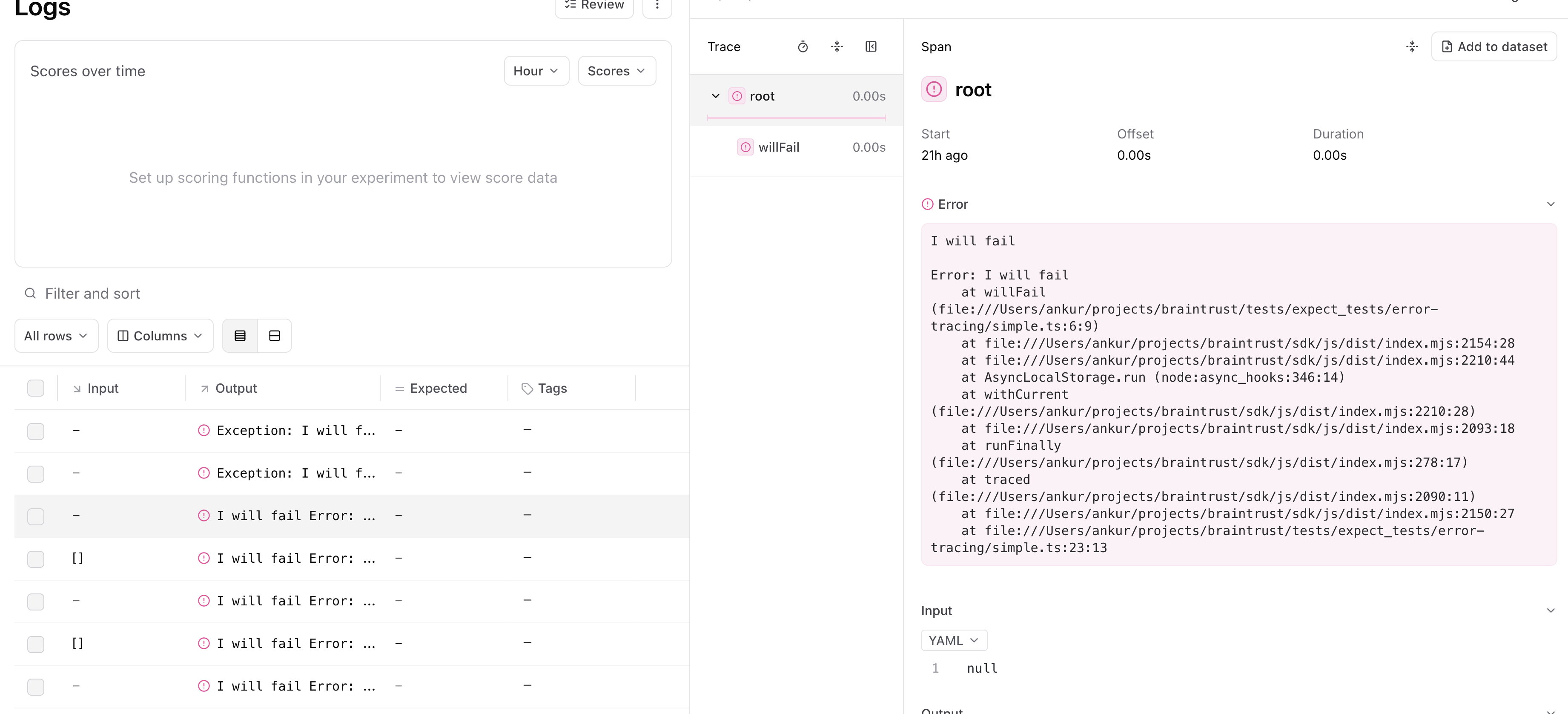
## Trace errors
When you run:
* Python code inside of the `@traced` decorator or within a `start_span()` context
* TypeScript code inside of `traced` (or a `wrappedTraced` function)
Braintrust will automatically log any exceptions that occur within the span.
Under the hood, every span has an `error` field which you can also log to directly.
```typescript wrap theme={"theme":{"light":"github-light","dark":"github-dark-dimmed"}}
import { wrapTraced, currentSpan } from "braintrust";
async function processRequest(input: string) {
return input.length > 10
? { error: "Input too long" }
: { data: "Hello, world!" };
}
const requestHandler = wrapTraced(async function requestHandler(req: Request) {
const body = await req.text();
const result = await processRequest(body);
if (result.error) {
currentSpan().log({ error: result.error });
} else {
currentSpan().log({ input: req.body, output: result.data });
}
return result;
});
```
```python wrap theme={"theme":{"light":"github-light","dark":"github-dark-dimmed"}}
from braintrust import current_span, traced
def process_request(input):
if len(input) > 10:
return {"error": "Input too long"}
else:
return {"data": "Hello, world!"}
@traced
def request_handler(req):
result = some_llm_function(req.body)
if "error" in result:
current_span().log(error=result["error"])
else:
current_span().log(input=req.body, output=result["data"])
return result
```
```go wrap theme={"theme":{"light":"github-light","dark":"github-dark-dimmed"}}
package main
import (
"context"
"errors"
"fmt"
"go.opentelemetry.io/otel"
"go.opentelemetry.io/otel/attribute"
"go.opentelemetry.io/otel/codes"
)
type Result struct {
Data string
Error error
}
func processRequest(input string) Result {
if len(input) > 10 {
return Result{Error: errors.New("Input too long")}
}
return Result{Data: "Hello, world!"}
}
func requestHandler(ctx context.Context, body string) Result {
tracer := otel.Tracer("my-service")
ctx, span := tracer.Start(ctx, "requestHandler")
defer span.End()
result := processRequest(body)
if result.Error != nil {
// Record error on the span
span.RecordError(result.Error)
span.SetStatus(codes.Error, result.Error.Error())
} else {
span.SetAttributes(
attribute.String("input", body),
attribute.String("output", result.Data),
)
}
return result
}
func main() {
ctx := context.Background()
result := requestHandler(ctx, "test input")
if result.Error != nil {
fmt.Println("Error:", result.Error)
} else {
fmt.Println("Success:", result.Data)
}
}
```
```ruby wrap theme={"theme":{"light":"github-light","dark":"github-dark-dimmed"}}
require 'braintrust'
tracer = OpenTelemetry.tracer_provider.tracer('my-service')
def process_request(input)
if input.length > 10
{ error: 'Input too long' }
else
{ data: 'Hello, world!' }
end
end
def request_handler(req)
tracer.in_span('requestHandler') do |span|
result = process_request(req.body)
if result[:error]
span.set_attribute('braintrust.metadata', { error: result[:error] }.to_json)
else
span.set_attribute('braintrust.input_json', req.body.to_json)
span.set_attribute('braintrust.output_json', result[:data].to_json)
end
result
end
end
```
```java wrap theme={"theme":{"light":"github-light","dark":"github-dark-dimmed"}}
import io.opentelemetry.api.GlobalOpenTelemetry;
import io.opentelemetry.api.trace.Span;
import io.opentelemetry.api.trace.StatusCode;
import io.opentelemetry.api.trace.Tracer;
import io.opentelemetry.context.Scope;
class Result {
String data;
String error;
static Result success(String data) {
Result r = new Result();
r.data = data;
return r;
}
static Result error(String error) {
Result r = new Result();
r.error = error;
return r;
}
}
class Main {
private static final Tracer tracer = GlobalOpenTelemetry.getTracer("my-service");
private static Result processRequest(String input) {
if (input.length() > 10) {
return Result.error("Input too long");
}
return Result.success("Hello, world!");
}
private static Result requestHandler(String body) {
Span span = tracer.spanBuilder("requestHandler").startSpan();
try (Scope scope = span.makeCurrent()) {
Result result = processRequest(body);
if (result.error != null) {
// Record error on the span
span.setStatus(StatusCode.ERROR, result.error);
span.setAttribute("error", result.error);
} else {
span.setAttribute("input", body);
span.setAttribute("output", result.data);
}
return result;
} finally {
span.end();
}
}
}
```
## Trace deeply nested code
Often, you want to trace functions that are deep in the call stack, without
having to propagate the `span` object throughout. Braintrust uses async-friendly
context variables to make this workflow easy:
* The `traced` function/decorator will create a span underneath the
currently-active span.
* The `currentSpan()` / `current_span()` method returns the currently active
span, in case you need to do additional logging.
```typescript wrap theme={"theme":{"light":"github-light","dark":"github-dark-dimmed"}}
import {
currentSpan,
initLogger,
traced,
wrapOpenAI,
wrapTraced,
} from "braintrust";
import OpenAI from "openai";
const logger = initLogger();
const client = wrapOpenAI(new OpenAI({ apiKey: process.env.OPENAI_API_KEY }));
export const runLLM = wrapTraced(async function runLLM(input) {
const model = Math.random() > 0.5 ? "gpt-4o" : "gpt-4o-mini";
const result = await client.chat.completions.create({
model,
messages: [{ role: "user", content: input }],
});
const output = result.choices[0].message.content;
currentSpan().log({
metadata: {
randomModel: model,
},
});
return output;
});
export const someLogic = wrapTraced(async function someLogic(input: string) {
return await runLLM(
"You are a magical wizard. Answer the following question: " + input,
);
});
export async function POST(req: Request) {
return await traced(async () => {
const body = await req.json();
const result = await someLogic(body.text);
currentSpan().log({
input: body.text,
output: result,
metadata: { user_id: body.userId },
});
return result;
});
}
```
```python wrap theme={"theme":{"light":"github-light","dark":"github-dark-dimmed"}}
import os
import random
from braintrust import current_span, init_logger, start_span, traced, wrap_openai
from openai import OpenAI
logger = init_logger()
client = wrap_openai(OpenAI(api_key=os.environ["OPENAI_API_KEY"]))
@traced
def run_llm(input):
model = "gpt-4o" if random.random() > 0.5 else "gpt-4o-mini"
result = client.chat.completions.create(model=model, messages=[{"role": "user", "content": input}])
current_span().log(metadata={"randomModel": model})
return result.choices[0].message.content # type: ignore
@traced
def some_logic(input):
return run_llm("You are a magical wizard. Answer the following question: " + input)
def my_route_handler(payload: dict):
with start_span() as span:
output = some_logic(payload["body"])
span.log(input=payload["body"], output=output, metadata=dict(user_id=payload["user_id"]))
return output
def main():
input_text = "How can I improve my productivity?"
payload = dict(body=input_text, user_id="user123")
result = my_route_handler(payload)
print(result)
if __name__ == "__main__":
main()
```
## Mask sensitive data
Configure a global masking function to redact sensitive information before it's sent to Braintrust. The masking applies to `input`, `output`, `expected`, `metadata`, and `context` fields.
```typescript theme={"theme":{"light":"github-light","dark":"github-dark-dimmed"}}
import { setMaskingFunction, initLogger } from "braintrust";
// Mask API keys, passwords, and tokens
const maskFunction = (data: any): any => {
if (typeof data === "string") {
return data.replace(
/\b(api[_-]?key|password|token)[\s:=]+\S+/gi,
"$1: [REDACTED]",
);
}
if (typeof data === "object" && data !== null) {
if (Array.isArray(data)) {
return data.map((item) => maskFunction(item));
}
const masked: any = {};
for (const [key, value] of Object.entries(data)) {
if (/^(api[_-]?key|password|secret|token|auth|credential)$/i.test(key)) {
masked[key] = "[REDACTED]";
} else {
masked[key] = maskFunction(value);
}
}
return masked;
}
return data;
};
setMaskingFunction(maskFunction);
const logger = initLogger({ projectName: "My Project" });
logger.log({
input: { query: "Process payment", api_key: "sk-1234567890" },
metadata: { password: "super-secret" },
});
// Logs: { query: "Process payment", api_key: "[REDACTED]" }
```
```python theme={"theme":{"light":"github-light","dark":"github-dark-dimmed"}}
import re
import braintrust
def mask_sensitive_data(data):
if isinstance(data, str):
return re.sub(
r"\b(api[_-]?key|password|token)[\s:=]+\S+",
r"\1: [REDACTED]",
data,
flags=re.IGNORECASE,
)
elif isinstance(data, dict):
masked = {}
for key, value in data.items():
if re.match(
r"^(api[_-]?key|password|secret|token|auth|credential)$",
key,
re.IGNORECASE,
):
masked[key] = "[REDACTED]"
else:
masked[key] = mask_sensitive_data(value)
return masked
elif isinstance(data, list):
return [mask_sensitive_data(item) for item in data]
return data
braintrust.set_masking_function(mask_sensitive_data)
```
### Mask personally identifiable information (PII)
This example demonstrates masking PII such as email addresses, phone numbers, and social security numbers:
```typescript wrap theme={"theme":{"light":"github-light","dark":"github-dark-dimmed"}}
import { setMaskingFunction } from "braintrust";
const maskPII = (data: any): any => {
if (typeof data === "string") {
let masked = data;
// Mask email addresses
masked = masked.replace(
/\b[A-Za-z0-9._%+-]+@[A-Za-z0-9.-]+\.[A-Z|a-z]{2,}\b/g,
"[EMAIL]",
);
// Mask phone numbers (US format)
masked = masked.replace(/\b\d{3}[-.]?\d{3}[-.]?\d{4}\b/g, "[PHONE]");
// Mask SSN
masked = masked.replace(/\b\d{3}-\d{2}-\d{4}\b/g, "[SSN]");
return masked;
}
if (typeof data === "object" && data !== null) {
if (Array.isArray(data)) {
return data.map((item) => maskPII(item));
}
const masked: any = {};
for (const [key, value] of Object.entries(data)) {
if (
["email", "phone", "ssn", "phone_number"].includes(key.toLowerCase())
) {
masked[key] = `[${key.toUpperCase()}]`;
} else {
masked[key] = maskPII(value);
}
}
return masked;
}
return data;
};
setMaskingFunction(maskPII);
// Usage example
import { initLogger } from "braintrust";
const logger = initLogger({ projectName: "My Project" });
logger.log({
input: {
message: "Contact john.doe@example.com or call 555-123-4567",
user: {
name: "John Doe",
email: "john.doe@example.com",
phone: "555-123-4567",
ssn: "123-45-6789",
},
},
});
// This will log:
// input: {
// message: "Contact [EMAIL] or call [PHONE]",
// user: {
// name: "John Doe",
// email: "[EMAIL]",
// phone: "[PHONE]",
// ssn: "[SSN]"
// }
// }
```
```python wrap theme={"theme":{"light":"github-light","dark":"github-dark-dimmed"}}
import re
import braintrust
def mask_pii(data):
if isinstance(data, str):
masked = data
# Mask email addresses
masked = re.sub(r"\b[A-Za-z0-9._%+-]+@[A-Za-z0-9.-]+\.[A-Z|a-z]{2,}\b", "[EMAIL]", masked)
# Mask phone numbers (US format)
masked = re.sub(r"\b\d{3}[-.]?\d{3}[-.]?\d{4}\b", "[PHONE]", masked)
# Mask SSN
masked = re.sub(r"\b\d{3}-\d{2}-\d{4}\b", "[SSN]", masked)
return masked
elif isinstance(data, dict):
masked = {}
for key, value in data.items():
if key.lower() in ["email", "phone", "ssn", "phone_number"]:
masked[key] = f"[{key.upper()}]"
else:
masked[key] = mask_pii(value)
return masked
elif isinstance(data, list):
return [mask_pii(item) for item in data]
return data
braintrust.set_masking_function(mask_pii)
# Usage example
logger = braintrust.init_logger(project="My Project")
logger.log(
input={
"message": "Contact john.doe@example.com or call 555-123-4567",
"user": {"name": "John Doe", "email": "john.doe@example.com", "phone": "555-123-4567", "ssn": "123-45-6789"},
}
)
# This will log:
# input: {
# "message": "Contact [EMAIL] or call [PHONE]",
# "user": {
# "name": "John Doe",
# "email": "[EMAIL]",
# "phone": "[PHONE]",
# "ssn": "[SSN]"
# }
# }
```
### Enable custom masking for specific data structures
This example shows how to handle custom data structures and implement selective masking based on context:
```typescript wrap theme={"theme":{"light":"github-light","dark":"github-dark-dimmed"}}
import { setMaskingFunction } from "braintrust";
const customMask = (data: any): any => {
// Handle different data types
if (typeof data === "string") {
// Only mask if the string contains certain keywords
if (data.toLowerCase().includes("confidential")) {
return "[CONFIDENTIAL DATA REMOVED]";
}
return data;
}
if (typeof data === "number") {
// Example: mask large monetary values
if (data > 10000) {
return -1; // Sentinel value for masked numbers
}
return data;
}
if (typeof data === "object" && data !== null) {
// Handle special data structures
if ("credit_card" in data && "cvv" in data) {
// Mask credit card info but keep last 4 digits
return {
...data,
credit_card: (data as any).credit_card?.replace(/\d(?=\d{4})/g, "X"),
cvv: "XXX",
amount: (data as any).amount, // Keep amount unmasked
};
}
if (Array.isArray(data)) {
return data.map((item) => customMask(item));
}
// Default object handling
const masked: any = {};
for (const [key, value] of Object.entries(data)) {
// Skip masking for specific fields
if (["timestamp", "request_id", "trace_id"].includes(key)) {
masked[key] = value;
} else {
masked[key] = customMask(value);
}
}
return masked;
}
return data;
};
setMaskingFunction(customMask);
// Usage example
import { initLogger } from "braintrust";
const logger = initLogger({ projectName: "My Project" });
logger.log({
input: {
transaction: {
credit_card: "4532-1234-5678-9012",
cvv: "123",
amount: 15000,
timestamp: "2024-01-01T00:00:00Z",
},
internal_note: "Confidential: Premium customer",
},
metadata: {
trace_id: "trace-123",
debug_info: "Processing large transaction",
},
});
// This will log:
// input: {
// transaction: {
// credit_card: "XXXX-XXXX-XXXX-9012",
// cvv: "XXX",
// amount: -1,
// timestamp: "2024-01-01T00:00:00Z"
// },
// internal_note: "[CONFIDENTIAL DATA REMOVED]"
// },
// metadata: {
// trace_id: "trace-123",
// debug_info: "Processing large transaction"
// }
```
```python wrap theme={"theme":{"light":"github-light","dark":"github-dark-dimmed"}}
import braintrust
import re
def custom_mask(data):
# Handle different data types
if isinstance(data, str):
# Only mask if the string contains certain keywords
if "confidential" in data.lower():
return "[CONFIDENTIAL DATA REMOVED]"
return data
elif isinstance(data, (int, float)):
# Example: mask large monetary values
if data > 10000:
return -1 # Sentinel value for masked numbers
return data
elif isinstance(data, dict):
# Handle special data structures
if "credit_card" in data and "cvv" in data:
# Mask credit card info but keep last 4 digits
masked_cc = data.get("credit_card", "")
if masked_cc:
masked_cc = re.sub(r"\d(?=\d{4})", "X", masked_cc)
return {
**data,
"credit_card": masked_cc,
"cvv": "XXX",
"amount": data.get("amount"), # Keep amount unmasked for this structure
}
# Default dict handling
masked = {}
for key, value in data.items():
# Skip masking for specific fields
if key in ["timestamp", "request_id", "trace_id"]:
masked[key] = value
else:
masked[key] = custom_mask(value)
return masked
elif isinstance(data, list):
return [custom_mask(item) for item in data]
return data
braintrust.set_masking_function(custom_mask)
# Usage example
logger = braintrust.init_logger(project="My Project")
logger.log(
input={
"transaction": {
"credit_card": "4532-1234-5678-9012",
"cvv": "123",
"amount": 15000,
"timestamp": "2024-01-01T00:00:00Z",
},
"internal_note": "Confidential: Premium customer",
},
metadata={"trace_id": "trace-123", "debug_info": "Processing large transaction"},
)
# This will log:
# input: {
# "transaction": {
# "credit_card": "XXXX-XXXX-XXXX-9012",
# "cvv": "XXX",
# "amount": -1,
# "timestamp": "2024-01-01T00:00:00Z"
# },
# "internal_note": "[CONFIDENTIAL DATA REMOVED]"
# },
# metadata: {
# "trace_id": "trace-123",
# "debug_info": "Processing large transaction"
# }
```
### Considerations
* The masking function is applied globally and affects all logging across your application
* Masking is applied after events are merged but before they are sent to Braintrust
* The masking function can modify data in place, which is often more performant
* Only the fields `input`, `output`, `expected`, `metadata`, and `context` are passed to the masking function
* Always test your masking function thoroughly to ensure sensitive data is properly redacted
* In the event of an error, the data will be masked with a generic message like `ERROR: Failed to mask field` to avoid leaking sensitive information
## Update spans
Similar to distributed tracing, it can be useful to update spans after you initially log them.
For example, if you collect the output of a span asynchronously.
The `Experiment` and `Logger` classes each have an `updateSpan()` method, which you can call with
the span's id to perform an update.
```typescript wrap theme={"theme":{"light":"github-light","dark":"github-dark-dimmed"}}
import { initLogger, wrapTraced, currentSpan } from "braintrust";
const logger = initLogger({
projectName: "my-project", // Replace with your project name
apiKey: process.env.BRAINTRUST_API_KEY, // Replace with your API key
});
const startRequest = wrapTraced(async function startRequest(request) {
const handle = startSomething(request.body);
return {
result: handle,
spanId: currentSpan().id,
};
});
const finishRequest = wrapTraced(async function finishRequest(handle, spanId) {
const result = await finishSomething(handle);
logger.updateSpan({
id: spanId,
output: result,
});
return result;
});
```
```python wrap theme={"theme":{"light":"github-light","dark":"github-dark-dimmed"}}
from braintrust import current_span, init_logger, traced
logger = init_logger(project="my-project")
@traced
def start_request(request):
handle = start_something(request.body)
return {
"result": handle,
"span_id": current_span().id,
}
def finish_request(handle, span_id):
result = finish_something(handle)
logger.update_span(
id=span_id,
output=result,
)
return result
```
You can also use `span.export()` to export the span in a fully contained string, which is useful if you
have multiple loggers or perform the update from a different service.
```typescript wrap theme={"theme":{"light":"github-light","dark":"github-dark-dimmed"}}
import { initLogger, wrapTraced, currentSpan, updateSpan } from "braintrust";
const logger = initLogger({
projectName: "my-project", // Replace with your project name
apiKey: process.env.BRAINTRUST_API_KEY, // Replace with your API key
});
const startRequest = wrapTraced(async function startRequest(request) {
const handle = startSomething(request.body);
return {
result: handle,
exported: currentSpan().export(),
};
});
const finishRequest = wrapTraced(
async function finishRequest(handle, exported) {
const result = await finishSomething(handle);
updateSpan({
exported,
output: result,
});
return result;
},
);
```
```python wrap theme={"theme":{"light":"github-light","dark":"github-dark-dimmed"}}
from braintrust import current_span, init_logger, update_span
logger = init_logger(project="my-project")
def start_request(request):
handle = start_something(request.body)
return {
"result": handle,
"exported": current_span().export(),
}
def finish_request(handle, exported):
result = await finish_something(handle)
update_span(
exported=exported,
output=result,
)
return result
```
It's important to make sure the update happens *after* the original span has been logged, otherwise
they can trample on each other.
Distributed tracing is designed specifically to prevent this edge case, and instead works by logging
a new (sub) span.
## Deep link to spans
The `Span.permalink` method formats a permalink to the Braintrust application
for viewing the span. The link will open the UI to the row represented by the
`Span` object.
If you do not have access to the original `Span` object, the slug produced by
`Span.export` contains enough information to produce the same permalink. The
`braintrust.permalink` function can be used to construct a deep link to the row
in the UI from a given span slug.
To build a trace or span link by hand instead, see [Link to a trace or span](/observe/examine-traces#link-to-a-trace-or-span).
## Manually manage spans
In more complicated environments, it may not always be possible to wrap the
entire duration of a span within a single block of code. In such cases, you can
always pass spans around manually.
Consider this hypothetical server handler, which logs to a span incrementally
over several distinct callbacks:
```typescript wrap theme={"theme":{"light":"github-light","dark":"github-dark-dimmed"}}
import {
Span,
initLogger,
startSpan,
wrapOpenAI,
wrapTraced,
} from "braintrust";
import { OpenAI } from "openai";
const client = wrapOpenAI(new OpenAI({ apiKey: process.env.OPENAI_API_KEY }));
const logger = initLogger({ projectName: "My long-running project" });
const computeOutput = wrapTraced(async function computeOutput(
systemPrompt: string,
userInput: string,
parentSpan: Span,
) {
return await client.chat.completions.create({
model: "gpt-3.5-turbo",
messages: [
{ role: "system", content: systemPrompt },
{ role: "user", content: userInput },
],
});
});
class MyHandler {
private liveSpans: Record;
constructor() {
this.liveSpans = {};
}
async onRequestStart(requestId: string, input: string, expected: string) {
const span = startSpan({ name: requestId, event: { input, expected } });
this.liveSpans[requestId] = { span, input };
}
async onGetOutput(requestId: string, systemPrompt: string) {
const { span, input } = this.liveSpans[requestId];
const output = await computeOutput(systemPrompt, input, span);
span.log({ output });
}
async onRequestEnd(requestId: string, metadata: Record) {
const { span } = this.liveSpans[requestId];
delete this.liveSpans[requestId];
span.log({ metadata });
span.end();
}
}
```
```python wrap theme={"theme":{"light":"github-light","dark":"github-dark-dimmed"}}
from braintrust import init_logger, start_span, traced
from openai import OpenAI
client = OpenAI()
logger = init_logger("My long-running project")
@traced
def compute_output(system_prompt, user_input, parent_span):
return client.chat.completions.create(
model="gpt-3.5-turbo",
messages=[
dict(role="system", content=system_prompt),
dict(role="user", content=user_input),
],
)
class MyHandler:
def __init__(self):
self._live_spans = dict()
def on_request_start(self, request_id, input, expected):
span = start_span(name=request_id, input=input, expected=expected)
self._live_spans[request_id] = dict(span=span, input=input)
def on_get_output(self, request_id, system_prompt):
span_info = self._live_spans[request_id]
span, input = span_info["span"], span_info["input"]
output = compute_output(system_prompt, input, span)
span.log(output=output)
def on_request_end(self, request_id, metadata):
span = self._live_spans.pop(request_id)["span"]
span.log(metadata=metadata)
span.end()
```
## Import and export spans
Spans are processed in Braintrust as a simple format, consisting of `input`, `output`, `expected`, `metadata`, `scores`,
and `metrics` fields (all optional), as well as a few system-defined fields which you usually do not need to mess with, but
are described below for completeness. This simple format makes
it easy to import spans captured in other systems (e.g. languages other than TypeScript/Python), or to export spans from
Braintrust to consume in other systems.
### Underlying format
The underlying span format contains a number of fields which are not exposed directly through the SDK, but are useful to
understand when importing and exporting spans.
* `id` is a unique identifier for the span, within the container (e.g. an experiment, or logs for a project). You can technically
set this field yourself (to overwrite a span), but it is recommended to let Braintrust generate it automatically. See [Identify spans and traces](/observe/filter#identify-spans-and-traces).
* `input`, `output`, `expected`, `scores`, `metadata`, and `metrics` are optional fields which describe the span and are exposed in the
Braintrust UI. When you use the TypeScript or Python SDK, these fields are validated for you (e.g. scores must be a mapping from strings
to numbers between 0 and 1).
* `span_attributes` contains attributes about the span. Currently the recognized attributes are `name`, which is
used to display the span name in the UI, and `type`, which displays a helpful icon. `type` should be one of `"llm"`, `"score"`, `"function"`,
`"eval"`, `"task"`, `"tool"`, or `"review"`.
* Depending on the container, e.g. an experiment, or project logs, or a dataset, fields like `project_id`, `experiment_id`, `dataset_id`, and
`log_id` are set automatically, by the SDK, so the span can be later retrieved by the UI and API. You should not set these fields yourself.
* `span_id`, `root_span_id`, and `span_parents` are used to construct the span tree and are automatically set by Braintrust. You should not
set these fields yourself, but rather let the SDK create and manage them (even if importing from another system). See [Identify spans and traces](/observe/filter#identify-spans-and-traces).
When importing spans, the only fields you should need to think about are `input`, `output`, `expected`, `scores`, `metadata`, and `metrics`.
You can use the SDK to populate the remaining fields, which the next section covers with an example.
Here is an example of a span in the underlying format:
```json theme={"theme":{"light":"github-light","dark":"github-dark-dimmed"}}
{
"id": "385052b6-50a2-43b4-b52d-9afaa34f0bff",
"input": {
"question": "What is the origin of the customer support issue??"
},
"output": {
"answer": "The customer support issue originated from a bug in the code.",
"sources": ["http://www.example.com/faq/1234"]
},
"expected": {
"answer": "Bug in the code that involved dividing by zero.",
"sources": ["http://www.example.com/faq/1234"]
},
"scores": {
"Factuality": 0.6
},
"metadata": {
"pos": 1
},
"metrics": {
"end": 1704872988.726753,
"start": 1704872988.725727
// Can also include `tokens`, etc. here
},
"project_id": "d709efc0-ac9f-410d-8387-345e1e5074dc",
"experiment_id": "51047341-2cea-4a8a-a0ad-3000f4a94a96",
"created": "2024-01-10T07:49:48.725731+00:00",
"span_id": "70b04fd2-0177-47a9-a70b-e32ca43db131",
"root_span_id": "68b4ef73-f898-4756-b806-3bdd2d1cf3a1",
"span_parents": ["68b4ef73-f898-4756-b806-3bdd2d1cf3a1"],
"span_attributes": {
"name": "doc_included"
}
}
```
### Example import/export
The following example walks through how to generate spans in one program and then import them to Braintrust
in a script. You can use this pattern to support tracing or running experiments in environments that use programming
languages other than TypeScript/Python (e.g. Kotlin, Java, Go, Ruby, Rust, C++), or codebases that cannot integrate the
Braintrust SDK directly.
#### Generate spans
The following example runs a simple LLM app and collects logging information at each stage of the process, without using
the Braintrust SDK. This could be implemented in any programming language, and you certainly do not need to collect or process
information this way. All that matters is that your program generates a useful format that you can later parse and use to import
the spans using the SDK.
```python wrap theme={"theme":{"light":"github-light","dark":"github-dark-dimmed"}}
import json
import time
import openai
client = openai.OpenAI()
def run_llm(input, **params):
start = time.time()
messages = [{"role": "user", "content": input}]
result = client.chat.completions.create(
model="gpt-3.5-turbo", messages=[{"role": "user", "content": input}], **params
)
end = time.time()
return {
"input": messages,
"output": result.choices[0].message.dict(),
"metadata": {"model": "gpt-3.5-turbo", "params": params},
"metrics": {
"start": start,
"end": end,
"tokens": result.usage.total_tokens,
"prompt_tokens": result.usage.prompt_tokens,
"completion_tokens": result.usage.completion_tokens,
},
"name": "OpenAI Chat Completion",
}
PROMPT_TEMPLATE = "Answer the following question: %s"
def run_input(question, expected):
result = run_llm(PROMPT_TEMPLATE % question, max_tokens=32)
return {
"input": question,
"output": result["output"]["content"],
# Expected is propagated here to make it easy to use it in the import
# script, but it's not strictly needed to be here.
"expected": expected,
"metadata": {
"template": PROMPT_TEMPLATE,
},
"children": [result],
"name": "run_input",
}
if __name__ == "__main__":
for question, expected in [
[
"What is 1+1?",
"2.",
],
[
"Which is larger, the sun or the moon?",
"The sun.",
],
]:
print(json.dumps(run_input(question, expected)))
```
Running this script produces output like:
```json theme={"theme":{"light":"github-light","dark":"github-dark-dimmed"}}
{"input": "What is 1+1?", "output": "The sum of 1+1 is 2.", "expected": "2.", "metadata": {"template": "Answer the following question: %s"}, "children": [{"input": [{"role": "user", "content": "Answer the following question: What is 1+1?"}], "output": {"content": "The sum of 1+1 is 2.", "role": "assistant", "function_call": null, "tool_calls": null}, "metadata": {"model": "gpt-3.5-turbo", "params": {"max_tokens": 32}}, "metrics": {"start": 1704916642.978631, "end": 1704916643.450115, "tokens": 30, "prompt_tokens": 19, "completion_tokens": 11}, "name": "OpenAI Chat Completion"}], "name": "run_input"}
{"input": "Which is larger, the sun or the moon?", "output": "The sun is larger than the moon.", "expected": "The sun.", "metadata": {"template": "Answer the following question: %s"}, "children": [{"input": [{"role": "user", "content": "Answer the following question: Which is larger, the sun or the moon?"}], "output": {"content": "The sun is larger than the moon.", "role": "assistant", "function_call": null, "tool_calls": null}, "metadata": {"model": "gpt-3.5-turbo", "params": {"max_tokens": 32}}, "metrics": {"start": 1704916643.450675, "end": 1704916643.839096, "tokens": 30, "prompt_tokens": 22, "completion_tokens": 8}, "name": "OpenAI Chat Completion"}], "name": "run_input"}
```
#### Import spans
The following program uses the Braintrust SDK in Python to import the spans generated by the previous script. Again, you can
modify this program to fit the needs of your environment, e.g. to import spans from a different source or format.
```python wrap theme={"theme":{"light":"github-light","dark":"github-dark-dimmed"}}
import json
import sys
import braintrust
from autoevals import Factuality
def upload_tree(span, node, **kwargs):
span.log(
input=node.get("input"),
output=node.get("output"),
expected=node.get("expected"),
metadata=node.get("metadata"),
metrics=node.get("metrics"),
**kwargs,
)
for c in node.get("children", []):
with span.start_span(name=c.get("name")) as span:
upload_tree(span, c)
if __name__ == "__main__":
# This could be another container, like a log stream initialized
# via braintrust.init_logger()
experiment = braintrust.init("My Support App")
factuality = Factuality()
for line in sys.stdin:
tree = json.loads(line)
with experiment.start_span(name="task") as span:
upload_tree(span, tree)
with span.start_span(name="Factuality"):
score = factuality(input=tree["input"], output=tree["output"], expected=tree["expected"])
span.log(
scores={
"factuality": score.score,
},
# This will merge the metadata from the factuality score with the
# metadata from the tree.
metadata={"factuality": score.metadata},
)
print(experiment.summarize())
```
## Run traced functions in a ThreadPoolExecutor
The Python SDK uses context variables to hold the span state for traces.
This means that if you run a traced function inside of a `concurrent.futures.ThreadPoolExecutor`,
the span state will be lost.
Instead, you can use the `TracedThreadPoolExecutor` class provided by the Braintrust SDK.
This class is a thin extension of `concurrent.futures.ThreadPoolExecutor`
that captures and passes context variables to its workers.
```python wrap theme={"theme":{"light":"github-light","dark":"github-dark-dimmed"}}
import os
import sys
import braintrust
import openai
braintrust.init_logger("math")
@braintrust.traced
def addition(client: openai.OpenAI):
return client.chat.completions.create(
model="gpt-4o-mini",
messages=[{"role": "user", "content": "What is 1+1?"}],
)
@braintrust.traced
def multiplication(client: openai.OpenAI):
return client.chat.completions.create(
model="gpt-4o-mini",
messages=[{"role": "user", "content": "What is 1*1?"}],
)
@braintrust.traced
def main():
client = braintrust.wrap_openai(openai.OpenAI(api_key=os.environ["OPENAI_API_KEY"]))
with braintrust.TracedThreadPoolExecutor(max_workers=2) as e:
try:
a = e.submit(addition, client=client)
m = e.submit(multiplication, client=client)
a.result()
m.result()
except Exception as e:
print("Failed", e, file=sys.stderr)
if __name__ == "__main__":
main()
```
## Disable logging
If you are not running an eval or logging, then the tracing code will be a no-op with negligible performance overhead. In other words, if you do not call initLogger/init\_logger/init, in your code, then the tracing annotations are a no-op.
## Trace data structures
A trace is a directed acyclic graph (DAG) of spans. Each span can have multiple parents, but most
executions are a tree of spans. Currently, the UI only supports displaying a single root span, due to
the popularity of this pattern.
## Background logging and retries
If the Braintrust SDK cannot log for some reason (e.g. a network issue), then your application should
not be affected. All logging operations run in a background thread, including api key validation,
project/experiment registration, and flushing logs.
When errors occur, the SDK retries a few times before eventually giving up. You'll see loud warning messages
when this occurs. And you can tune this behavior via the environment variables defined in [Tune performance](#tune-performance).
## Log to multiple projects
When logging to multiple projects, create separate loggers with `setCurrent: false` to avoid conflicts.
```typescript theme={"theme":{"light":"github-light","dark":"github-dark-dimmed"}}
import { initLogger } from "braintrust";
const projectALogger = initLogger({
projectName: "Project A",
setCurrent: false,
});
const projectBLogger = initLogger({
projectName: "Project B",
setCurrent: false,
});
// Use specific loggers
await projectALogger.traced(async (span) => {
span.log({ output: "Logged to Project A" });
});
await projectBLogger.traced(async (span) => {
span.log({ output: "Logged to Project B" });
});
```
```python theme={"theme":{"light":"github-light","dark":"github-dark-dimmed"}}
from braintrust import init_logger
project_a_logger = init_logger(project="Project A", set_current=False)
project_b_logger = init_logger(project="Project B", set_current=False)
# Use specific loggers
with project_a_logger.start_span() as span:
span.log(output="Logged to Project A")
with project_b_logger.start_span() as span:
span.log(output="Logged to Project B")
```
Cache loggers for better performance. Initializing a logger on every request adds overhead. Create loggers once and reuse them.
## Initialize login
The logger lazily authorizes against Braintrust when it is first used. This information is shared across loggers, but you may want to explicitly call `login()` once to avoid having to pass in an API key to each logger (or to use the `BRAINTRUST_API_KEY` environment variable).
There is a lower-level mechanism which can even let you use different API keys for different loggers, but it's not documented or officially supported. [Get in touch](mailto:support@braintrust.dev) if you need this.
```typescript theme={"theme":{"light":"github-light","dark":"github-dark-dimmed"}}
import { login } from "braintrust";
// Run this function once at the beginning of your application
async function init() {
await login({
apiKey: process.env.BRAINTRUST_API_KEY,
});
}
```
```python theme={"theme":{"light":"github-light","dark":"github-dark-dimmed"}}
from braintrust import login
# Run this function once at the beginning of your application
async def init():
await login(api_key=os.environ["BRAINTRUST_API_KEY"])
```
## Flush logs manually
The SDK buffers logs in memory and sends them in batches to improve performance. When `asyncFlush` / `async_flush` is enabled (the default), you can use the `.flush()` method to manually flush any outstanding logs to the server.
This is useful in cleanup functions or when you need to ensure all logs are sent before the program exits.
```typescript theme={"theme":{"light":"github-light","dark":"github-dark-dimmed"}}
import { initLogger } from "braintrust";
const logger = initLogger({
projectName: "My Project",
apiKey: process.env.BRAINTRUST_API_KEY,
});
// ... Your application logic ...
// Some function that is called while cleaning up resources
async function cleanup() {
await logger.flush();
}
```
```python theme={"theme":{"light":"github-light","dark":"github-dark-dimmed"}}
from braintrust import init_logger
logger = init_logger(project="My Project")
# ... Your application logic ...
def cleanup():
logger.flush()
```
```go wrap theme={"theme":{"light":"github-light","dark":"github-dark-dimmed"}}
package main
import (
"context"
"github.com/braintrustdata/braintrust-sdk-go"
"go.opentelemetry.io/otel"
"go.opentelemetry.io/otel/sdk/trace"
)
func main() {
ctx := context.Background()
tp := trace.NewTracerProvider()
otel.SetTracerProvider(tp)
braintrust.New(tp, braintrust.WithProject("My Project"))
// Flush pending traces
tp.ForceFlush(ctx)
}
```
```ruby theme={"theme":{"light":"github-light","dark":"github-dark-dimmed"}}
require "braintrust"
Braintrust.init(project: "My Project")
# ... Your application logic ...
# Flush pending traces
OpenTelemetry.tracer_provider.force_flush
```
```java theme={"theme":{"light":"github-light","dark":"github-dark-dimmed"}}
import dev.braintrust.Braintrust;
import io.opentelemetry.sdk.OpenTelemetrySdk;
class Main {
public static void main(String[] args) {
var braintrust = Braintrust.get();
var openTelemetry = (OpenTelemetrySdk) braintrust.openTelemetryCreate();
// ... Your application logic ...
// Flush pending traces
openTelemetry.getSdkTracerProvider().forceFlush();
}
}
```
In Python, Braintrust also registers an `atexit` flush hook by default. If your runtime manages shutdown explicitly, set `BRAINTRUST_DISABLE_ATEXIT_FLUSH=1` and call `logger.flush()` yourself during cleanup. This is useful in serverless and long-running service environments where you want explicit control over shutdown behavior.
## Customize span rendering
Although the built-in span viewers cover a variety of different span field display types— `YAML`, `JSON`, `Markdown`, LLM calls, and more—you may
want to further customize the display of your span data. For example, you could include the id of an internal database
and want to fetch and display its contents in the span viewer. Or, you may want to reformat the data in the span in a way
that's more useful for your use case than the built-in options.
Span iframes provide complete control over how you visualize span data, making them particularly valuable for when you have custom visualization needs or want to incorporate data from external sources. They also support interactive features - for example, you can implement custom human review feedback mechanisms like thumbs up/down buttons on image search results and write the scores directly to the `expected` or `metadata` fields.
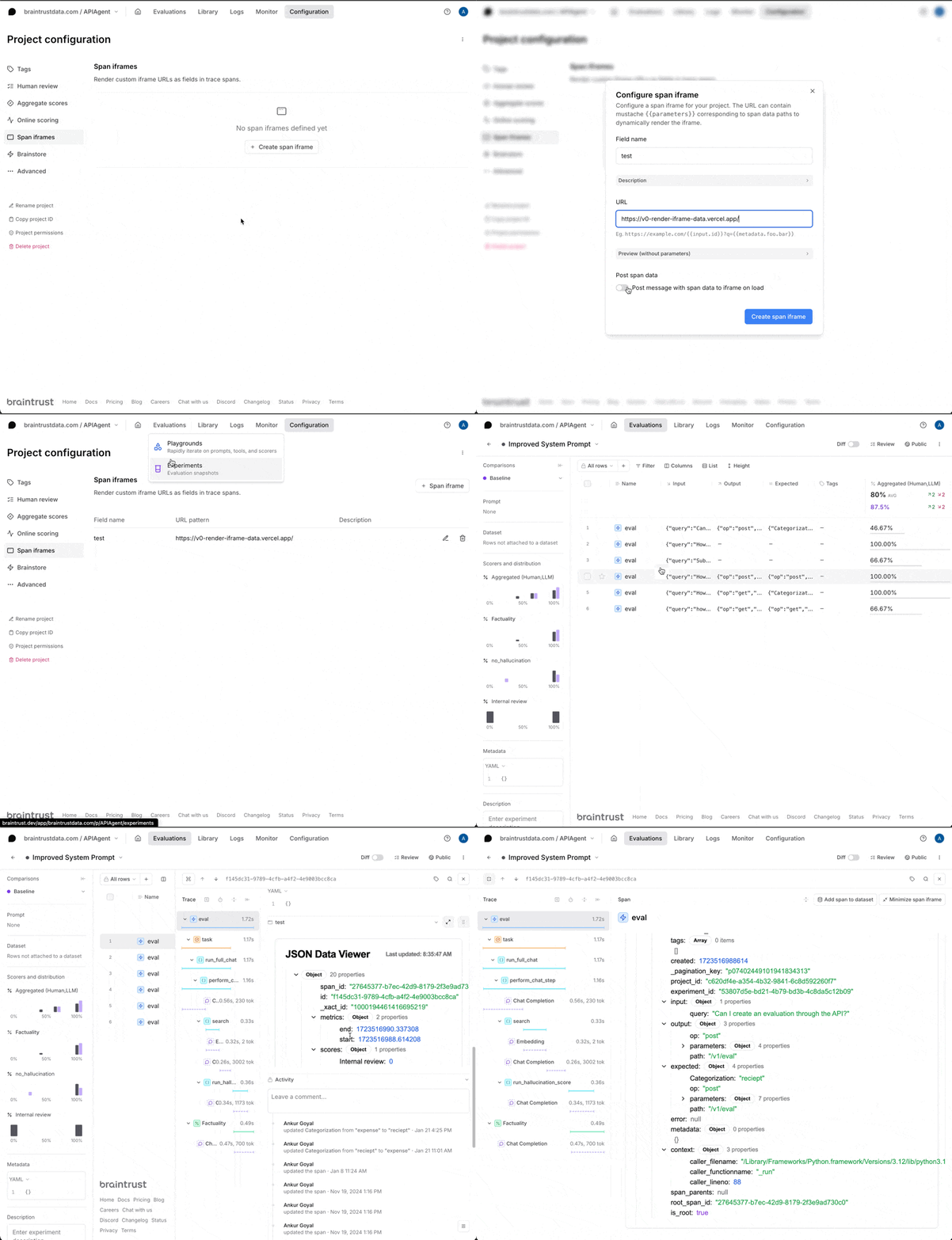
To enable a span iframe, visit the **Configuration**
tab of a project, and create one. You can define the URL, and then customize its behavior:
* Provide a title, which is displayed at the top of the section.
* Provide, via [mustache](https://mustache.github.io/mustache.5.html), template parameters to the URL. These parameters are
in terms of the top-level span fields, e.g. `{{input}}`, `{{output}}`, `{{expected}}`, etc. or their subfields, e.g.
`{{input.question}}`.
* Allow Braintrust to send a message to the iframe with the span data, which is useful when the data may be very large and
not fit in a URL.
* Send messages from the iframe back to Braintrust to update the span data.
### Quickstart
Since span iframes run your custom code, you need to host them somewhere. Tools like [val.town](https://www.val.town/) or [v0.dev](https://v0.dev/) make it easy to do this.
You can use [https://v0-render-iframe-data.vercel.app/](https://v0-render-iframe-data.vercel.app/) as a quick test. It renders a JSON object which shows you all of
the fields that are available in the span.
### iframe message format
In Zod format, the message schema looks like this:
```typescript theme={"theme":{"light":"github-light","dark":"github-dark-dimmed"}}
import { z } from "zod";
export const settingsMessageSchema = z.object({
type: z.literal("settings"),
settings: z.object({
theme: z.enum(["light", "dark"]),
readOnly: z.boolean(),
}),
});
export const iframeUpdateMessageSchema = z.object({
type: z.literal("update"),
field: z.string(),
data: z.any(),
});
export const dataMessageSchema = z.object({
type: z.literal("data"),
data: z.object({
input: z.array(z.record(z.unknown())),
}),
});
export const messageSchema = z.union([
settingsMessageSchema,
dataMessageSchema,
]);
```
There are cases when the span data will be sent before the page is fully loaded. You can manually request span data by sending a message with `{ "type": "request-data" }` from your frame code.
### Sample workflow
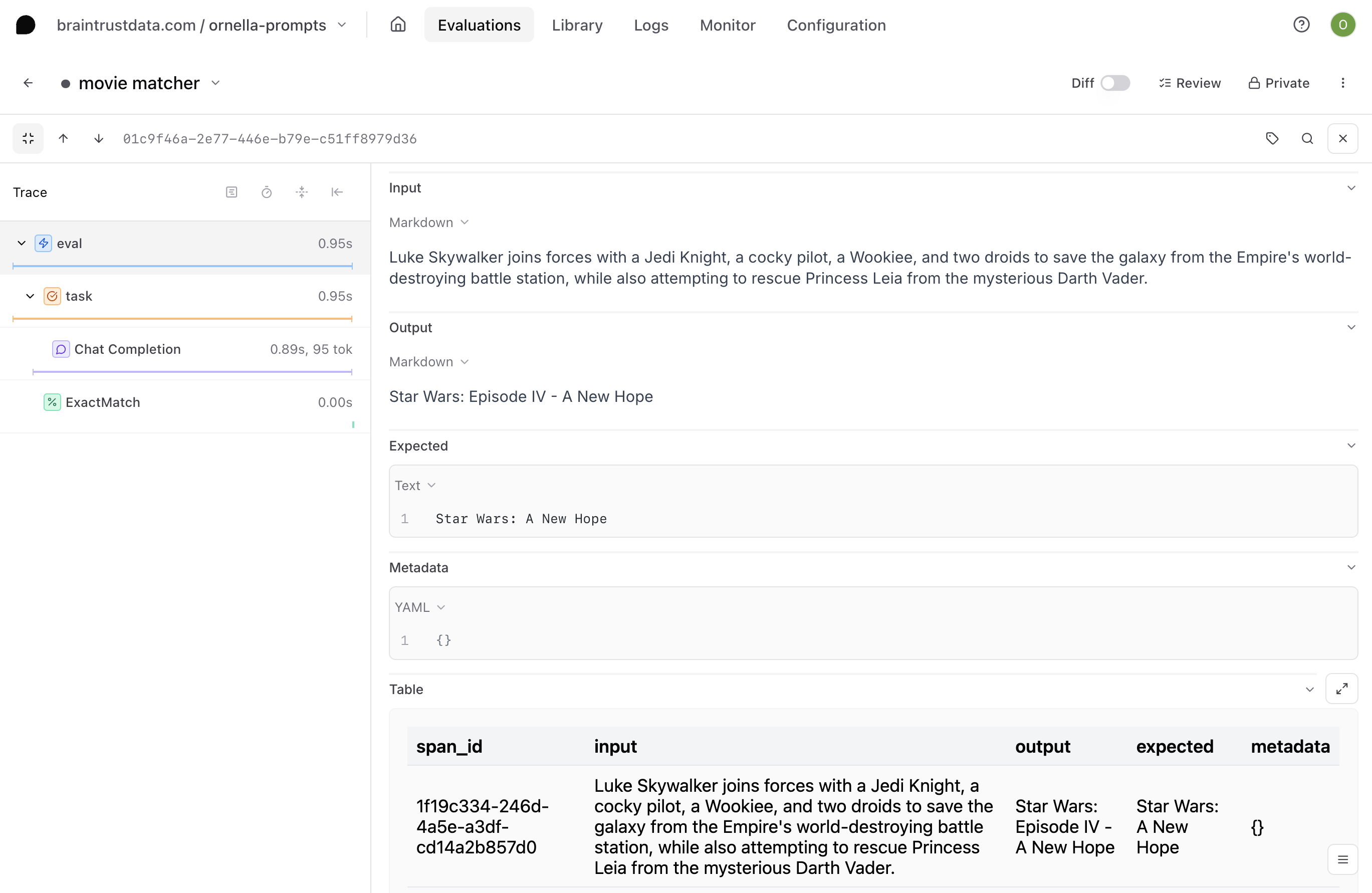
Say you want to render the `input`, `output`, `expected`, and `id` fields for a given span in a table format for easier parsing.
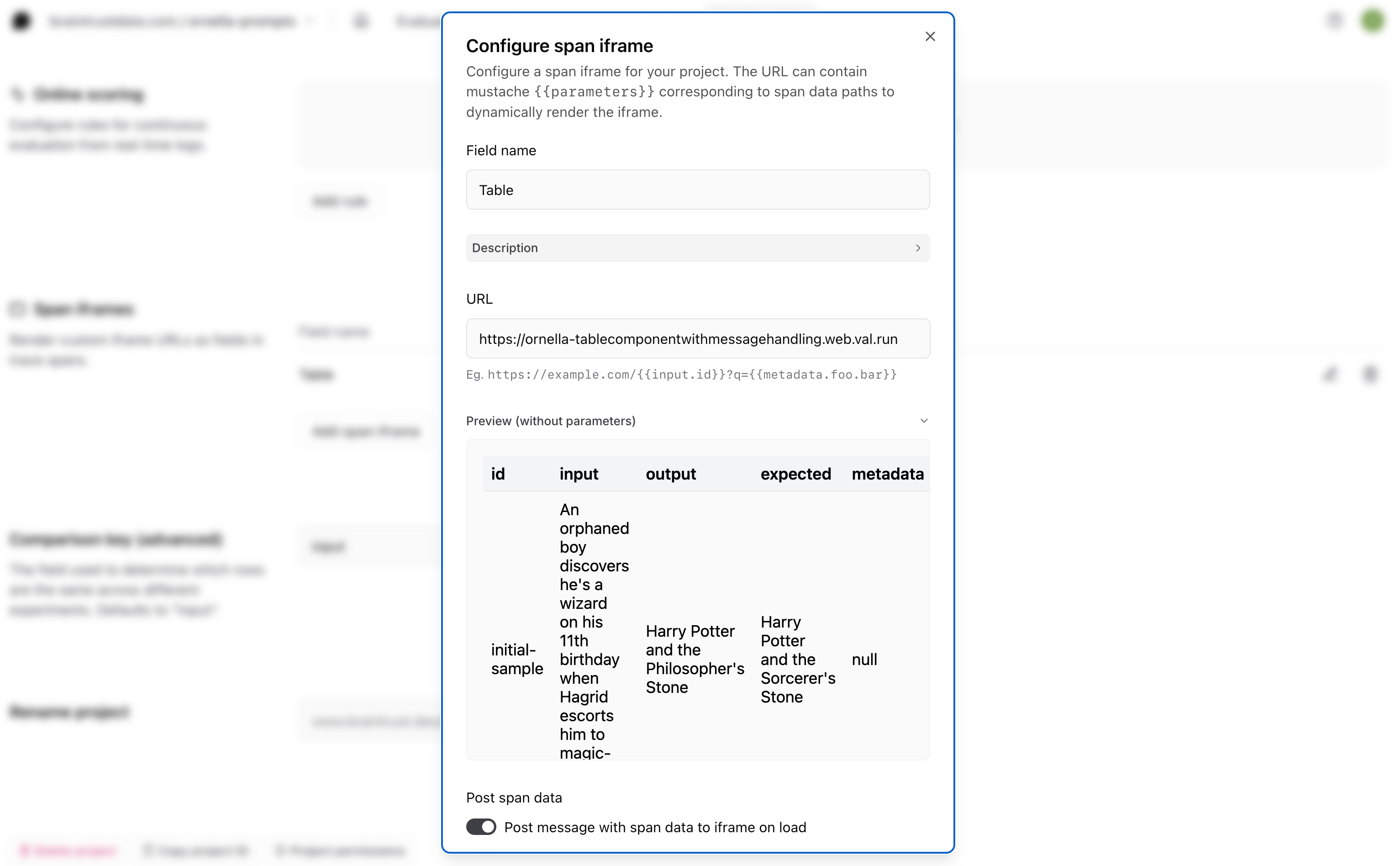
The first thing you'll need to do is choose where to host your table. Span iframes are externally hosted, either in your own infrastructure or a cloud hosting service. In this example, we'll use Val Town. Navigate to [val.town](https://www.val.town/) and create an account if you don't already have one.
Next, you'll need to write the code for the component you'd like to render inside of your span, making sure that it uses the correct message handling to allow communication with Braintrust. To speed things up, we can go to [Townie](https://www.val.town/townie), Val Town's AI assistant that helps you get pages up and running quickly. Prompt the AI to generate your table code for you, keeping these few things in mind:
* You'll want to add the message handling that allows the iframe to send messages back to Braintrust
To do this, we use the [window.postMessage()](https://developer.mozilla.org/en-US/docs/Web/API/Window/postMessage) method behind the scenes.
* You'll want to use some hardcoded span data to illustrate what it might look like in the preview before you ship
For example, your prompt might look something like this:
```
Create a table component in React that uses this type of message handling:
"use client";
import {
Table,
TableBody,
TableCell,
TableHead,
TableHeader,
TableRow,
} from "@/components/ui/table";
import { useEffect, useMemo, useState } from "react";
import { z } from "zod";
export const dataMessageSchema = z.object({
type: z.literal("data"),
data: z.object({
input: z.array(z.record(z.string())),
}),
});
export const settingsMessageSchema = z.object({
type: z.literal("settings"),
settings: z.object({
theme: z.enum(["light", "dark"]),
readOnly: z.boolean(),
}),
});
export const messageSchema = z.union([
dataMessageSchema,
settingsMessageSchema,
]);
export type Message = z.infer;
export default function TablePage() {
const [data, setData] = useState[]>([]);
useEffect(() => {
const handleMessage = (event: MessageEvent) => {
try {
const message = messageSchema.parse(event.data);
if (message.type === "data") {
setData(message.data.input);
}
} catch (error) {
console.error("Invalid message received:", error);
}
};
window.addEventListener("message", handleMessage);
return () => {
window.removeEventListener("message", handleMessage);
};
}, []);
const headers = useMemo(
() => (data.length > 0 ? Object.keys(data[0]) : []),
[data]
);
if (data.length === 0) {
return
);
}
Here's an example of how the data should look:
{
type: 'data',
data: {
span_id: 'd42cbeb6-aaff-43d6-8517-99bbbd82b941',
input: "Some input text",
output: "Some output text",
expected: 1,
metadata: { some: "additional info" }
}
}
Use this sample span data to illustrate how the table will look:
ID: initial-sample
Input: An orphaned boy discovers he's a wizard on his 11th birthday when Hagrid escorts him to magic-teaching Hogwarts School.
Output: Harry Potter and the Philosopher's Stone
Expected: Harry Potter and the Sorcerer's Stone
Metadata: null
Make sure the Zod schema is flexible for different data types and make sure all the properties from the message are included. Also be sure to handle any undefined values.
```
Townie will generate some code for you and automatically deploy it to a URL. Check it out and make sure the table looks how you'd like, then copy the URL.
Lastly, go back to Braintrust and visit the **Configuration**
tab of your project, then navigate down to the span iframe section. Paste in the URL of your hosted table.
Now, when you go to a span in your project, you should see the table you created, but populated with the corresponding data for each span.
### Example code
To help you get started, check out the [braintrustdata/braintrust-viewers](https://github.com/braintrustdata/braintrust-viewers)
repository on Github, which contains example code for rendering a table, X/Tweet, and more.
## Tune performance
Configure SDK behavior with environment variables for your deployment needs:
* **`BRAINTRUST_SYNC_FLUSH`**: Set to `1` to flush synchronously instead of in background. Useful for debugging but impacts performance.
* **`BRAINTRUST_MAX_REQUEST_SIZE`**: Maximum batch payload size. Defaults are tuned for AWS Lambda.
* **`BRAINTRUST_DEFAULT_BATCH_SIZE`**: Maximum number of log messages per network request.
* **`BRAINTRUST_NUM_RETRIES`**: Network retry attempts before failing.
* **`BRAINTRUST_QUEUE_SIZE`** (Python): Maximum logging queue size. Additional logs drop oldest elements.
* **`BRAINTRUST_QUEUE_DROP_EXCEEDING_MAXSIZE`** (JavaScript): Cap queue size and discard additional elements.
* **`BRAINTRUST_FLUSH_BACKPRESSURE_BYTES`** (JavaScript): Byte threshold for flush backpressure during evaluations. When `maxConcurrency` is set, the SDK only flushes logs when pending data exceeds this threshold, avoiding excessive sequential round-trips for small payloads while bounding memory usage for large ones. Defaults to 10 MB.
* **`BRAINTRUST_CACHE_LOCATION`** (JavaScript): Selects where prompt and parameter caching stores data. Accepts `"mixed"` (default), `"memory"`, `"disk"`, or `"none"`. Invalid values warn and fall back to `"mixed"`. Disk caching is unsupported on some platforms, where it is disabled.
* **`BRAINTRUST_DISABLE_ATEXIT_FLUSH`** (Python): Disables the automatic flush that Braintrust registers at process exit. When set to `1`, pending logs are not flushed on interpreter shutdown, so applications should call `logger.flush()` explicitly. Useful for runtimes with custom shutdown handling. Disabled by default.
For debugging SDK internals (TypeScript only):
* **`BRAINTRUST_DEBUG_LOG_LEVEL`** (TypeScript): Set to `"error"`, `"warn"`, `"info"`, or `"debug"` to enable internal SDK troubleshooting output. Useful for diagnosing flush failures, API retry behavior, and instrumentation lifecycle. You can also set this programmatically via the `debugLogLevel` option on `init()`, `initLogger()`, and other entry points. Disabled by default.
To save failed or all payloads to disk:
* **`BRAINTRUST_FAILED_PUBLISH_PAYLOADS_DIR`**: Directory for failed payloads
* **`BRAINTRUST_ALL_PUBLISH_PAYLOADS_DIR`**: Directory for all payloads
* **`BRAINTRUST_ENABLE_TRACE_CONSOLE_LOG`** (Go): Set to `true` to log all traces to stdout for debugging. Use during local development, not in production. The programmatic equivalent is the `WithEnableTraceConsoleLog(bool)` option on the Go client. Defaults to `false`.
## Next steps
* [Capture user feedback](/instrument/user-feedback) on your traces
* [Log attachments](/instrument/attachments) like images and audio
* [View your logs](/observe/view-logs) in the Braintrust dashboard
 Under the hood, every span has an `error` field which you can also log to directly.
 ### iframe message format
In Zod format, the message schema looks like this:
```typescript theme={"theme":{"light":"github-light","dark":"github-dark-dimmed"}}
import { z } from "zod";
export const settingsMessageSchema = z.object({
type: z.literal("settings"),
settings: z.object({
theme: z.enum(["light", "dark"]),
readOnly: z.boolean(),
}),
});
export const iframeUpdateMessageSchema = z.object({
type: z.literal("update"),
field: z.string(),
data: z.any(),
});
export const dataMessageSchema = z.object({
type: z.literal("data"),
data: z.object({
input: z.array(z.record(z.unknown())),
}),
});
export const messageSchema = z.union([
settingsMessageSchema,
dataMessageSchema,
]);
```
There are cases when the span data will be sent before the page is fully loaded. You can manually request span data by sending a message with `{ "type": "request-data" }` from your frame code.
### Sample workflow
Say you want to render the `input`, `output`, `expected`, and `id` fields for a given span in a table format for easier parsing.
### iframe message format
In Zod format, the message schema looks like this:
```typescript theme={"theme":{"light":"github-light","dark":"github-dark-dimmed"}}
import { z } from "zod";
export const settingsMessageSchema = z.object({
type: z.literal("settings"),
settings: z.object({
theme: z.enum(["light", "dark"]),
readOnly: z.boolean(),
}),
});
export const iframeUpdateMessageSchema = z.object({
type: z.literal("update"),
field: z.string(),
data: z.any(),
});
export const dataMessageSchema = z.object({
type: z.literal("data"),
data: z.object({
input: z.array(z.record(z.unknown())),
}),
});
export const messageSchema = z.union([
settingsMessageSchema,
dataMessageSchema,
]);
```
There are cases when the span data will be sent before the page is fully loaded. You can manually request span data by sending a message with `{ "type": "request-data" }` from your frame code.
### Sample workflow
Say you want to render the `input`, `output`, `expected`, and `id` fields for a given span in a table format for easier parsing.
 ### Example code
To help you get started, check out the [braintrustdata/braintrust-viewers](https://github.com/braintrustdata/braintrust-viewers)
repository on Github, which contains example code for rendering a table, X/Tweet, and more.
## Tune performance
Configure SDK behavior with environment variables for your deployment needs:
* **`BRAINTRUST_SYNC_FLUSH`**: Set to `1` to flush synchronously instead of in background. Useful for debugging but impacts performance.
* **`BRAINTRUST_MAX_REQUEST_SIZE`**: Maximum batch payload size. Defaults are tuned for AWS Lambda.
* **`BRAINTRUST_DEFAULT_BATCH_SIZE`**: Maximum number of log messages per network request.
* **`BRAINTRUST_NUM_RETRIES`**: Network retry attempts before failing.
* **`BRAINTRUST_QUEUE_SIZE`** (Python): Maximum logging queue size. Additional logs drop oldest elements.
* **`BRAINTRUST_QUEUE_DROP_EXCEEDING_MAXSIZE`** (JavaScript): Cap queue size and discard additional elements.
* **`BRAINTRUST_FLUSH_BACKPRESSURE_BYTES`** (JavaScript): Byte threshold for flush backpressure during evaluations. When `maxConcurrency` is set, the SDK only flushes logs when pending data exceeds this threshold, avoiding excessive sequential round-trips for small payloads while bounding memory usage for large ones. Defaults to 10 MB.
* **`BRAINTRUST_CACHE_LOCATION`** (JavaScript): Selects where prompt and parameter caching stores data. Accepts `"mixed"` (default), `"memory"`, `"disk"`, or `"none"`. Invalid values warn and fall back to `"mixed"`. Disk caching is unsupported on some platforms, where it is disabled.
* **`BRAINTRUST_DISABLE_ATEXIT_FLUSH`** (Python): Disables the automatic flush that Braintrust registers at process exit. When set to `1`, pending logs are not flushed on interpreter shutdown, so applications should call `logger.flush()` explicitly. Useful for runtimes with custom shutdown handling. Disabled by default.
For debugging SDK internals (TypeScript only):
* **`BRAINTRUST_DEBUG_LOG_LEVEL`** (TypeScript): Set to `"error"`, `"warn"`, `"info"`, or `"debug"` to enable internal SDK troubleshooting output. Useful for diagnosing flush failures, API retry behavior, and instrumentation lifecycle. You can also set this programmatically via the `debugLogLevel` option on `init()`, `initLogger()`, and other entry points. Disabled by default.
To save failed or all payloads to disk:
* **`BRAINTRUST_FAILED_PUBLISH_PAYLOADS_DIR`**: Directory for failed payloads
* **`BRAINTRUST_ALL_PUBLISH_PAYLOADS_DIR`**: Directory for all payloads
* **`BRAINTRUST_ENABLE_TRACE_CONSOLE_LOG`** (Go): Set to `true` to log all traces to stdout for debugging. Use during local development, not in production. The programmatic equivalent is the `WithEnableTraceConsoleLog(bool)` option on the Go client. Defaults to `false`.
## Next steps
* [Capture user feedback](/instrument/user-feedback) on your traces
* [Log attachments](/instrument/attachments) like images and audio
* [View your logs](/observe/view-logs) in the Braintrust dashboard
### Example code
To help you get started, check out the [braintrustdata/braintrust-viewers](https://github.com/braintrustdata/braintrust-viewers)
repository on Github, which contains example code for rendering a table, X/Tweet, and more.
## Tune performance
Configure SDK behavior with environment variables for your deployment needs:
* **`BRAINTRUST_SYNC_FLUSH`**: Set to `1` to flush synchronously instead of in background. Useful for debugging but impacts performance.
* **`BRAINTRUST_MAX_REQUEST_SIZE`**: Maximum batch payload size. Defaults are tuned for AWS Lambda.
* **`BRAINTRUST_DEFAULT_BATCH_SIZE`**: Maximum number of log messages per network request.
* **`BRAINTRUST_NUM_RETRIES`**: Network retry attempts before failing.
* **`BRAINTRUST_QUEUE_SIZE`** (Python): Maximum logging queue size. Additional logs drop oldest elements.
* **`BRAINTRUST_QUEUE_DROP_EXCEEDING_MAXSIZE`** (JavaScript): Cap queue size and discard additional elements.
* **`BRAINTRUST_FLUSH_BACKPRESSURE_BYTES`** (JavaScript): Byte threshold for flush backpressure during evaluations. When `maxConcurrency` is set, the SDK only flushes logs when pending data exceeds this threshold, avoiding excessive sequential round-trips for small payloads while bounding memory usage for large ones. Defaults to 10 MB.
* **`BRAINTRUST_CACHE_LOCATION`** (JavaScript): Selects where prompt and parameter caching stores data. Accepts `"mixed"` (default), `"memory"`, `"disk"`, or `"none"`. Invalid values warn and fall back to `"mixed"`. Disk caching is unsupported on some platforms, where it is disabled.
* **`BRAINTRUST_DISABLE_ATEXIT_FLUSH`** (Python): Disables the automatic flush that Braintrust registers at process exit. When set to `1`, pending logs are not flushed on interpreter shutdown, so applications should call `logger.flush()` explicitly. Useful for runtimes with custom shutdown handling. Disabled by default.
For debugging SDK internals (TypeScript only):
* **`BRAINTRUST_DEBUG_LOG_LEVEL`** (TypeScript): Set to `"error"`, `"warn"`, `"info"`, or `"debug"` to enable internal SDK troubleshooting output. Useful for diagnosing flush failures, API retry behavior, and instrumentation lifecycle. You can also set this programmatically via the `debugLogLevel` option on `init()`, `initLogger()`, and other entry points. Disabled by default.
To save failed or all payloads to disk:
* **`BRAINTRUST_FAILED_PUBLISH_PAYLOADS_DIR`**: Directory for failed payloads
* **`BRAINTRUST_ALL_PUBLISH_PAYLOADS_DIR`**: Directory for all payloads
* **`BRAINTRUST_ENABLE_TRACE_CONSOLE_LOG`** (Go): Set to `true` to log all traces to stdout for debugging. Use during local development, not in production. The programmatic equivalent is the `WithEnableTraceConsoleLog(bool)` option on the Go client. Defaults to `false`.
## Next steps
* [Capture user feedback](/instrument/user-feedback) on your traces
* [Log attachments](/instrument/attachments) like images and audio
* [View your logs](/observe/view-logs) in the Braintrust dashboard